Plans, Seats and What Each Plan Includes
QAM Hub has three paid plans: Start, Standard and Advanced. All three are billed per seat, in EUR or USD, monthly or annually, and AI features are included in every plan. Start covers the core test management workflow for a team of up to 10 paid seats: unlimited projects, cases, checklists and runs, requirements traceability, automation results, dashboards and issue creation in all seven supported trackers. Standard removes the seat cap and adds the layer most growing teams reach for next: version history, case templates, custom execution statuses, two-way tracker sync, Test Explorer for flaky tests, cross-project reports and Projects Health. Advanced adds analysis and governance on top: Release Readiness, Quality and Coverage Analytics, scheduled email reports, Google SSO, organization-wide 2FA enforcement, organization audit logs, priority support and assisted migration, plus the knowledge base for AI context and AI Testing Agents, both in beta.
Prices per seat per month, read on the pricing page on 13 October 2026:
| Plan | Billed monthly | Billed annually |
|---|---|---|
| Start | $17 (€15) | $15 (€13) |
| Standard | $27 (€24) | $24 (€21) |
| Advanced | $45 (€39) | $42 (€36) |
Annual billing costs less per seat and is charged once for the year. The pricing page is always the current source for these figures; if it and this article ever disagree, the pricing page is right.
What a seat is#
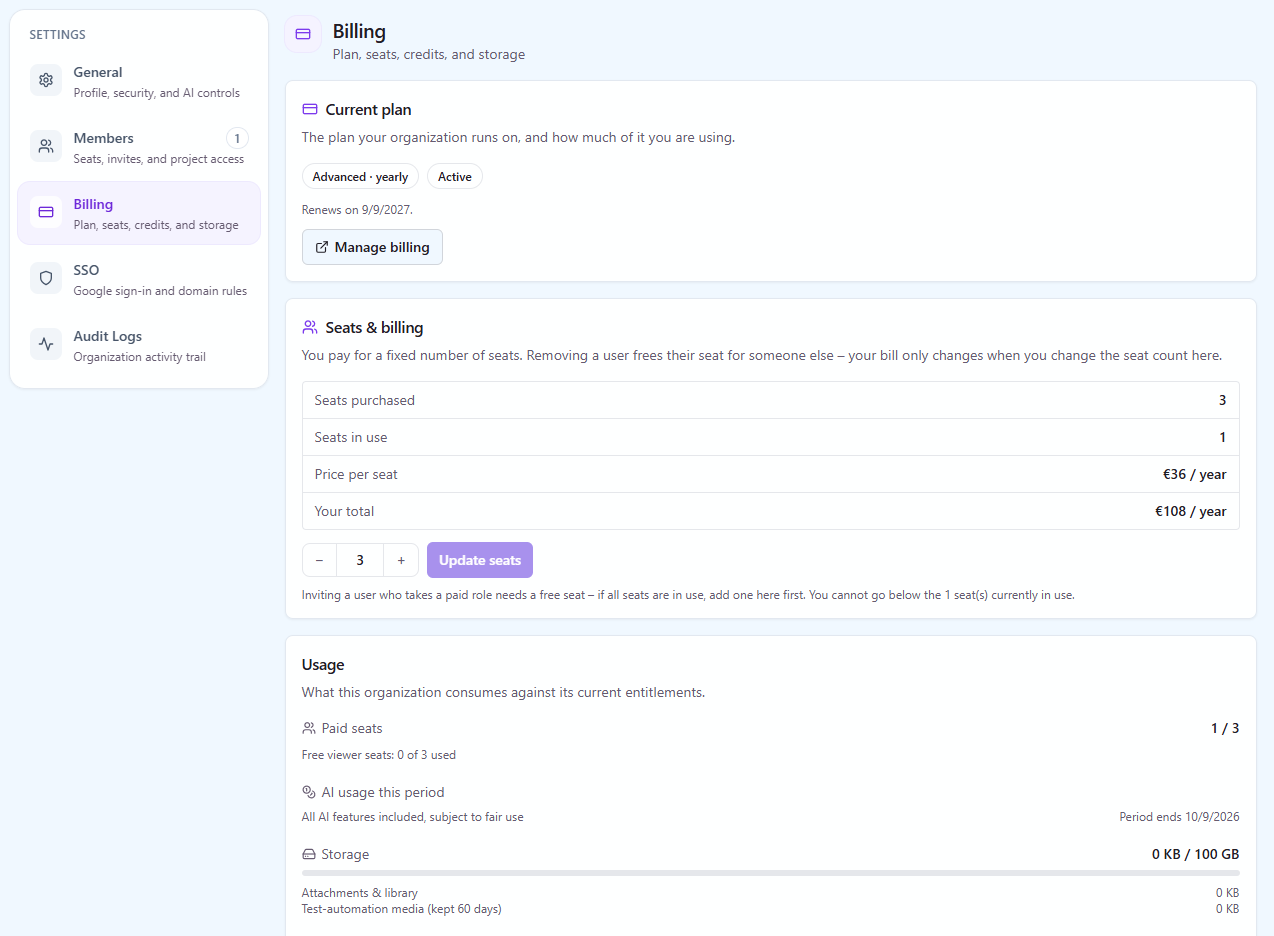
A seat is one person who can create or change something: test cases, checklists, runs, requirements, reports, settings. You pay for those people. Every paid seat also entitles you to one free viewer seat, at a ratio of one to one, on every plan, so a workspace with ten paid seats can add ten viewers at no extra cost. Viewers can read everything they have project access to and cannot edit.
Viewer seats are the right place for the people who consume test results rather than produce them: product managers, developers who only need to see what failed, a client-side stakeholder on a shared project. If you need eleven viewers on ten paid seats, the eleventh needs a paid seat.
Seats are counted per organization, not per project. Roles are what limit access inside a project. Start allows up to 10 paid seats per organization, which with the one-to-one ratio means up to 10 viewers as well; Standard and Advanced have no seat cap. If you are deciding who gets which role before you decide how many seats to buy, read Understanding Roles and Permissions first.
What each plan includes#
| Capability | Start | Standard | Advanced |
|---|---|---|---|
| Paid seats | Up to 10 | Unlimited | Unlimited |
| Free viewer seats, one per paid seat | Yes | Yes | Yes |
| Projects, test cases, checklists and runs | Unlimited | Unlimited | Unlimited |
| Test suites, cases, steps, tags | Yes | Yes | Yes |
| Custom fields per project | 5 | 20 | 20 |
| Case templates | No | Yes | Yes |
| Version history and rollback (last 20 versions) | No | Yes | Yes |
| Checklists with custom columns and run history | Yes | Yes | Yes |
| Test runs, assignment, attachments, execution history | Yes | Yes | Yes |
| Custom execution statuses (up to 3) | No | Yes | Yes |
| Requirements, traceability, milestones | Yes | Yes | Yes |
| Playwright, Cypress, WebdriverIO, Selenium and JUnit XML results | Yes | Yes | Yes |
| Test Explorer: flaky tests, stability trends, quarantine | No | Yes | Yes |
| Issue creation in Jira, GitHub Issues, GitLab, Linear, Asana, Redmine and Trello | Yes | Yes | Yes |
| Two-way tracker sync: requirements in from the tracker, coverage and bugs published back onto the issue | No | Yes | Yes |
| AI test case and checklist generation (from a description or a screenshot), AI bug analysis | Yes | Yes | Yes |
| In-app AI Assistant | Yes | Yes | Yes |
| AI fix suggestions, automation run analysis, retrospectives | No | Yes | Yes |
| REST API and MCP server for AI agents | Yes | Yes | Yes |
| Knowledge base for AI context | No | No | Beta |
| AI Testing Agents (Agent Flows) | No | No | Beta |
| Project dashboards, run reports, PDF and CSV export | Yes | Yes | Yes |
| Saved reports, cross-project reports, Projects Health | No | Yes | Yes |
| Scheduled email reports | No | No | Yes |
| Quality and Coverage Analytics | No | No | Yes |
| Release Readiness analysis | No | No | Yes |
| Role-based access, personal two-factor authentication | Yes | Yes | Yes |
| Organization-wide 2FA enforcement, Google SSO, organization audit logs | No | No | Yes |
| TestRail and Qase import wizards | Self-service | Self-service | Assisted |
| Automation video and trace retention | 14 days | 30 days | 60 days |
| Priority support | No | No | Yes |
| Onboarding and team training session | No | No | Yes |
| Custom features on request | No | No | Yes |
Two rows are easy to misread. Issue creation and two-way sync are different things: on Start you can file a bug from a run straight into any of the seven trackers, but requirements do not come in from the tracker and the issue does not get a comment listing the test cases that cover it, their latest results and the bugs found. That loop is Standard and up. The second is AI: generation, bug analysis and the assistant are on every plan, while the features that work across many runs (fix suggestions, run analysis, retrospectives) start on Standard.
Storage and retention#
Storage grows with every paid seat; the current allowance is on the pricing page. Storage is pooled across the organization rather than allocated per person.
One distinction matters more than the allowance. Videos and traces from uploaded automation reports are removed automatically once they pass the plan's retention window: 14 days on Start, 30 days on Standard, 60 days on Advanced. Nothing else is. Screenshots, attachments people add by hand during a run, assets in the image library and knowledge documents stay as long as the project does. If your compliance requirement is about evidence attached to a run, that evidence is not on a timer. If it is about the video of an automated run from last quarter, it is, and the plan decides how long.
When an organization reaches its storage cap, nothing is deleted. New uploads are refused and a banner explains why, so the fix is to free space or add seats.
Which plan to start on#
Start fits a small team, up to 10 paid seats, that is moving off spreadsheets or has no test management tool at all. It gives you a real case library, runs, requirements traceability, automation results from Playwright, Cypress or any framework that writes JUnit XML, dashboards, bug filing into your tracker and the AI generation features. Be clear about what it leaves out before you choose it: there is no version history on cases, no templates, no custom execution statuses, only 5 custom fields per project, no Test Explorer for flaky tests and no two-way sync with the tracker. A team that already depends on any of those, or expects to pass 10 people this year, should look at Standard instead.
Standard is enough for most teams that write and run tests, import automation results and work out of a tracker. It is not a stripped-down plan: unlimited seats, version history, templates, two-way sync with all seven trackers, Test Explorer, cross-project reports and Projects Health, the full AI set apart from the beta features, MCP access and the TestRail and Qase import wizards are all in it.
Advanced earns the difference in two situations. The first is anyone who needs to answer "can we release" with something better than a gut call, which is Release Readiness plus Quality and Coverage Analytics. The second is an organization with a security or audit requirement, since Google SSO, enforced 2FA and audit logs are all Advanced. Assisted migration and a live onboarding session come with it, which matters most in the first month rather than the twelfth.
You do not have to decide on day one. Every new workspace runs on a 30-day trial of Advanced with no card, so you can use every feature and then choose any of the three plans. See What Happens When Your Trial Ends for what changes at the end of it.
Where to check your current plan#
Open your organization settings and go to the billing area. The Organization Owner sees the active plan, the interval, the number of paid seats and the invoice history. Other roles do not: billing is Owner-only by design, and that includes reading it.