

Checklists
Spreadsheet-style checklist suites with custom columns per run, comments and a full change history for every cell.
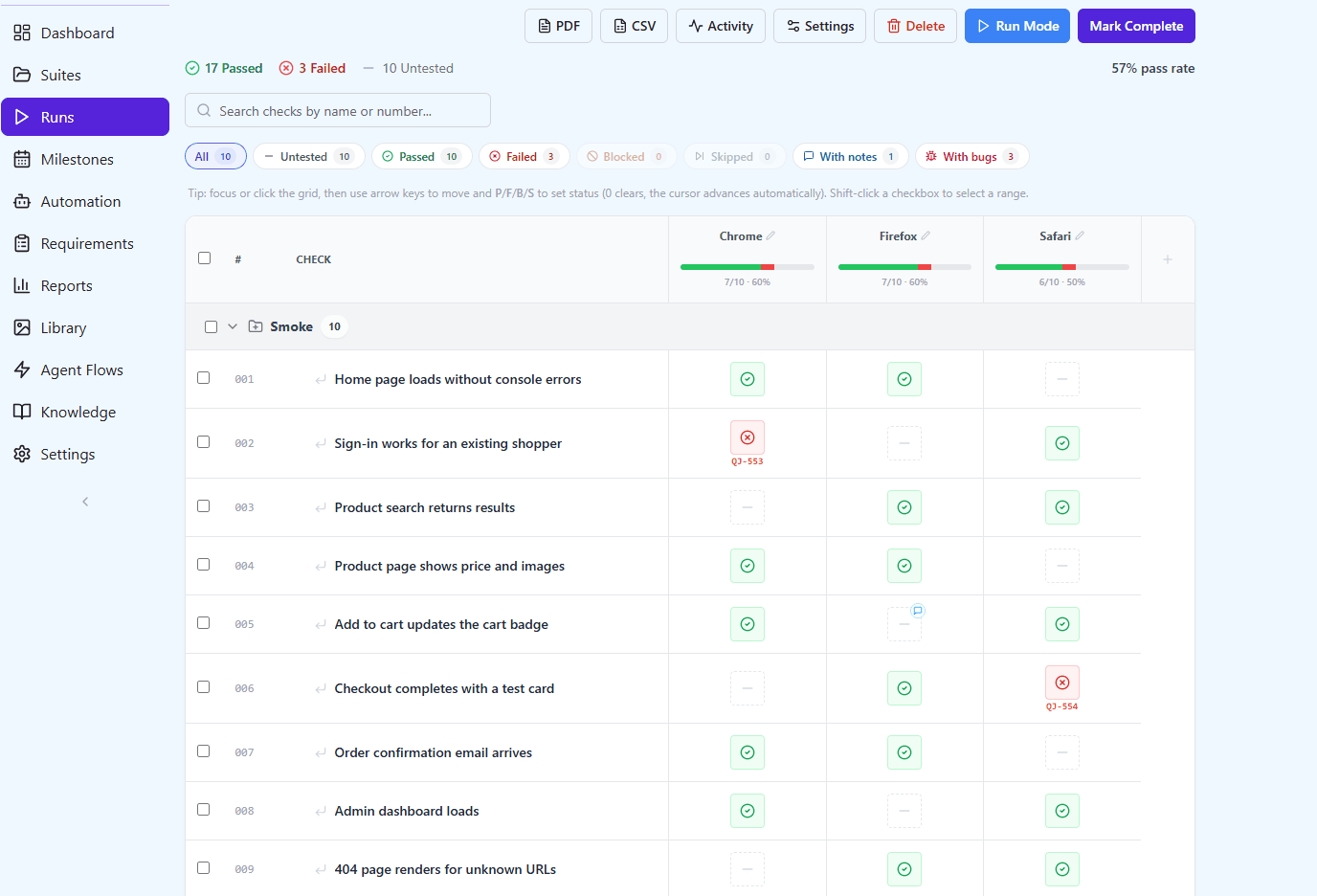
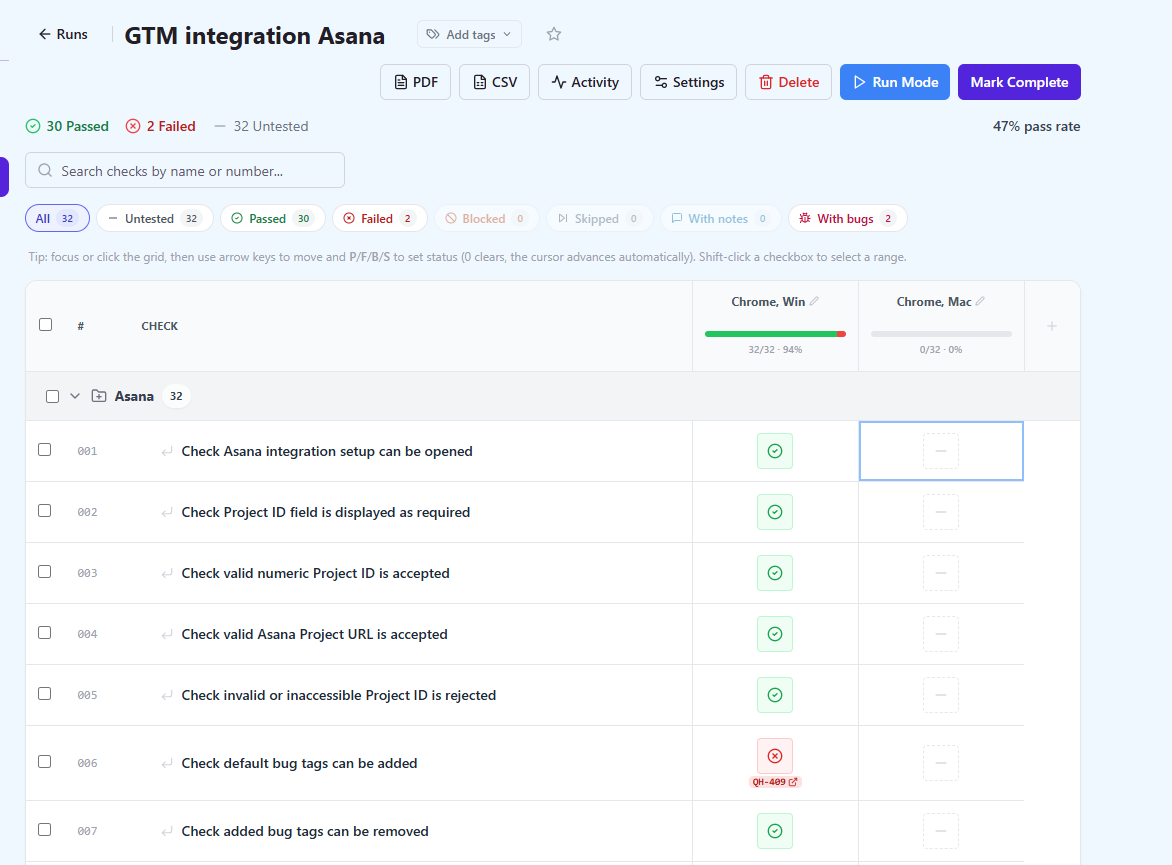
Most QA teams keep two kinds of tests. Some deserve a full test case with steps and an expected result. Many do not: a smoke pass before a release, a cross-browser sweep, a device matrix, a go-live checklist. Those usually live in a spreadsheet, because a spreadsheet is fast. A checklist suite in QAM Hub keeps that speed and adds what the spreadsheet silently loses: who set a cell, when, why, and the certainty that a finished run will still say the same thing next year.
A checklist suite
A check is one line: a title and an optional note with the details. Checks sit in groups and sub-groups, carry tags, and get a project-wide number that is never reused, so "check 042" means the same thing in every run and every report.
- Inline add: type a check at the bottom of a group, press Enter, type the next one.
- Drag and drop between groups; moving a check does not touch the runs that already use it.
- Bulk actions on a selection: move, duplicate, tag, delete, copy or move to another checklist suite.
- CSV import and export with the columns Group, Check, Tags, Note; nested groups are written as "Auth > Login".
- AI-generated checks from a feature description, reviewed before they are added.
A run is a grid
Starting a run turns the suite into a table: checks down the side, one column per browser, device, environment or tester across the top. Columns are added when the run is created or later, and a column can be scoped to a tag, so a "Safari" column only asks for the checks that matter in Safari. New checks added to the suite can join a running checklist automatically.
- Four statuses per cell: Passed, Failed, Blocked, Skipped.
- Keyboard entry: click into the grid, move with the arrow keys, press P, F, B or S, and the cursor advances on its own.
- Bulk entry: select checks or a whole group and set a status for all of them in one go.
- A comment on any cell, and a bug on any failed cell: create an issue in the connected tracker, link an existing one or type its id. Several bugs can hang on one cell.
- Filters for Untested, Passed, Failed, Blocked, Skipped, With notes and With bugs, plus search by name or number.
- Run Mode shows one check at a time for a tester walking through the list on a second screen.
A record, not a scratchpad
Every cell change is appended to a history with the status, the comment, who made it and when. The run keeps its own copy of each check's title and group, so renaming or deleting a check later never rewrites what was tested. When a run is marked complete it locks: nothing in it can change until someone deliberately reopens it. That is the difference between a checklist and a spreadsheet tab somebody edited in March.
Where checklist results show up
- On the Runs page next to test runs, with their own type badge and pass rate.
- In milestones: a checklist run attached to a milestone counts toward its readiness and burndown.
- On the project dashboard, in the Manual Runs report and in the Defects report, which lists bugs filed from checklist cells.
- In organization-wide reports and Projects Health, with an "Include checklists" switch for teams that want test-run numbers only.
- As PDF or CSV of a single run, for the people who will never log in.
Checklist or test case?
| Use a checklist when | Use test cases when |
|---|---|
| The check is one sentence and the tester knows how to do it | The steps and the expected result have to be written down |
| The same list is run across browsers, devices or builds | One case is run once per run and linked to requirements |
| Speed of entry matters more than detail | Automation results should link to it by number |
| Release sign-off, smoke, exploratory sweeps | Regression suites, acceptance criteria, traceability |
Both live in the same project, share its tags and its bug tracker, and appear in the same runs list. Checklists are an optional module: switch them off in Project Settings and they disappear from the interface, the API and every aggregate without anything being deleted.