

Xray migration: move Xray tests into QAM HubNew
Import Xray Cloud projects: the Test Repository tree, manual, Cucumber and Generic tests, preconditions, covered issues, Test Executions and attachments.
Xray tests are Jira issues, so an Xray migration has to read two systems: Xray for the Test Repository, steps, preconditions, Test Executions and results, and Jira for the summary, labels, priority, description and people of every test. The QAM Hub import wizard reads both, keeps the Jira key on every case and turns one Jira project into one QAM Hub project after a field mapping you review before anything is written.
How the Xray migration works
- Open "Import from other TMS" on Org Home and choose Xray. Organization Admins only.
- Connect with an Xray API key: the client id and client secret. The regional Xray host is handled automatically.
- Add Jira Cloud credentials: the email and API token of a Jira user who can see the projects. They are required.
- Pick the projects and review the preview of what each contains.
- Review the field mapping and change any row that is not what you want.
- Decide on the team, start the import, follow the live progress and read the report.
The wizard supports Xray Cloud only, through the Xray GraphQL API. Xray Server and Data Center are not supported.
Why Jira credentials are required
Xray stores the test itself: the steps, the type, the folder, the executions. The summary, labels, priority, description, custom fields and the people on a test are Jira issue fields, and the Xray API refers to them by id. Without Jira the import would produce cases with no title and executions with no tester, so the wizard asks for Jira Cloud credentials up front and uses them for the names, the covered issues, the defects and the Team step.
What comes across from Xray
| In Xray and Jira | In QAM Hub |
|---|---|
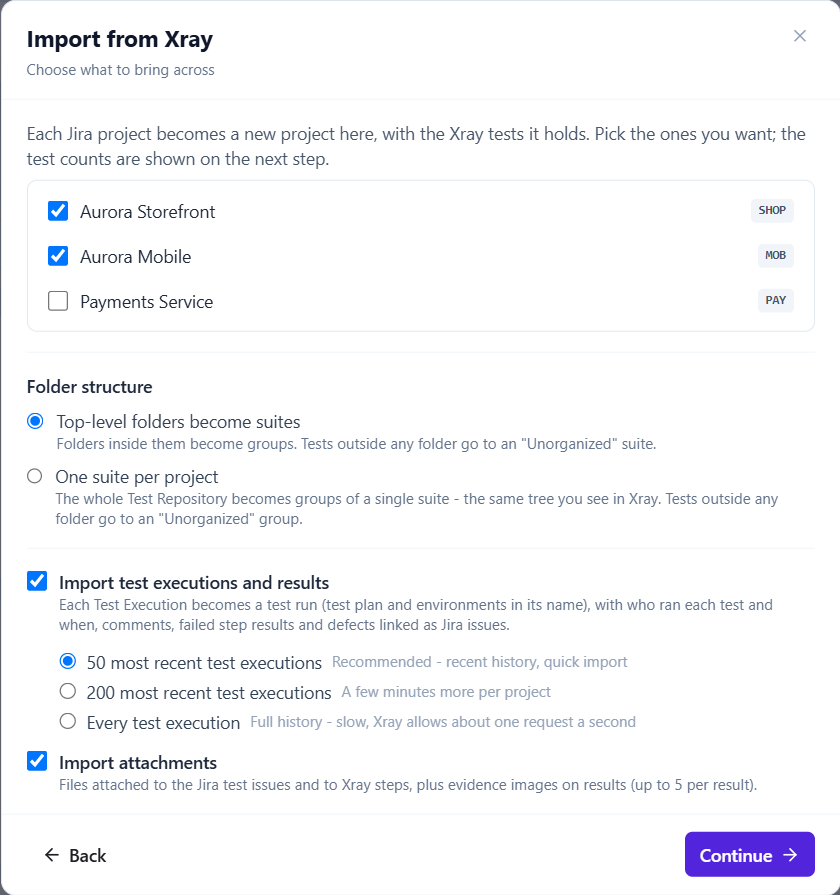
| Test Repository folders | Top-level folders become suites with nested folders as groups, or one suite with the whole tree as groups. You choose. Tests outside any folder land in an "Unorganized" group. |
| Jira summary | The case title. |
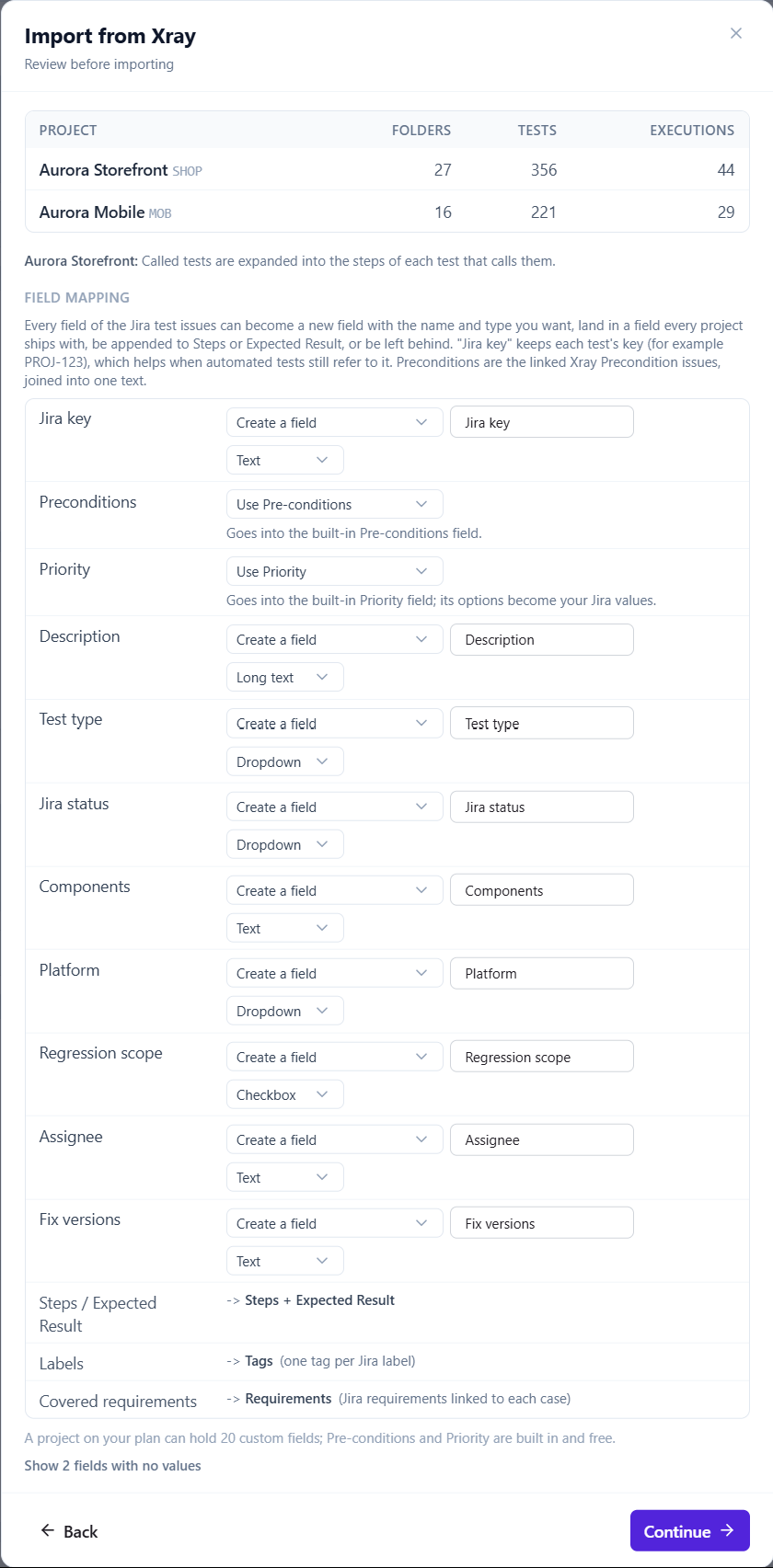
| Jira description | A Description custom field by default, converted from Jira wiki markup to Markdown; the mapping can send it to Pre-conditions, append it to Steps or skip it. |
| Manual test steps | Steps with action, data and expected result, one copy of each expectation under the step number. |
| Called tests | Expanded inline into the calling test. |
| Cucumber tests | The Gherkin scenario, kept verbatim. |
| Generic tests | The test definition, kept as is. |
| Preconditions | Every linked precondition issue, concatenated into the built-in Pre-conditions field. |
| Jira labels | Tags. |
| Jira priority | The built-in Priority field. |
| Jira custom fields | Custom fields, up to 20 per project; the surplus is reported in the preview. |
| Jira key, dates, reporter | The Jira key is kept on the case in a "Jira key" text field; the original dates are kept, and the reporter when that person is in the workspace. |
| Covered issues | Requirements with source "jira", linked to the case. |
| Test Executions | Test runs: the newest 50, 200 or all per project. |
| Xray test runs inside an execution | One execution per test with one history entry, its tester, date and comment. |
| Execution defects | Linked Jira issues on the execution. |
| Attachments on tests, steps and results | Attachments, deduplicated into the project library. |
| Jira users | Matched to workspace members by email; the rest can be invited. |
How each Xray test type is converted
| Xray test type | What the case contains |
|---|---|
| Manual | Numbered steps, each with its action, its data and its expected result. The expectation appears once, under the step number, so a long case is not repeated at the bottom. |
| Manual with called tests | The called test's steps are expanded inline where the call sits, so the case is complete on its own. |
| Cucumber | The Gherkin is kept verbatim, so Given, When and Then read exactly as the feature file did. |
| Generic | The definition is kept, so an automated test keeps the reference to what runs it. |
Preconditions and covered issues
In Xray a precondition is its own issue, linked to one or more tests. The import does not create a case per precondition; every precondition linked to a test is concatenated into that test's built-in Pre-conditions field, so a tester reads the setup where it matters and the preconditions list does not become a suite of its own.
The issues a test covers in Xray become requirements in QAM Hub with source "jira", each linked to the case. That is the requirements coverage view from day one: covered and uncovered counts per requirement, filterable by source and milestone, with the latest result of every covering case.
Test Executions become test runs
Each Test Execution becomes a test run, and you choose how far back to go per project: the newest 50, the newest 200, or all of them. Inside an execution, each Xray test run becomes one execution of the case with one history entry carrying its tester, date and comment, and the defects raised on it become linked Jira issues on that execution.
| Xray status | QAM Hub status |
|---|---|
| PASSED | Passed |
| FAILED | Failed |
| TODO | Untested |
| EXECUTING | A custom execution status (one of up to three), or Untested when the project has no free custom status |
| ABORTED | A custom execution status (one of up to three), or Untested when the project has no free custom status |
| Custom statuses | Up to three become custom execution statuses; the rest import as Untested. |
You review the field mapping first
Nothing is written until you have seen the field mapping. Every row can be changed: create a custom field with your own name and type, map into an existing field, append the content to Steps or Expected Result, or skip it. A field no case fills is not created, so a Jira custom field that exists in the project but was never filled on a test does not become an empty column. Custom fields are capped at 20 per project and the preview reports the surplus.
Your team comes with the projects
The Team step matches the Jira users found on tests and executions to workspace members by email and offers invites for the rest. Invited people are granted access to the imported projects, so the tester named on last month's execution can open it under their own name.
Good to know
- Partial failures are per item and reported in the summary; a project that fails entirely is removed, so nothing half-imported remains.
- A second import of the same project creates a second copy. Move each project once.
- One import of any tool (TestRail, Qase, Zephyr Scale or Xray) runs per organization at a time.
- Case numbers in QAM Hub are never reused, so links to a case keep resolving.
- After the import, connect the project to Jira through the Jira integration: new bugs are then filed from failed executions and the covered issues can be refreshed from Jira on demand.
- Coming from Zephyr Scale or TestRail instead? Those wizards follow the same steps. For anything else, CSV import covers cases, checklists and requirements.
Plans
The Xray import is included on every plan and in the free trial.
Frequently asked questions
Does the import work with Xray Server or Data Center?
No. The wizard reads Xray Cloud through the Xray GraphQL API with a client id and client secret, and the regional Xray host is handled automatically. Server and Data Center instances are not supported.
Why does the wizard ask for Jira credentials when I already gave it an Xray API key?
Because the summary, labels, priority, description, custom fields and people of an Xray test live in Jira, and Xray refers to them by id. The Jira Cloud email and API token are used to resolve those ids, to find the covered issues and defects, and to match your team.
What happens to Cucumber and Generic tests?
Cucumber tests keep their Gherkin verbatim, and Generic tests keep their definition. Manual tests keep their steps with action, data and expected result, and called tests are expanded inline so each case is complete on its own.
Are preconditions imported as separate test cases?
No. Every precondition linked to a test is concatenated into that test's built-in Pre-conditions field, so the setup is read where it is needed and no extra suite is created.