

Test management API and API tokens
Everything the interface does is an API call, available to your own scripts through scoped API tokens.
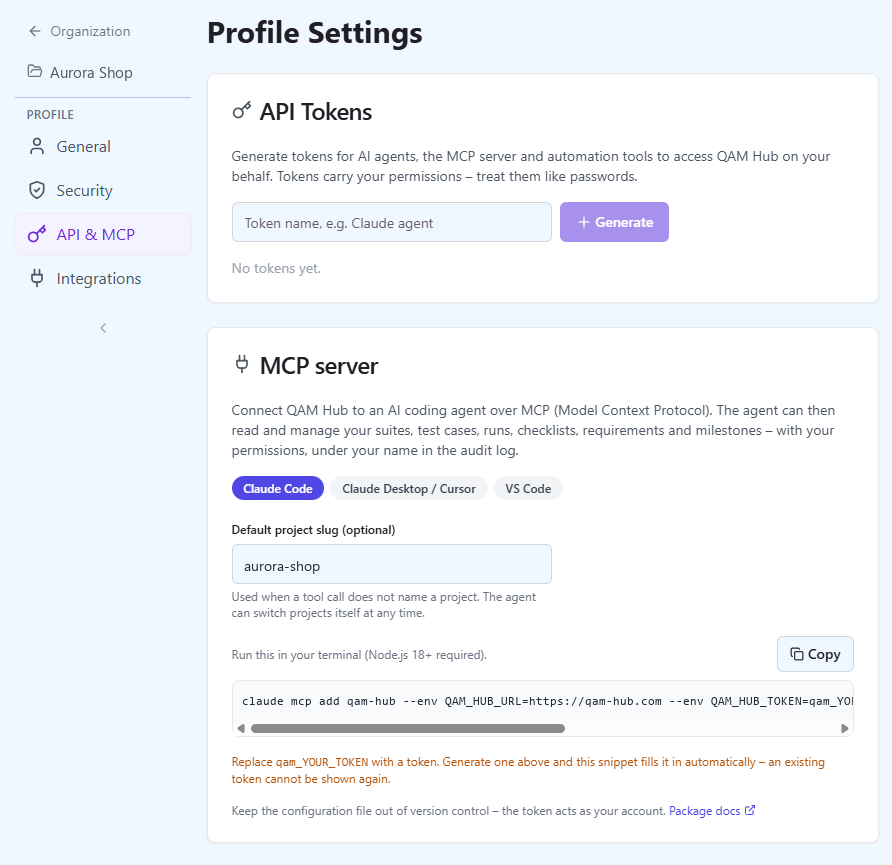
Every click in the QAM Hub interface is a call to its REST API, and that API is the one your own scripts use. A test management API shared with the product rather than bolted onto it means there is nothing the interface can do that a script cannot, and nothing a script may do that your account could not do by hand. Access is through personal API tokens that you create yourself, keep in CI secrets and revoke when you are done.
What the test management API covers
| Area | What you can do |
|---|---|
| Projects | List the projects you are a member of, read project statistics and members |
| Suites and groups | Create, rename, reorder and delete suites, groups and sub-groups |
| Test cases | Create one or many, update, bulk edit, move, duplicate, tag, set custom field values, read history, list and restore versions |
| Test runs and executions | Create a run, change its cases, assign testers, set execution statuses one by one or in bulk, read execution history |
| Checklists | Add checks and columns, create checklist runs, set cell results, import and export CSV |
| Requirements | Create, update and link requirements to cases, import and export CSV, preview and run a sync from the connected tracker |
| Milestones, tags, custom fields, templates | Full management, including the default field configuration |
| Automation | Upload Playwright, Cypress and JUnit XML runs, read a run and the history of a test |
| Reports | Read report data such as defects, release readiness, milestone burndown and dashboard trends |
Suites, cases, runs, executions, checklists, requirements, milestones and reports are all reachable. The list matches the tool list of the MCP server because every MCP tool is a thin wrapper over one of these endpoints: an AI agent and a shell script see the same API.
How API tokens work
Open Profile, "API & MCP", and create a token. It starts with qam_, is shown exactly once and can never be displayed again, so it goes into your CI secrets or client configuration at that moment. A token belongs to you: it acts as your account, in your organization, in the projects you are a member of. Revoke it on the same page when a pipeline is retired or a laptop is lost, and create a new one when you need to rotate.
curl -H "Authorization: Bearer qam_..." \
  https://<your-qam-hub-api>/api/project/<project-slug>/test-cases
The token travels as a Bearer token in the Authorization header, exactly as the signed-in app sends its own session, and the API answers JSON. The API base URL is shown on the "API & MCP" page.
What a token can and cannot do
- It carries the creator's permissions, no more and no less. A token created by a project Viewer reads but does not write; a token created by a project Admin can do what that Admin can do. If the interface refuses an action for your role, the API refuses it for your token.
- Every write is recorded in the audit log under the creator's name, with a snapshot of what changed, exactly like a change made in the browser. Organization Admins read it in the audit log.
- A plan limit, such as the test case cap on a trial, comes back as an explicit error that names the limit, so a script fails with a readable reason instead of a bare status code.
- There is no privileged back door: no token reaches data that its owner could not open in the interface.
People sign in with a password, Google or Microsoft Entra ID; machines use tokens. The two never mix, which keeps the question "who did this" answerable for every row in the audit log. The measures behind both are listed on the security page.
What is already built on the API
- The Playwright reporter and the Cypress helper publish CI runs with a token from the pipeline's secrets.
- The qam-hub CLI uploads JUnit XML from any framework and CI with the same kind of token, read from the QAM_API_TOKEN environment variable.
- The MCP server lets Claude Code, Cursor, VS Code and other MCP clients read and write your projects as you.
None of these has a special integration path. Each is a client of the same API with a personal token, which is why an in-house script written this afternoon is an equal citizen of the three.
What teams script against it
- Create a run for every deployment from the release pipeline, scoped by the tags of the service that shipped, and record the results the pipeline already knows.
- Keep requirements in step with a planning tool that has no tracker integration: create and update requirements from an export and link them to the cases that prove them.
- Reorganize a suite in bulk: move cases between suites without losing their numbers, rename to one convention, set a custom field value across hundreds of cases.
- Pull report data into a BI tool or a release checklist, so the pass rate and the open defects of a milestone appear where the rest of the engineering metrics live.
Reference and setup
The "API & MCP" page shows the server URL of your workspace and ready-made configuration for MCP clients with the new token already pasted in. There is no separate public API reference yet: the endpoints are the ones the web app calls, and the MCP server's tool list is the quickest map of them.
Plans. The API and personal tokens are included on every plan.
Frequently asked questions
Is this the same API the web app uses?
Yes. The web app is a client of the same REST API, so every suite, case, run, execution, checklist, requirement, milestone and report that the interface can show or change is reachable with a token. There is no second, reduced API for integrations.
Can a token do more than my own account?
No. A token carries the permissions of the person who created it, in the projects that person belongs to, and the same role checks run on every call. A change that your role could not make in the browser is refused for your token as well.
What happens when a script hits a plan limit?
The request is refused with an error that names the limit, for example the test case cap of a trial, so the script and the person reading its log know what to do next. The interface shows the same limit in the same words.
How do I rotate or revoke a token?
Create a new token in Profile, "API & MCP", update the secret in your CI or client, then revoke the old one on the same page. A revoked token stops working, and because an existing token can never be displayed again, there is no way to recover one you did not copy.
Do changes made through the API show who made them?
Yes. Every write through a token is recorded in the audit log under the token owner's name with a snapshot of what changed, whether the call came from a script, the CLI, a CI reporter or an AI agent over the MCP server.