

Defect tracking
Create or link an issue from the execution that found it, and see every defect back on the case, the run and the report.
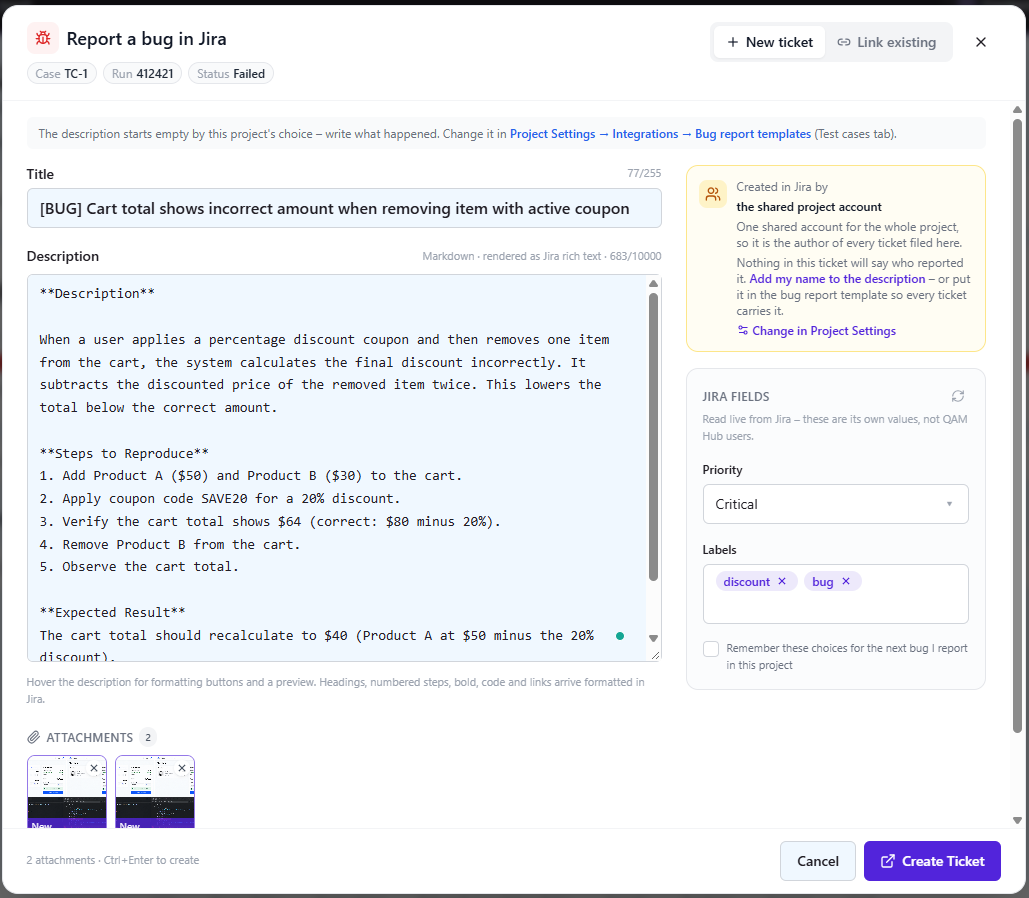
A failing test is where a bug report starts, so that is where QAM Hub files it. The issue is created from the execution itself in Jira, GitHub, GitLab, Linear, Asana, Redmine or Trello, and the link is kept on both ends: the execution, the test case, the requirement it traces to and the defects report.
One dialog, pre-filled from the failure
The Report a bug dialog is the same from a test execution, a checklist cell and an Agent Flows triage card. It opens with a Markdown description built from your template, the execution's screenshots already selected as attachments, and the tracker's own fields: issue type, priority, assignee and labels as they exist in that tracker. Drop, paste or browse to add more files.
Bug report templates with variables
Each project has two templates, because the facts differ: one for test cases (steps, expected result, actual result, run) and one for checklists (check, note, column, cell comment, checklist run). Insert variables with a click:
- reporter name and email, project and date;
- the case key, title, steps, expected result, tags and a deep link to it;
- the run name and link, the execution status and actual result;
- any custom field by name, or every non-empty custom field at once.
A preview renders the template with sample data, and a variable with no value is dropped from the result instead of leaving an empty label.
The tracker's required fields, read live
Required fields come from the tracker itself, per issue type, with their real options: a Jira project that requires a component or a fix version asks for it in the dialog, and Create stays disabled until it is filled. A project can set defaults for any field, either fixed and hidden or pre-filled and editable, and each person's choices are remembered for the next bug.
One bug for many cases, many tickets for one execution
Select several cases in a run and file one bug for all of them: the ticket is created once, attached to every selected case, and its description lists the other cases under "Also affects". The reverse works too: the Link existing tab takes a key or URL, and several tickets can hang on one execution or check.
Shared or personal tracker accounts
Each project chooses how it talks to the tracker. A shared account files every bug under one project-wide identity, and the dialog offers to add the reporter's name to the description so the ticket still says who found it. Personal accounts let each tester connect their own tracker login in their profile, so tickets are authored by the person who filed them.
Formatting and attachments arrive native
| Tracker | Description | Screenshots |
|---|---|---|
| Jira | Rich text: headings, numbered steps, code blocks, tables | Uploaded as files |
| Asana | Rich text | Uploaded as files |
| GitLab, Linear, Redmine, Trello | Markdown | Uploaded as files |
| GitHub | Markdown | Added as links (GitHub has no attachment API) |
Every defect back in one report
Linked issues appear on the case, in the run, on the requirement and in a project-wide Defects report with source and run filters, including issues raised from checklist cells. Nobody has to remember which ticket belonged to which failing case.