

Playwright test reporting in QAM Hub
Publish every Playwright run to QAM Hub with the official reporter: statuses, retries, traces and videos, linked to your manual test cases by number.
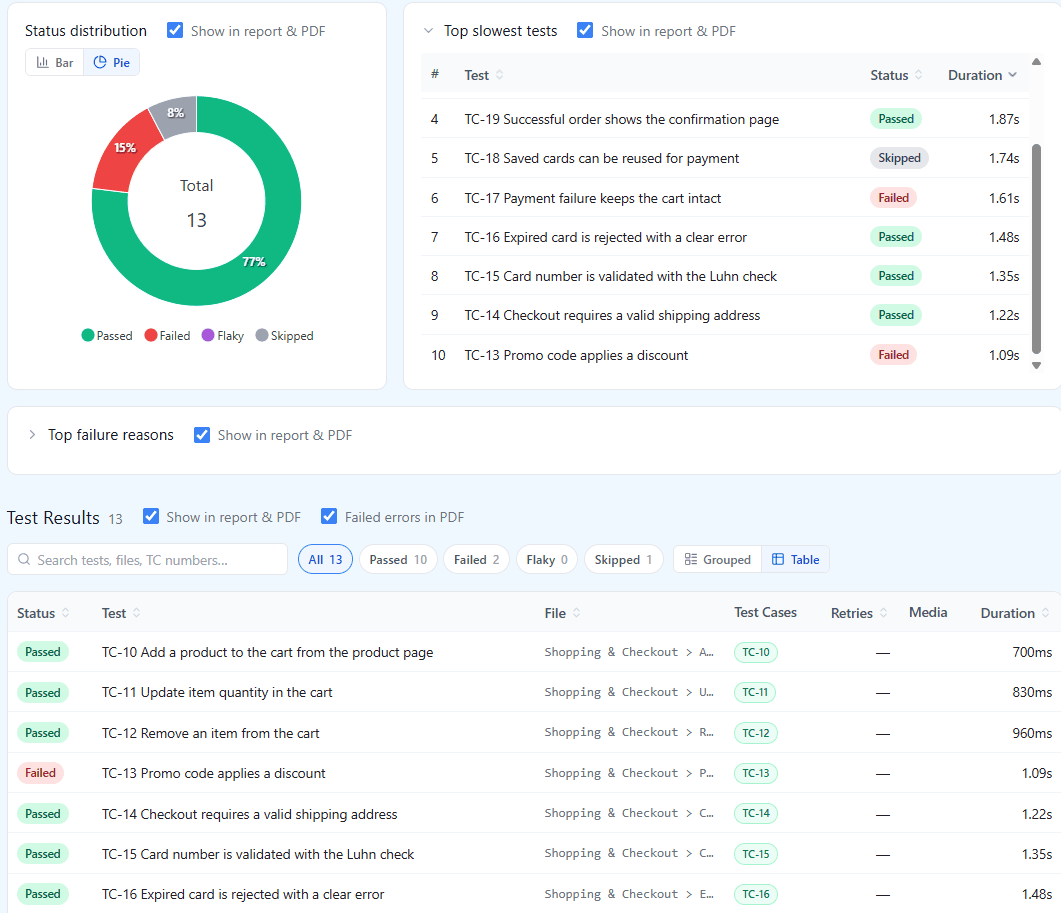
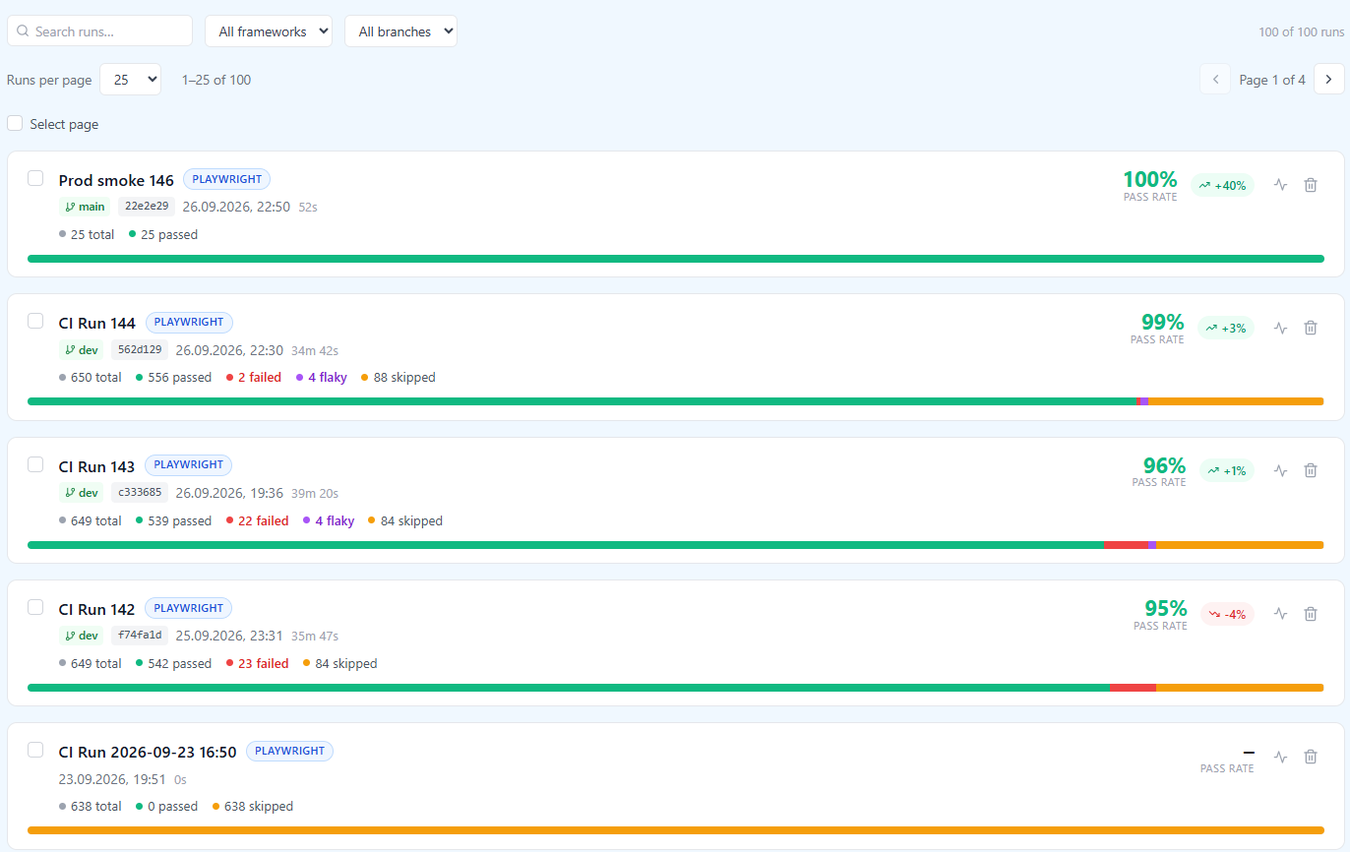
Playwright test reporting in QAM Hub starts with one entry in your Playwright config. The official reporter publishes every CI run to your project: the spec hierarchy, each attempt of each test, error output, screenshots, videos and traces. Results land next to the manual test cases of the same release, linked by case number, so one page answers which cases automation covers, what passed in the last build and which tests have started to flake.
How Playwright test reporting works
Install @qamadness/qam-playwright-reporter from npm and add it to the reporter array of playwright.config.ts, next to the reporters you already run. Nothing else changes: the list reporter still prints to the console, the HTML report is still written, and QAM Hub receives the results when the run finishes.
// playwright.config.ts
import { defineConfig } from '@playwright/test';

export default defineConfig({
  reporter: [
    ['list'],
    ['html'],
    ['@qamadness/qam-playwright-reporter', {
      apiUrl: process.env.QAM_API_URL,        // your QAM Hub API, e.g. https://qam-hub.onrender.com/api
      projectId: process.env.QAM_PROJECT_ID,  // from the project's Automation page
      // apiToken defaults to process.env.QAM_API_TOKEN
    }],
  ],
});
The three values live in your CI secrets. The token is a personal API token created in Profile, "API & MCP"; it carries the permissions of the person who created it, and every upload is recorded in the audit log under their name. The project id is shown on the project's Automation page, which opens with a setup guide for your CI: GitHub Actions, GitLab CI, Jenkins or Azure Pipelines.
When a pipeline cannot reach QAM Hub, or a run from a laptop is worth keeping, upload the Playwright JSON report by hand from the Automation page. It becomes the same kind of run with the same detail. Both paths are described step by step in uploading Playwright reports.
What lands in QAM Hub from each run
| In Playwright | In QAM Hub |
|---|---|
| Spec files, describe blocks, tests | The same hierarchy, as a grouped results table or a flat list |
| Test outcome | One of four statuses: passed, failed, flaky or skipped |
| Retries | Every attempt is kept; a test that passes on a retry is flaky, not passed |
| Error message and stack trace | Shown on the test and aggregated into the top failure reasons of the run |
| Durations | Per test and per run, with the slowest tests listed |
| Screenshots, videos, trace files | Media attached to the test result, opened from the run |
| CI environment | Branch, commit, commit message and a link to the build, detected automatically |
Because every attempt is stored, a retried test never appears as two contradicting results. You see the failed attempt with its trace and the passing attempt after it, which is usually enough to decide whether the test or the application is at fault.
Linking Playwright tests to manual test cases
Put the case number in the test title: test('TC-123 checkout applies the discount', ...). The reporter reads the number and the result appears on manual case 123, in its history and in the automation coverage of the project. Each case then reads as covered by automation, still manual, or covered by neither, and the coverage report shows the three groups next to the manual results of the same release.
Case numbers in QAM Hub are never reused, even after a case is deleted, so a title written once keeps pointing at the same case for the life of the project. The naming conventions that keep that link stable as suites grow are covered in mapping automated test results to test cases.
Reading a run: the list and the detail
The runs list shows one row per upload: a framework badge, branch, commit, date, duration, pass rate and the change against the previous run. Filter by framework and branch when one project receives Playwright runs from several pipelines, and page back through older runs to find the build that first turned red.
A run opens on its status distribution, the slowest tests and the top failure reasons, so the first screen already tells you whether thirty failures are thirty bugs or one broken login shared by thirty specs. Below it sits the results table, grouped by file and describe block or flattened, with search and status filters. "Compared to previous run" lists the new failures and the pass rate delta against the previous run of the same framework and branch, which is the question a reviewer actually has: what broke since the last green build. Each row opens the error output and the media of that test.
For a run with many failures, AI analysis groups them by likely cause and reports health by area and what to look at first, so triage starts from a short list rather than a long red table.
How the pass rate is calculated
One formula is used everywhere, on the runs list, in the run detail, on the dashboard widget and in reports: pass rate = (passed + flaky) / (total - skipped). Flaky counts toward the numerator because the test did pass, on a retry. Skipped tests leave the denominator because they did not run. A run of 100 tests with 90 passed, 3 flaky, 5 failed and 2 skipped therefore reads as 93 of 98 rather than 90 of 100, and it reads the same on every page.
History across runs: Test Explorer and flaky tests
Each Playwright test is registered once, and every later run adds to its record. The Tests tab (Test Explorer) opens that record: status and duration run over run, the failure history, and the tests that started failing or started passing since the previous run of the same branch. A test that alternates between passing and failing is detected as flaky and can be quarantined while the team fixes it, so its noise stops hiding real regressions. The rules behind the verdict are on the flaky test detection page.
Where videos and traces live
Media uploaded by the reporter is stored in object storage behind presigned URLs, never in a public bucket, and opened from the test result. Videos and traces are machine-generated bulk media, so they are kept for the retention period of your plan and then swept. Screenshots, the attachments on manual test cases and the project library are never touched by retention. Your organization sees a per-category storage breakdown, so the share taken by CI media is visible before it becomes a surprise.
Playwright in a mixed pipeline
Playwright for Java and .NET, pytest, WebdriverIO and every other framework that writes JUnit XML report through the qam-hub CLI into the same runs list, with the same linking by case number, so a project with several stacks still has one automation picture. If you are still deciding where Playwright results should live at all, the buyer's guide for Playwright teams lists the questions to ask of any tool.
Plans. Playwright reporting is included on every plan. Test Explorer history and AI run analysis are part of the Standard and Advanced plans.
Frequently asked questions
Do I have to replace my existing Playwright reporters?
No. The QAM Hub reporter is one more entry in the reporter array of your Playwright config, next to list, html or anything else you use. Your console output and HTML report stay as they are, and QAM Hub receives the results when the run finishes.
What if my CI runner cannot reach QAM Hub?
Keep Playwright's JSON reporter in your config and upload the JSON report by hand from the project's Automation page. The upload produces the same run, with the same hierarchy, statuses, attempts and media as a run published by the reporter.
What counts as a flaky test in QAM Hub?
A test that failed and then passed on a retry within the same run is flaky. It counts toward the pass rate because it did pass, every attempt is kept with its error output and media, and the Tests tab tracks how often the same test flips across runs so a habitual offender can be quarantined.
Are Playwright traces and videos kept forever?
No. Videos and traces are kept for the retention period of your plan and then swept, because they are the bulk of automation storage. Screenshots and the attachments on manual test cases are never removed by retention, and the organization sees a storage breakdown by category.