

AI test case generator for QA teams
Generate test cases and checklist items from a short description – a QA engineer reviews every result before it is saved.
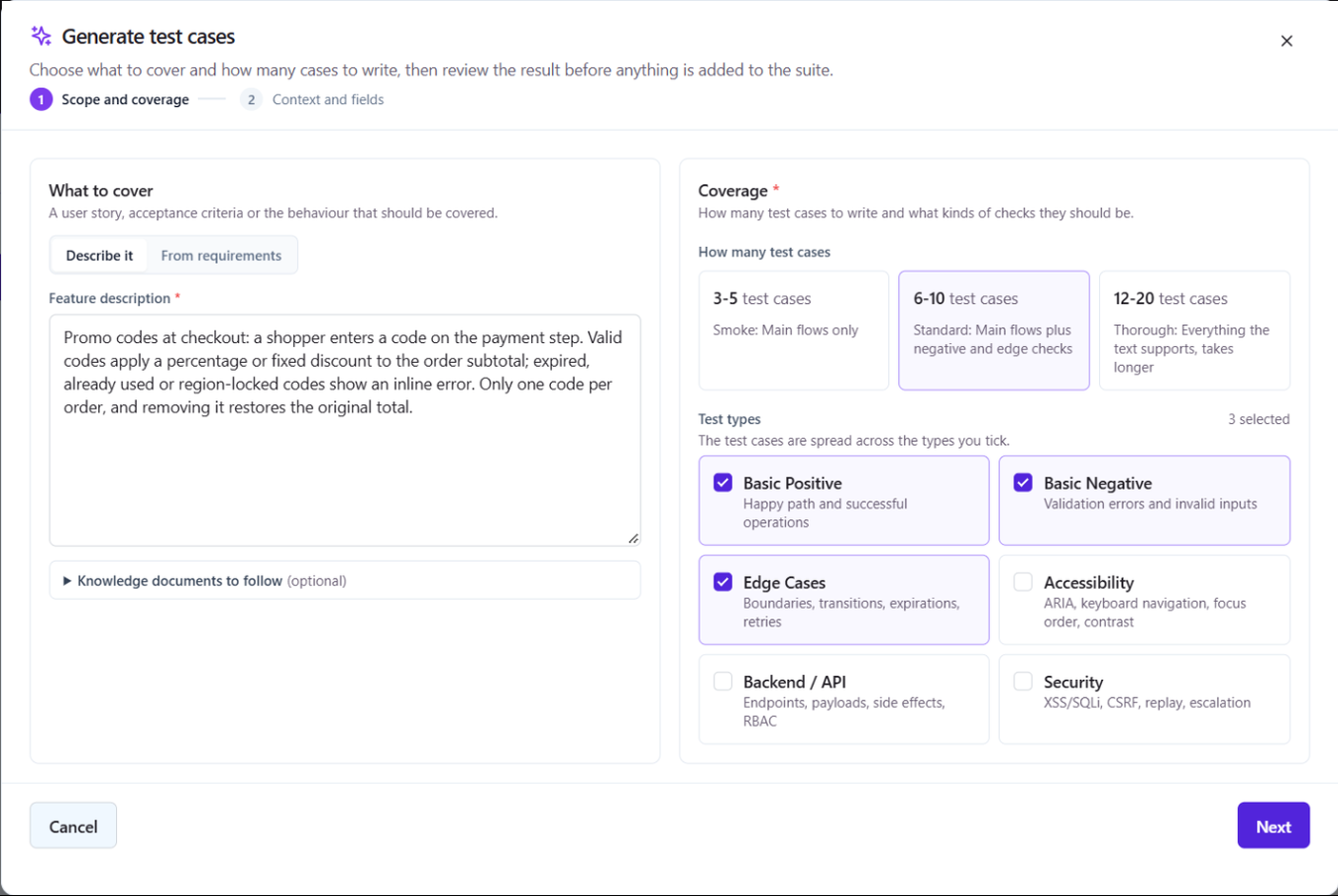
An AI test case generator is only useful if what it writes fits the suite it lands in. QAM Hub generates test cases from a feature description, a user story, acceptance criteria or the requirements already in your project, in your project's own structure: steps, expected result and custom fields, following the template and preferences your admins set. The proposals arrive as a list you review. You add the ones you want, and nothing enters the suite without a person choosing it.
What you give it: a description or your requirements
Generation starts from a suite with the dialog "Generate Test Cases with AI". It has two steps, "Scope and coverage" and then "Context and fields". The first choice is the "Source" switch, which decides what the AI reads.
| Source | What you provide | What comes back |
|---|---|---|
| "Describe it" | A feature description, user story or acceptance criteria typed into the "Feature description" field | Test cases for that description, at the depth you choose |
| "From requirements" | One or more requirements picked from the project | Cases generated per requirement, with "Cases per requirement" instead of a total; each case is linked to its requirement when you add it |
The second source is the one to use when your requirements are already synced from the issue tracker or imported from CSV: the generated cases arrive already traced to the requirement they cover, so coverage numbers and the requirement coverage report are right from the first run.
Choosing coverage types and depth
You tell the generator what kind of cases you want rather than hoping it guesses. Coverage types come in two groups.
| Group | Coverage types |
|---|---|
| Functional | Basic Positive, Basic Negative, Edge Cases |
| Cross-cutting | Accessibility, Backend / API, Security |
Instead of asking for a free number of cases, you pick a coverage depth: Smoke, Standard or Thorough. Each level shows the approximate range of cases it produces, so you know what you are asking for before you start, and deeper levels take longer. Smoke is a quick pass over the main paths; Thorough is the level to use when a feature is new and you want the negative and edge paths spelled out.
Before anything is added, the titles of the proposals are checked against the cases already in the suite, and duplicate titles are flagged. That matters most on the second and third generation for the same feature, where the model would otherwise rewrite what you already have.
How the AI test case generator knows your project
Generic test cases are easy to produce and expensive to clean up. The second step of the dialog, "Context and fields", is where the generator picks up what your project already knows about itself.
- "System Context": the project's shared AI context, a required description of the system under test. It is set once by project admins in Project Settings, on the AI tab, and every generation in the project uses it.
- Test case template and preferences: the same admin settings decide the shape and tone of a case, so generated cases read like the ones your team writes by hand. The fields they fill are the project's own; see templates and custom fields.
- Project knowledge base (Advanced plan): PDF, TXT, Markdown, JSON and CSV documents plus text notes, with the text extracted on the server. Documents are enabled or disabled one by one, organized in folders, and the relevant ones are assembled into a context block for generation, so a spec, a domain glossary or a list of environment quirks shapes the cases instead of living in a wiki nobody reads.
Generated cases land in a group of the suite, "AI Generated" by default, so they are easy to find, review and move once they have been checked.
Review before anything is added
The result of a generation is a list of proposals, not a change to your suite. You read each case, keep the ones that are right, and leave the rest. Only the cases you add are written. There is no mode in which the generator writes directly into the suite without review, because a test base is only as good as the people who vouch for it.
The same review rule applies everywhere AI touches your data in QAM Hub: proposals are shown, a person decides. The reasoning behind that design is in what AI in software testing can and cannot do.
Generating checklist checks
Checklist suites get the same treatment. From a checklist, generate checks from a feature description or acceptance criteria, review the list and add the ones that belong. A check is one line a tester already knows how to perform, so the generator is a fast way to turn a release note or a ticket into a smoke or cross-browser list, with the same review before anything is saved.
Beyond generation: fixing cases and writing bug reports
Two more AI actions sit next to the generator.
- "Fix with AI" rewrites an existing case: a case with no expected result, vague steps or conditional logic inside a step gets a rewritten version for you to accept. It is also how a Quality Analyzer finding is resolved in one step.
- AI bug analysis helps you write a bug report from a failure: it turns a messy failure note into a clear reproduction you can file in your tracker.
No API key, no model picker
The platform runs the model. There is no provider or model picker in the product and no personal key to create, paste or rotate. A new member of the team can generate cases on their first day without an admin provisioning anything, and nobody's personal account is billed for the team's generation. AI usage is included in every plan under fair use.
Keep the generated volume honest
Generation gets you volume fast, and volume is where test bases rot: the same scenario written three times, cases that cannot fail because they have no expected result. Pair a large generation with the Quality Analyzer, which grades the suite, groups likely duplicates and lists per-case findings with the quoted evidence, so the cleanup after a thorough generation is a measurable task rather than a vague worry. For the editorial side, how to brief the generator, how much to accept and what to rewrite, read AI-generated test cases: best practices.
Plans
AI test case and checklist generation is included on every plan, with no API key to configure. AI fix suggestions for existing cases are part of the Standard and Advanced plans.
Frequently asked questions
Can the AI test case generator write cases from user stories?
Yes. Choose "Describe it" as the source and paste the user story or acceptance criteria into the "Feature description" field, pick the coverage types and a depth, and review the proposals. If the story already exists as a requirement in the project, choose "From requirements" instead, and each generated case is linked to that requirement when you add it.
Will generated test cases match the format my team uses?
Generated cases follow your project's structure: steps, expected result and custom fields, shaped by the test case template and preferences your project admins set on the AI tab of Project Settings, plus the required "System Context" that describes the product. On the Advanced plan the project knowledge base adds your own documents as context, so the cases use your product's terms rather than generic ones.
Does anything get added to my suite automatically?
No. Every generation returns a list of proposals, and only the cases you add are written to the suite, in a group named "AI Generated" by default. Duplicate titles against existing cases are flagged before adding, and nothing is created without a person choosing it.
Do I need my own API key for a model provider?
No. The platform runs the model, there is no provider or model picker, and there is no personal key to manage. AI usage is included in every plan under fair use.
Can I generate checklist items as well as test cases?
Yes. Checklist suites generate checks from a feature description or acceptance criteria the same way, and you review the list before any check is added to the suite.