

Release readiness tracking with test milestones
Group runs and requirements under a milestone and watch it burn down towards a date you can defend.
Release readiness is one question asked in every release meeting: can we ship this? QAM Hub answers it from the testing that actually happened. A milestone collects the runs and requirements of a release, replays the execution history into a burndown, forecasts whether the date holds, and checks the result against quality gates you define. Which metrics deserve a place in that meeting is a separate discussion, covered in QA metrics that matter for engineering leaders; this page is about how the milestone produces them.
What a milestone groups
A milestone groups the test runs, checklist runs and requirements of a release, sprint or regression cycle. It has a start date, a due date and a status: Planned, Active or Completed. A run or a checklist run is attached to the milestone it belongs to and counts toward its burndown and readiness from then on; a requirement attached to the milestone defines the scope that has to be covered.
The Milestones page
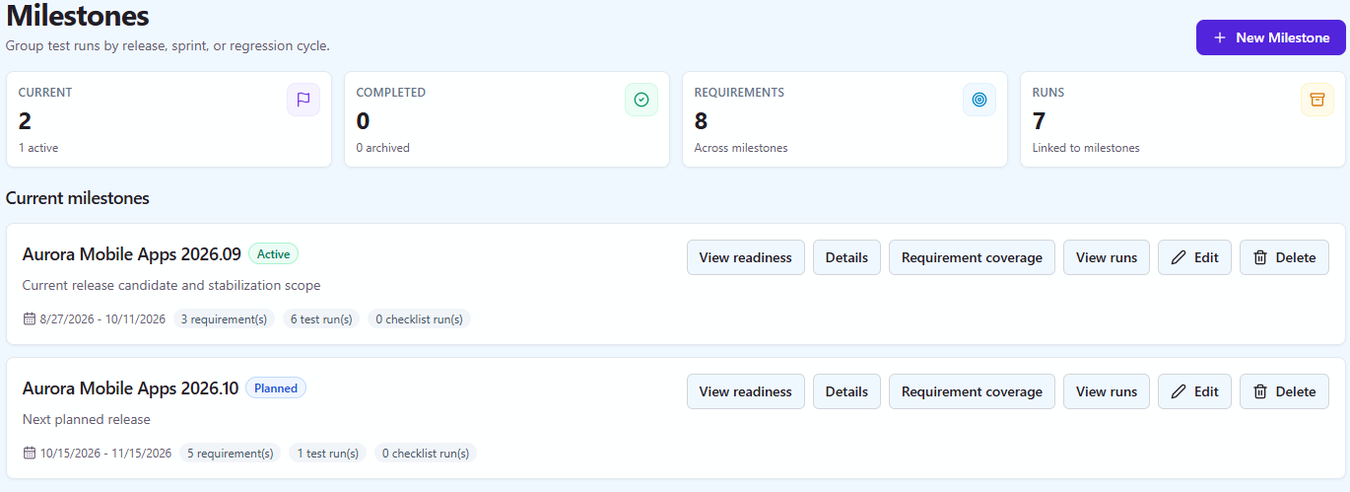
The page opens with Current and Completed counts and, for each milestone, how many requirements and runs are linked. Overdue milestones are flagged rather than hidden, and a milestone without a date is listed as well, so nothing drops out of sight because someone forgot to set a date. Every milestone offers four actions:
- "View readiness" opens the Release Readiness report for that milestone.
- "Details" shows the milestone's dates, status, runs and requirements.
- "Requirement coverage" lists which requirements in scope are covered by test cases and what those cases returned last.
- "View runs" lists the test runs and checklist runs attached to it.
Burndown replayed from execution history
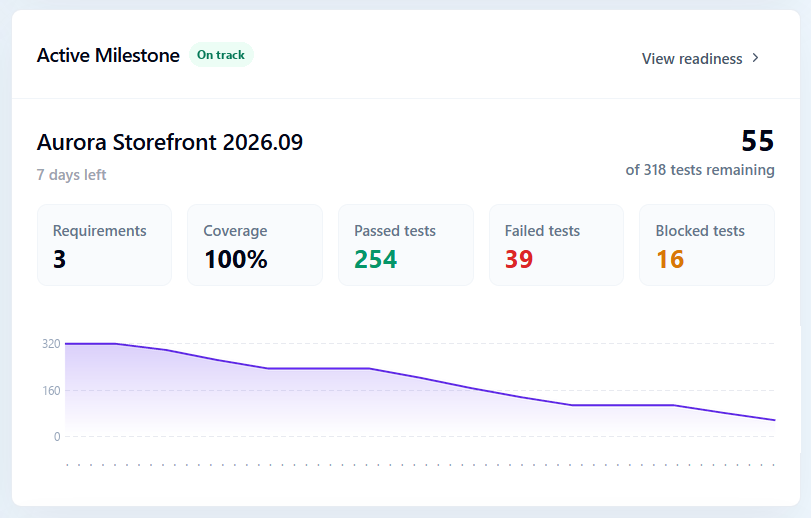
The burndown shows remaining versus total executions per day. It is not an estimate: QAM Hub replays the real execution history of the attached runs day by day, for up to 60 days, so the curve reflects when results were actually recorded. An execution counts as remaining until it reaches a final result.
| Execution status | In the burndown |
|---|---|
| Untested | Remaining |
| Failed | Remaining |
| Blocked | Remaining |
| Retest | Remaining |
| Passed | Done |
| Skipped | Done |
| Custom status | Done. A custom status is neutral, so it is never counted as remaining; only Untested, Failed, Blocked and Retest are. |
Treating Failed and Blocked as remaining is deliberate. A failed case still stands between you and the release: it needs a fix and a retest, so the burndown does not go down until it passes.
Forecast: on track, at risk or overdue
From the last 7 days of burn rate, the milestone gets a forecast: "on track" when the remaining executions will be done by the due date at the current pace, "at risk" when they will not, and "overdue" when the date has passed with work remaining. The same forecast and burndown appear in the Active Milestone widget on the project dashboard, so the team sees the trend every morning without opening a report.
The release readiness report and its quality gates
The Release Readiness report turns the milestone into a go or no-go picture for stakeholders. You configure the quality gates the release has to pass, and the report shows a verdict banner at the top with the gate results under it.
| Gate | What it checks |
|---|---|
| Pass-rate threshold | The pass rate of the milestone's executions is at or above the value you set |
| Execution completeness | How much of the scope has been executed at all |
| "Max count" gates | No more than N executions in a given status, built-in or custom, for example a cap on Blocked or on a custom "Needs design review" status |
Because "max count" gates work on any status, including the custom ones a project adds, the gate matches the way your team actually labels results instead of forcing a generic definition of done. The report exports to PDF, so the go/no-go record leaves the room as a document and not as a screenshot.
AI release analysis
Next to the gates, an AI release analysis summarizes the risk picture before shipping: what failed, what is blocked, what is uncovered, and where the attention should go. Past analyses are kept with the milestone and can be reopened later at no cost, so the analysis from the last release is still readable when you plan the next one.
Closing a milestone and looking across projects
Closing a milestone can take an automatic report snapshot. The numbers at release time are frozen as they were, so when someone asks three months later what the pass rate was when version 4.2 shipped, the answer is the snapshot, not a recomputation over runs that have since been reopened or added to.
For a team that runs several projects, organization-wide milestone reports show milestones across every project in one place, so a release manager compares the readiness of parallel releases without opening each project.
Plans
Milestones and burndown are included on every plan. The Release Readiness report and AI release analysis are part of the Advanced plan.
Frequently asked questions
What does release readiness mean in QAM Hub?
Release readiness is the Release Readiness report of a milestone: configurable quality gates such as a pass-rate threshold, execution completeness and maximum counts per status, with a verdict banner and an export to PDF. It is computed from the test runs, checklist runs and requirements attached to the milestone.
How is the milestone burndown calculated?
The burndown plots remaining versus total executions per day, replayed from the real execution history of the attached runs for up to 60 days. Untested, Failed, Blocked and Retest count as remaining, and a forecast of "on track", "at risk" or "overdue" is derived from the last 7 days of burn rate.
Do checklist runs count toward a milestone?
Yes. A milestone groups test runs, checklist runs and requirements, and a checklist run attached to a milestone counts toward its burndown and readiness in the same way as a test run.
Can I define my own quality gates?
Yes. The Release Readiness report has configurable gates: a pass-rate threshold, execution completeness, and "max count" gates for any execution status, built-in or custom. The verdict banner reflects whether every gate passed.
What happens to the numbers after the release ships?
Closing a milestone can take an automatic report snapshot, which freezes the numbers as they were at release time. Past AI release analyses are kept as well and can be reopened later, so the release record stays readable long after the runs have moved on.