

AI-assisted testing
AI in QAM Hub proposes and a person decides: test cases and checks generated from a description, a Quality Analyzer that grades a suite and finds duplicates, and autonomous agent runs that drive a real browser through your regression cases and queue the results for review.
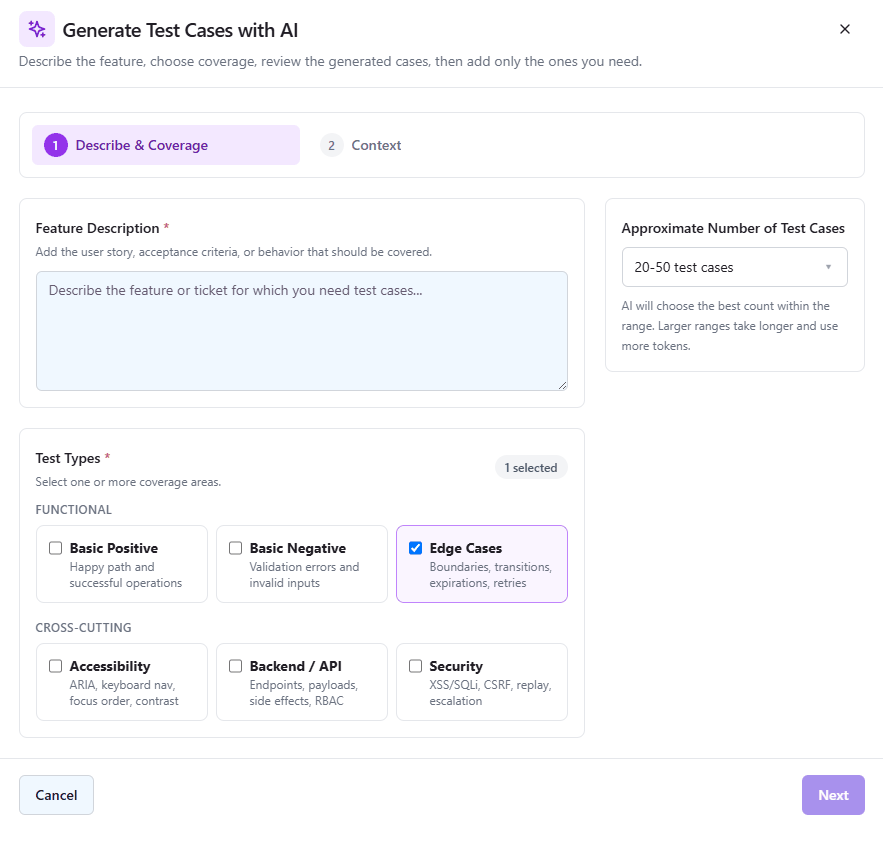
AI test case generation
Generate test cases and checklist items from a short description – a QA engineer reviews every result before it is saved.
Describe the feature, paste an acceptance criterion or point at a requirement, and QAM Hub proposes test cases or checklist checks in your project’s own format – using the project AI context, templates and preferences an admin has configured, plus any knowledge documents you have uploaded.
Nothing is written until a human approves it. Results arrive as a reviewable list: edit, drop or accept, then save into the suite. The same applies to AI bug analysis, which turns a messy failure note into a clear reproduction.
- Test cases and checklist checks from a description or requirement
- Project-wide AI context, templates and formatting preferences
- Every proposal reviewed and edited by a human before saving
- AI bug analysis for turning a failure into a usable report
Autonomous agent runsBeta
Let an AI agent drive the browser through your regression cases, then triage the results yourself.
Agent flows take a set of test cases and execute them in a real browser through a runner you install with one command. Each case gets a step-by-step trace, a verdict, and – where the run captured one – a baseline to compare future runs against.
Triage stays human. Every not-passed case arrives in a review queue with the agent’s own reasoning: confirm it as a bug, which opens the issue dialog against your tracker; accept a proposed change to the expected result when the product legitimately changed; or reject the finding. A decision always has a visible consequence.
- One-command runner install, scheduled runs via cron expressions
- Step-level traces, baselines and per-case verdicts
- A review queue with filters, comments and CSV export
- Confirming a bug creates a real issue in your tracker
Project knowledge baseBeta
Upload the documents your product actually runs on, and AI features answer in terms of your system, not a generic one.
A project knowledge base holds PDFs, notes, Markdown, CSV and JSON – specs, domain glossaries, environment quirks – with text extracted server-side. Documents can be enabled or disabled individually, and the relevant ones are assembled into a token-budgeted context block for test generation and agent runs.
After each agent run, QAM Hub proposes knowledge updates it learned from what it saw: add this, correct that, this note is stale. People accept or reject them, so the knowledge base stays current without becoming a second documentation chore.
- PDF, TXT, Markdown, JSON and CSV documents, plus text notes
- Per-document enable and disable, folders for structure
- Injected into AI generation and agent runs automatically
- AI-proposed knowledge updates, accepted or rejected by a human
In-app AI assistant
A product help chat that answers "where is this and how does it work" and links straight to the right screen.
The assistant knows QAM Hub, not the internet. Ask where a setting lives, how run tags differ from case tags, or how to connect a reporter, and it answers with links into your own workspace.
It deliberately refuses to write test cases or bug reports and points you at the built-in AI tools instead – one place to generate QA artifacts, with review built in, rather than two with different rules.
- Product and navigation answers with in-app deep links
- Voice input for your questions
- Scoped to the product – it redirects QA-artifact requests
- Available from every page header