

MCP server for AI agents
Manage suites, cases, runs and checklists from Claude or another AI agent over the Model Context Protocol.
The Model Context Protocol (MCP) is the standard way an AI coding agent talks to an external tool. QAM Hub ships an MCP server as an npm package: run it next to your agent and the agent can read your suites, write test cases, open runs and record results as part of a larger task. "Review this pull request and add the test cases it implies" becomes one instruction instead of an afternoon.
What an agent can do
| Area | Tools |
|---|---|
| Projects | List the projects you are a member of, read project stats and members |
| Suites and groups | Create, rename, reorder and delete suites, groups and sub-groups |
| Test cases | Create one or many, update, bulk edit, move, duplicate, tag, set custom field values, read history, list and restore versions |
| Test runs | Create a run, change its cases, assign testers, set execution statuses one by one or in bulk, read execution history |
| Checklists | Add checks and columns, create checklist runs, set cell results, import and export CSV |
| Requirements | Create, update and link requirements to cases, import and export CSV, preview and run a sync from the connected tracker |
| Milestones, tags, custom fields, templates | Full management, including the default field configuration |
Every tool is a thin wrapper over the same REST API the web app uses. There is no privileged back door: if the interface would refuse an action for your role, the agent is refused too.
Set up in two minutes
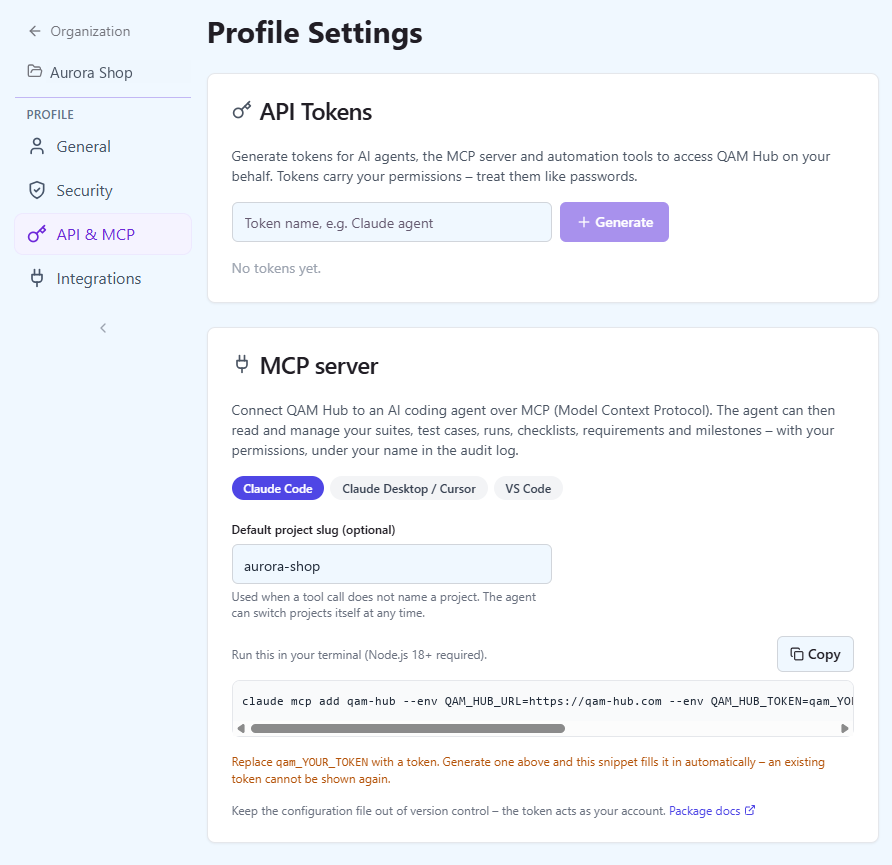
Open Profile → API & MCP in QAM Hub, create a personal API token and pick your client. The page shows the snippet with your server URL and the new token already filled in. For Claude Code it is one command:
claude mcp add qam-hub \
  --env QAM_HUB_URL=https://your-qam-hub-backend \
  --env QAM_HUB_TOKEN=qam_... \
  -- npx -y @qamadness/qam-hub-mcp
Claude Desktop, Cursor, VS Code and Windsurf take the same server as a JSON entry:
{
  "mcpServers": {
    "qam-hub": {
      "command": "npx",
      "args": ["-y", "@qamadness/qam-hub-mcp"],
      "env": {
        "QAM_HUB_URL": "https://your-qam-hub-backend",
        "QAM_HUB_TOKEN": "qam_...",
        "QAM_HUB_PROJECT": "your-project-slug"
      }
    }
  }
}
QAM_HUB_PROJECT is optional: it sets the default project, and every tool also accepts a project slug. Node.js 18 or newer is the only requirement.
Permissions and audit
- The token acts as you. The agent can do exactly what your account can do, in the projects you belong to, and nothing more.
- Every change the agent makes is recorded in the audit log under your name, with a snapshot of what changed.
- Revoke the token in Profile → API & MCP at any time; an existing token can never be displayed again.
- A plan limit, such as the test case cap on a trial, comes back to the agent as an error that names the limit, exactly as the interface would show it.
What teams use it for
- Turn a pull request or a ticket into draft test cases in the right suite, with tags and custom fields filled in.
- Reorganize a suite: split a group, rename cases to one convention, move cases between suites without losing their numbers.
- Create a run for a release and record results from a CI log or a manual session the agent is assisting.
- Import cases from a document the agent is reading, or export requirements and link them to the cases that cover them.
The server is open about what it is: a client of your own account, included on every plan, and configured per person rather than per organization.