

Test case version history and rollback
Every change to a test case is snapshotted, so you can see what it used to say and restore an earlier version.
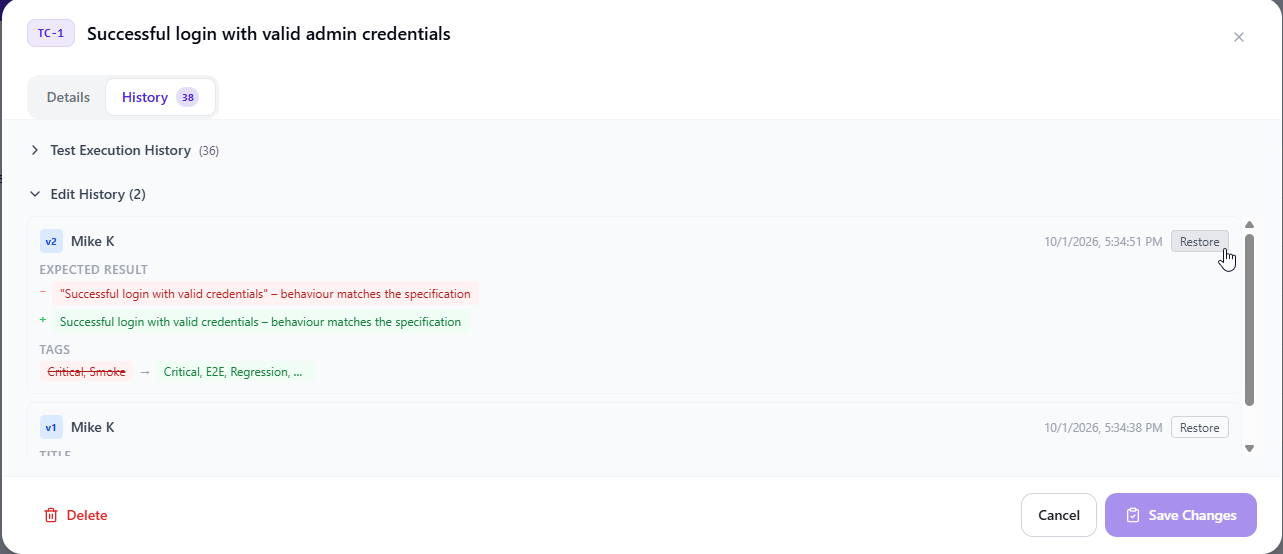
Test case version history in QAM Hub is automatic: every save of a case creates a version with the author, the time and an optional reason for the change. The History tab of the case shows the versions as a per-field diff, removed text in red and added text in green, and any version can be restored. Execution history lives on the same tab, so "what did this case say when it last failed" is answered on one screen.
What a version records
| Part of the case | In the version |
|---|---|
| Title | Yes, shown as a diff |
| Steps | Yes, shown as a diff |
| Expected result | Yes, shown as a diff |
| Custom field values | Yes, each changed field is part of the diff |
| Tags | Yes, tags added and tags removed are listed |
| Group | Yes, a move to another group is recorded |
| Attachments | Yes, the files attached at the time of the save |
| Author, time, "Reason for change" | On every version; the reason is optional |
| Case number | Never changes, in any version |
The reason is optional on purpose. A mandatory field collects "update" from everyone; an optional one collects "aligned with the new checkout flow" from the people who have something to say, and nothing from a typo fix, which is the record you want to read a year later.
How test case version history looks on the case
Open a case and switch to its History tab. "Edit History" lists the versions, each with its author, time and reason, and shows a per-field diff against the version before it: removed text in red, added text in green, and the tag changes. You read what changed, not two full copies of the case side by side. A rewritten step shows as removed and added text; a changed dropdown value shows as one field with its old and new value.
The same tab holds "Test Execution History": every status the case received in a test run, with who set it, when, the comment that came with it and the linked bugs. Checklist cell edits and agent run results are kept against the case in the same way. The two histories sit together because the questions arrive together: a case that started failing last week is read next to the edit that happened the week before.
Restoring a previous test case
Every version has a "Restore" action. Restoring brings the chosen content back as a new version at the top of the history; the versions written after it are not deleted. A restore is therefore as safe as any other edit: if the wrong version was picked, restore again. The case keeps its number and its execution history, only the editable content moves back, and the restore itself is recorded with your name and time.
Edit history and execution history, side by side
| Edit History | Test Execution History | |
|---|---|---|
| Answers | What did the case say, who changed it and why | What happened when the case was run, and by whom |
| One entry per | Save of the case | Status change in a run, checklist cell edit or agent run result |
| Carries | Per-field diff, author, time, "Reason for change" | Status, tester, time, comment, screenshots, linked bugs |
| Can be rolled back | Yes, with "Restore" | No, it is the record of what was tested |
Why finished runs and case numbers never change
A test run is a record of what was tested, so it is not rewritten when a case moves on. A finished run keeps the title the tester saw at the time: rename the case today and yesterday's run still reads as it did yesterday. Case numbers are never reused, not even after a deletion, so the links from automation results, requirements and issue trackers keep pointing at the same case through every version. The run side of this is described under test runs.
Versions and the rest of the project
Custom field values are versioned like the built-in text, so a field added under templates and custom fields is part of the diff from its first value. A save made through the API or by an AI agent over the MCP server creates a version like a save in the editor, and both are recorded under the token owner's name. The organization audit log records the same saves one level up, for every entity in the organization, with the actor and a snapshot of what changed; the version history is the per-case view, with a diff you can read and a Restore you can click. Step-by-step instructions are in version history and rollback.
Plans. Versions are recorded on every plan. Viewing and restoring versions is part of the Standard and Advanced plans.
Frequently asked questions
Does restoring a version delete the newer ones?
No. "Restore" writes the chosen content as a new version on top of the history and leaves every later version in place. If the wrong version was restored, restore another one; nothing is lost at any step.
Is "Reason for change" required?
No, it is optional. Every version records the author and the time automatically; the reason is there for the changes worth explaining, such as a case rewritten after a feature changed, and can be left empty for a typo fix.
Does editing a test case change the results of past runs?
No. A test run keeps the title the tester saw at the time and its own execution history, so a rename or a rewrite never alters a finished run. The History tab shows the edits and the past executions next to each other, so you can tell which version a result belongs to.
Are versions kept if we are on the Start plan?
Yes. Versions are recorded on every plan from the first save. Viewing the diff and restoring a version are part of the Standard and Advanced plans, so a team that moves up later finds the full history of its cases already there.