

Test management audit trail for QA teams
Every create, update, delete and move recorded with the actor, the entity and a snapshot of what changed.
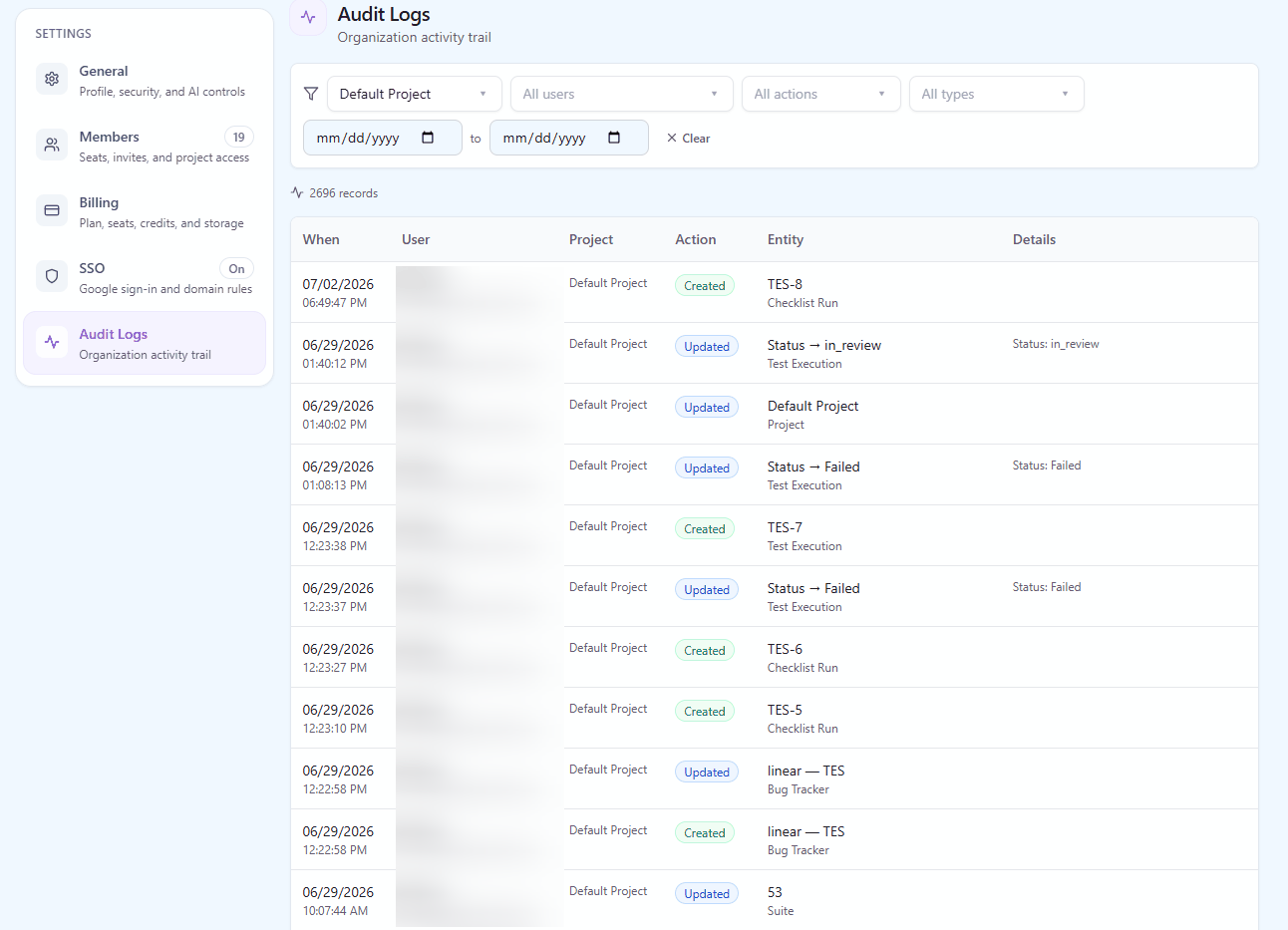
A test management audit trail answers the question that comes up months after the fact: who changed this test case, when was that run reopened, which requirement was unlinked before the release went out. QAM Hub records every create, update, delete and move in the product with the actor, the project, the entity and a snapshot of what changed, and gives Organization Admins a filterable view of their organization's history. The log is written by every mutation, not bolted onto a few sensitive screens, so there is no category of change it misses.
What the audit log records
An entry is written whenever something in the product changes. Each entry carries the same set of facts, whatever the entity.
| Recorded | What it tells you |
|---|---|
| Actor | The person who made the change, or the owner of the API token or MCP server connection that made it |
| Project | The project the change happened in |
| Entity | What was touched: a test case, a run, an execution, a checklist cell, a requirement, a milestone, a member, a setting |
| Action | Create, update, delete or move, plus AI usage |
| Snapshot | What changed, captured as a snapshot of the entity rather than only an action name |
| Time | When it happened |
The snapshot is what makes the log useful instead of merely present. "Test case 214 updated by Dana on Tuesday" is a fact; the snapshot tells you what the case said before Dana touched it. The same goes for a deleted run or a moved requirement: the entry keeps a picture of the thing, not a pointer to something that no longer exists.
AI usage is recorded too. Every generation, analysis or fix made with the built-in AI leaves an entry, so an admin can see which features the team's AI usage comes from and who used them.
A test management audit trail that covers the whole product
Audit features are often added late and selectively: a log for permissions, a log for deletions, nothing for the thousand small edits that actually change what gets tested. In QAM Hub the log is written by every mutation in the product, across every entity type. A step edited in a test case, a status set on an execution, a cell changed in a checklist run, a case moved between suites, a requirement linked, a member's role changed, a project setting switched: each is an entry with the same shape.
That matters for the questions nobody plans for. A release review asks why a case that used to fail now passes; the log shows the case's expected result was edited the day before the run. A customer asks who removed a requirement from a milestone; the log names the person and the moment.
Finding an answer: filters
The organization log is filtered by project, user, action, entity type and date range, and the filters combine. The typical questions map directly onto them:
- "What did this contractor change last week?" Filter by user and date range.
- "What was deleted in the payments project this quarter?" Filter by project, action and date range.
- "Who has been editing requirements?" Filter by entity type and action.
- "What happened to this run before it was completed?" Filter by project and entity type around the run's dates.
API tokens and the MCP server are recorded under their owner
A growing share of changes in a test base is not made by a person clicking in the browser. CI reporters publish automation results, the CLI uploads JUnit XML, scripts call the REST API, and AI agents read and write through the MCP server. Every one of those authenticates with a personal API token, and every change made through a token or the MCP server is recorded under the token owner's name.
So when an AI agent creates forty test cases through MCP, the log says which person's token did it, the same way it would if that person had typed them. There is no anonymous "system" actor behind which an automated write can hide, and no separate log for machine changes to reconcile with the human one.
Who sees the log
Organization Admins see their organization's log. It is scoped to the organization, so an admin of one organization never sees another organization's history, and a member without the admin role does not see the organization-wide log. The log is read in the app; there is no bulk export of it.
Audit log and version history: two different questions
QAM Hub keeps two kinds of history, and they answer different questions.
| Question | Where to look |
|---|---|
| What did this test case say before, and can I bring that back? | Version history on the case: per-field diffs and a Restore action |
| Who did what across the organization, including deletions, moves and settings? | The audit log: every entity type, every action, with the actor and a snapshot |
| Which statuses did this execution go through? | The execution's own status history in the run |
Version history is the editor's tool: it lives on the case and is about getting content back. The audit log is the admin's tool: it lives at the organization level and is about accountability, including for things that cannot be restored from a version, such as a deleted run or a changed project setting.
Answering audit questions
When an internal auditor, a customer's security review or a regulated client asks how changes to test evidence are controlled, the audit log is the record you point at: who can change what is decided by roles and permissions, and what was changed is recorded here with the actor and the snapshot. QAM Hub does not claim a certification on your behalf; it gives you the trail that lets you answer the question with evidence rather than with a description of your process. The platform's own security practices are described on the security page.
Plans
The organization audit log is part of the Advanced plan.
Frequently asked questions
What does the audit log record?
Every create, update, delete and move in the product, with the actor, the project, the entity and a snapshot of what changed, plus AI usage. It is written by every mutation across every entity type, so test cases, runs, executions, checklist cells, requirements, milestones, members and settings are all covered.
Are changes made by scripts or AI agents recorded?
Yes. Changes made through a personal API token or the MCP server are recorded under the token owner's name, exactly like changes made in the browser. There is no anonymous system actor, so an automated write is always attributable to a person.
Who can see the audit log?
Organization Admins see their organization's log, filtered by project, user, action, entity type and date range. The log is scoped to the organization, so no admin sees another organization's history.
Is the audit log the same as test case version history?
No. Version history lives on a test case and shows per-field differences between versions with a Restore action. The audit log is organization-wide, covers every entity and action including deletions, moves and settings, and records the actor and a snapshot for accountability rather than for restoring content.