

Requirements traceability tool for QA teams
Link test cases to requirements – imported from your tracker or written by hand – and see coverage in both directions.
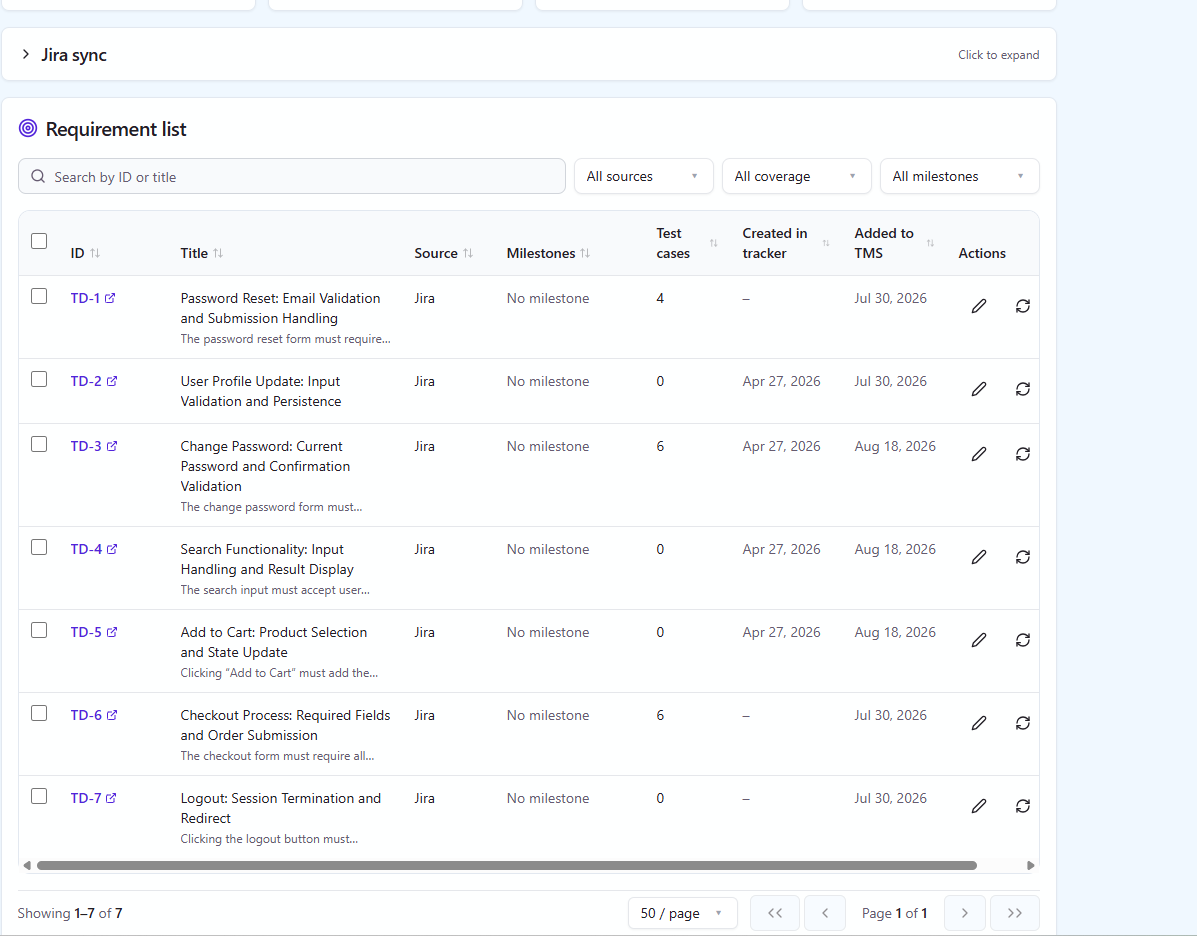
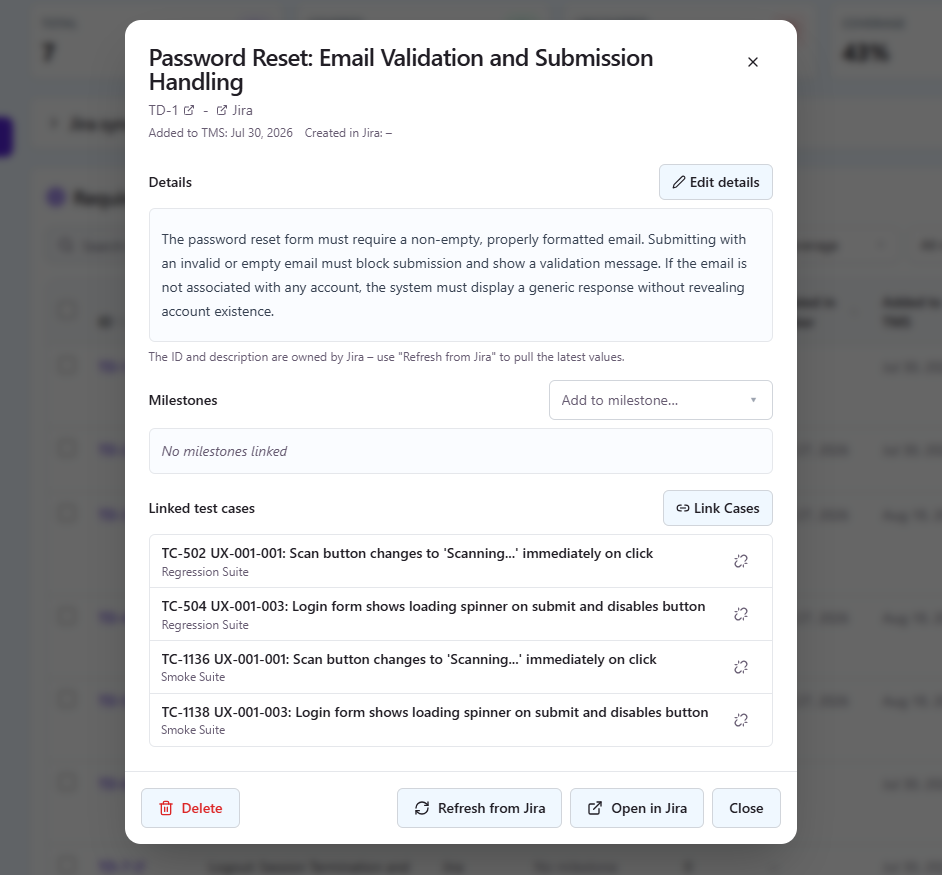
A requirements traceability tool answers two questions a ticket board cannot: which requirement has no test behind it, and which tests prove a requirement is done. QAM Hub keeps requirements in the same project as your test cases, runs and bugs, links them in both directions, and reports coverage with the latest results next to it. If you want the general explanation of a traceability matrix first, read the requirements traceability matrix guide; this page is about how QAM Hub does it.
Where requirements come from
Requirements enter a project from three sources, and they can sit side by side in the same list with a filter by source.
- Synced from an issue tracker: Jira, GitHub, GitLab, Linear, Asana, Redmine, Trello, Azure DevOps, ClickUp, YouTrack, Shortcut or ServiceNow.
- Created manually in QAM Hub, for the requirements that never had a ticket.
- Imported from CSV, for a list that lives in a spreadsheet or in another tool.
Sync requirements from Jira and other trackers
Tracker sync works by filter rather than by hand-picking: for example tags, state or modified since, in the vocabulary of the tracker you connect. Before anything is imported, QAM Hub shows a sortable preview of what the filter matched, so you can check the list and tighten the filter. One sync can pull up to 1000 issues.
A synced requirement is not a one-time copy. Each requirement can be refreshed from the tracker on demand, so a reworded story or a changed description comes across when you ask for it. The Jira integration page describes the connection setup; the same sync exists for the other eleven trackers.
What a requirement keeps
| Field | What it holds |
|---|---|
| Tracker key | The issue key, with a link back to the issue in the tracker |
| Title and description | As synced, written by hand or imported |
| Source | The tracker it came from, manual or CSV |
| "Created in tracker" | When the issue was created in the tracker |
| "Added to TMS" | When the requirement entered QAM Hub |
| Milestones | The releases or cycles the requirement belongs to |
| Linked test cases | The cases that cover it, with their latest results on the detail page |
Link test cases to requirements from either side
Links are made from whichever side you are on. On the requirement, you pick the cases that cover it; in the case editor, you pick the requirements the case proves. The relation is many-to-many, so one acceptance criterion can be covered by five cases and one end-to-end case can cover three criteria.
The link is visible where the work happens. In Run mode, the linked requirements are shown on the case, so a tester sees what the case proves while recording the result, not only what to click. A requirement detail page shows its cases and their latest results, and the issues found against them hang off the same graph, which is the answer to "is this actually done?" with evidence attached.
How the requirements traceability tool reports coverage
The requirements page carries four numbers at the top: Total, Covered, Uncovered and Coverage %. Filters narrow the list by source, by coverage and by milestone, so "uncovered requirements in the next release that came from Jira" is three clicks rather than a spreadsheet exercise. Coverage reads both ways: which requirements have no tests, and which tests exist for no stated requirement.
The Requirement Coverage report takes the same data into a shareable, exportable form, and a requirement's coverage status is one of the inputs of release readiness.
Requirements in milestones and release readiness
Requirements attach to milestones, next to the test runs and checklist runs of that release. The Requirement Coverage report and Release Readiness use them: a milestone reports not only how many executions passed, but whether every requirement in scope has covering cases and what those cases returned last. How that works, with burndown and quality gates, is on the milestones page.
Publish coverage back onto the issue
Teams that live in the tracker can have the coverage come to them. With publishing switched on, the issue gets one QAM Hub comment listing the covering test cases, and that comment is edited in place as links change, so the issue never collects a trail of outdated comments. Jira also gets a remote link in its link panel. Publishing is off by default and is enabled per project and per tracker, and it is one-way: nothing human-owned on the issue is written. The test management tool for Jira post shows what this looks like from the Jira side.
Export
The requirements list exports to CSV, with the coverage numbers next to each requirement, for an audit folder or a stakeholder who prefers a spreadsheet.
Plans
Requirements and traceability are included on every plan. Syncing requirements from an issue tracker is part of the Standard and Advanced plans; publishing coverage back onto the issue is part of the Advanced plan.
Frequently asked questions
Can I link test cases to Jira issues?
Yes. Jira issues are synced into QAM Hub as requirements by filter, then linked to test cases from the requirement or from the case editor. Each requirement keeps its Jira key with a link to the issue, and with publishing switched on the issue gets one QAM Hub comment listing the covering cases plus a remote link.
Do I need an issue tracker to use requirements?
No. Requirements can be created manually in QAM Hub or imported from CSV, and they are linked to test cases, counted in coverage and attached to milestones exactly like synced ones. A tracker connection adds sync, refresh on demand and publishing back.
What happens when the issue changes in the tracker?
Each synced requirement can be refreshed from the tracker on demand, which brings the current title and description across. The links to test cases stay in place, so refreshing never costs you coverage.
Does QAM Hub write anything into my tracker?
Only if you switch publishing on, per project and per tracker; it is off by default. Then each linked issue gets one QAM Hub comment with the covering test cases, edited in place as links change, and Jira also gets a remote link. The issue's own fields are never written.
How many issues can one sync pull?
Up to 1000 issues per sync, selected by a filter such as tags, state or modified since. A sortable preview shows what matched before anything is imported, so you can narrow the filter instead of importing a whole backlog.