

Test Management Tool for Jira: Native Apps vs Standalone TMS (2026)
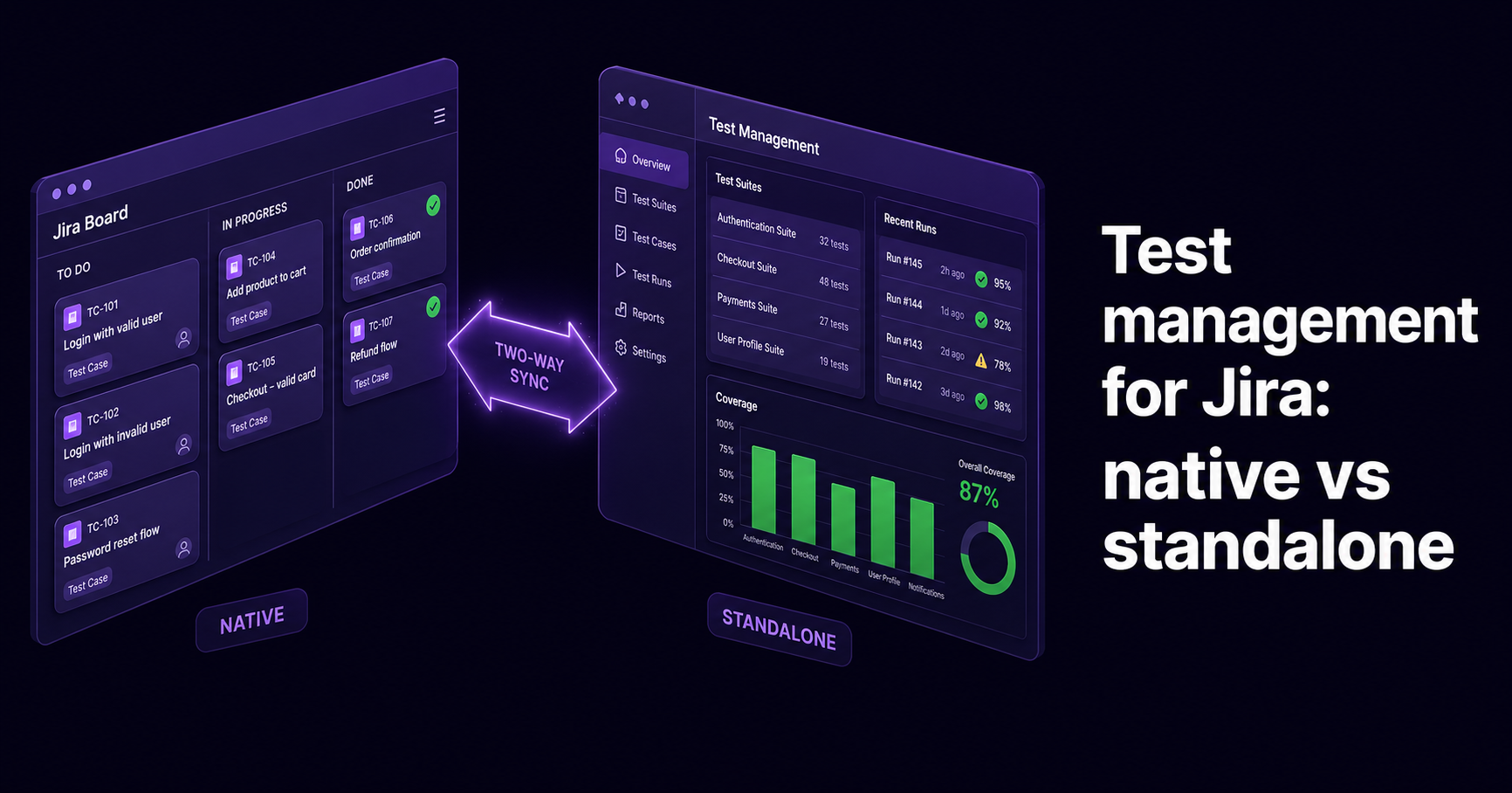
A test management tool for Jira is a QA system that adds structured test cases, execution results, coverage, and traceability on top of Jira, because Jira on its own tracks issues and sprints but has no real place to store versioned test cases, plan test runs, or report on what was tested before a release. There are two ways to get there. Jira-native apps such as Xray and Zephyr live inside Jira and turn tests into Jira issue types, so everything stays in one interface. Standalone platforms such as QAM Hub, TestRail, and Qase keep a purpose-built test repository and sync with Jira two ways, so a bug found during a test run creates a Jira issue automatically and its status flows back. QAM Hub uses the second model: it runs as its own TMS with a two-way Jira integration, plus six other tracker integrations, so QA gets a proper test workspace while developers keep working in Jira.
This guide explains the difference between the two approaches, why it matters for both your workflow and your bill, and how to connect QAM Hub to Jira step by step. If you want the wider market view first, see our guide to what a test management system is and the best test management tools in 2026.
Why Jira alone is not enough for test management
Atlassian reports more than 300,000 customers, and Jira is the issue tracker behind most of them. Jira is very good at what it was built for: tracking work items, sprints, and defects. It was not built to manage test cases. Out of the box it has no test case versioning, no execution planning, no requirement traceability matrix, and no coverage reporting. Teams that bend Jira issue types into test cases run into the same wall every release: they cannot cleanly answer one question, which is what was tested and did it pass.
You can get partway with custom fields, labels, and a few dashboards. That holds up for a small team running occasional smoke tests. It falls apart once you need reusable test steps, a history of how a case changed, structured test runs across environments, or a report that maps coverage back to user stories. At that point you either add a Jira test management app or connect a standalone TMS. Both close the gap. They do it in very different ways.
The two architectures: Jira-native versus standalone with two-way sync
Almost every Jira test management tool falls into one of two camps. Picking the right camp for your team matters more than any single feature checkbox, so understand both before you compare products.
Jira-native add-ons (tests as Jira issues)
Native apps work entirely inside Jira. They add new issue types for tests, test executions, and test plans, so a test case is a Jira issue like any story or bug. Xray and Zephyr are the two best-known examples, both sold through the Atlassian Marketplace. Because tests are Jira issues, they inherit Jira workflows, permissions, JQL, dashboards, and automation rules for free. Your team never leaves Jira.
The trade-offs show up at scale. Jira issues were not designed to be a large, fast test repository, so browsing thousands of cases, bulk-editing steps, or running a big regression cycle can feel heavy. Reporting is built on Jira's model rather than a dedicated test data model, and the cases only live inside Jira, so a team that later adopts a second tracker or moves off Jira has to migrate everything.
Standalone platforms with two-way Jira sync
Standalone tools are purpose-built for testing and keep their own test repository, execution engine, and reporting, then integrate with Jira through a two-way connector. QAM Hub, TestRail, and Qase work this way. The test workspace is designed for QA from the ground up, so structured suites, execution history, custom statuses, and coverage reports are first-class. The connector links each test or defect to the matching Jira issue, and a good two-way sync means a failed test can open a Jira bug automatically and reflect its status back without anyone copying data by hand.
The honest trade-off is context switching: QA works in the TMS while developers work in Jira, so testers use two interfaces. Modern connectors keep that friction low, and for many teams the split is welcome, because it also means the tool works the same whether your engineers live in Jira, GitHub Issues, GitLab, or a mix.
The pricing difference nobody warns you about
The architecture choice has a direct effect on cost, and it surprises finance teams often enough to call out plainly. Native Marketplace apps are licensed against the size of your whole Jira instance, not the number of QA engineers who use the app. As the pricing guide from QASkills notes, a 50-user Jira instance and a 5,000-user instance pay very different amounts for the same app even if both have only five testers. So five testers on a 200-seat Jira instance can end up paying for 200 seats of the test tool.
Standalone tools price per actual user of the test tool. If ten people touch test cases, you pay for ten. For a small QA team sitting inside a large Jira org, that gap is large, and it is the single most common source of sticker shock when teams price Jira-native test management.
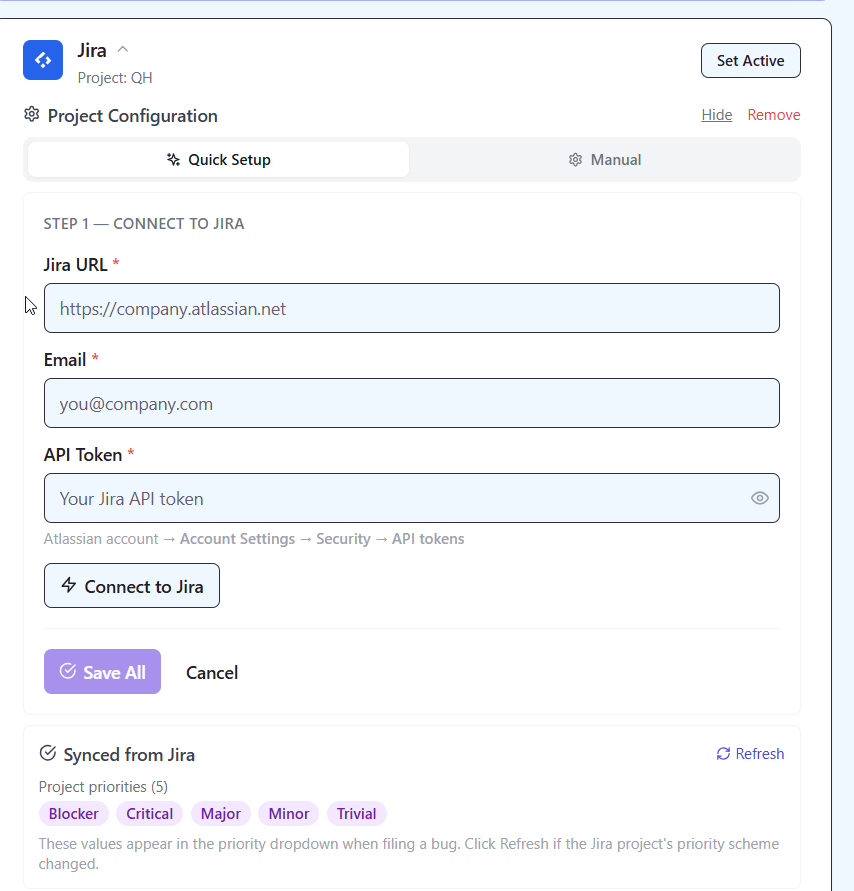
How QAM Hub works with Jira
QAM Hub is a standalone test management system built by QA Madness, a QA outsourcing company. It keeps a dedicated test repository and connects to Jira through a two-way integration, so QA owns a proper test workspace while your developers keep triaging and fixing in Jira. It is honest to say up front that QAM Hub is not Jira-native: your test cases do not live as Jira issues. If a hard requirement is that tests must be Jira issues managed with JQL, a native app like Xray or Zephyr fits that better. If you want purpose-built test management that plugs into Jira and is not locked to it, QAM Hub is designed for exactly that.
The Jira connection is two-way. You link a QAM Hub project to a Jira project, and from then on a defect logged against a failed test run can create a Jira issue, carry the run context with it, and reflect the Jira status back inside QAM Hub. That keeps the developer in Jira and the tester in a tool built for testing, without the manual copy-paste that plagues loose integrations.
Jira is one of seven trackers QAM Hub integrates with two ways. The full list is Jira, GitHub Issues, GitLab, Asana, Linear, Redmine, and Trello. That matters for mixed toolchains: if part of your org runs Jira and another part runs Linear or GitHub Issues, one TMS covers both instead of forcing everyone onto a single tracker.
What you get in QAM Hub that Jira does not have
The point of connecting a TMS is the test-side capability Jira lacks. In QAM Hub that includes:
- Nestable test suites and test cases with steps, expected results, custom fields, tags, and templates.
- Version history that keeps the last 20 versions of a case with one-click rollback, so you can see how a case changed and revert a bad edit.
- Test runs with pass, fail, blocked, skip, and untested statuses, per-tester assignment, comments, attachments, and full execution history per case across every run.
- Checklists as first-class column-based suites for release readiness and exploratory testing, which most test tools do not offer natively.
- Requirements and traceability plus milestones, so coverage maps back to what you set out to test.
- More than ten report types, including coverage, traceability, release readiness, defects, and team activity, with PDF export.
- Custom statuses, custom fields, and custom field types, so the workflow bends to your process rather than the reverse.
Automation results and coverage, linked to Jira work
QAM Hub ingests automated results as well as manual ones. Playwright and Cypress push results automatically through official npm reporters, and a generic XML reporter covers any other framework, so you are not limited to two tools. It stores traces, video, and screenshots with each run, flags flaky tests, and shows pass rate, stability score, flakiness rate, average duration, and trends over a 7–90 day window in Test Explorer. Automated tests auto-link to their manual case through a TC-<number> prefix in the test title, so automation coverage and manual coverage sit in one view rather than two. When one of those runs fails, the same two-way Jira link turns it into a tracked defect. For the deeper automation workflow, see our guides to managing automated test results in a TMS, test management for Playwright, and test management for Cypress.
One honest caveat on automation data: CI metadata such as branch, commit SHA, environment, and build URL is optional. It appears only if your pipeline passes it. A manual upload through the UI carries none of that, so treat CI metadata as available when your pipeline sends it, not as something captured automatically.
Built-in AI and an MCP server for agents
QAM Hub includes AI as part of the platform rather than as a separately metered add-on. It can generate test cases and checklists from a description or a screenshot, analyze a bug, suggest a fix for a failing test, and run a retrospective. The Quality Analyzer finds duplicate and vague test cases and suggests fixes. The design keeps a human in the loop: the AI proposes, a QA engineer decides. QAM Hub also ships an MCP server, available to QAM Hub users on request, that lets an AI agent such as Claude read and write test artifacts directly. If you connect your Jira stories through an agent, that agent can draft cases in QAM Hub, which is a practical bridge between the ticket and the test. We cover that setup in connecting Claude to your TMS via MCP.
Setting up the QAM Hub to Jira integration
Connecting the two takes a few minutes. The exact labels may differ slightly as the product updates, but the flow is:
- In QAM Hub, open your project and go to the integrations settings.
- Choose Jira and authorize the connection to your Jira site with the account that has permission to create issues in the target Jira project.
- Map the QAM Hub project to the Jira project you want defects to land in, and pick the Jira issue type to use for new bugs.
- Confirm the two-way sync options so status changes on the Jira side flow back into QAM Hub.
- Run a quick test: mark a step as failed, raise a defect, and check that the Jira issue appears with the run context attached.
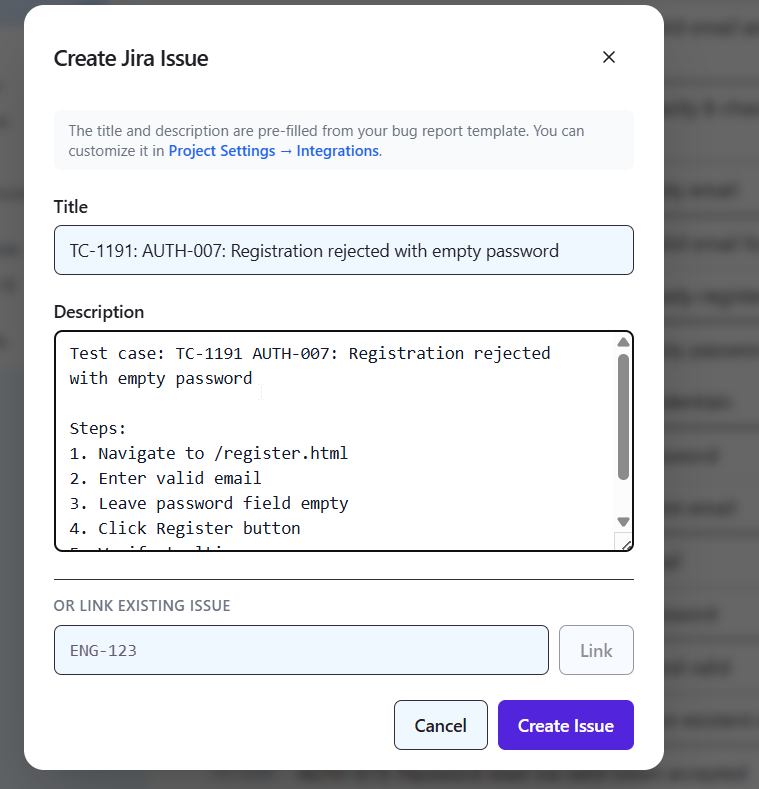
From there, testers work in QAM Hub and developers see clean, context-rich bugs in Jira. If you also run automation, point the Playwright, Cypress, or XML reporter at the same QAM Hub project so automated failures follow the same path to Jira.
QAM Hub vs Xray vs Zephyr vs TestRail for Jira
Here is how the main options compare on the things that decide the choice. Verify current pricing on each vendor's own listing before you commit, because Marketplace pricing changes periodically.
| Tool | Architecture | Jira model | AI | Pricing model | Best for |
|---|---|---|---|---|---|
| QAM Hub | Standalone TMS | Two-way connector, plus 6 other trackers | Built-in, not credit-metered (test generation, Quality Analyzer, bug analysis) | Per actual user, two straightforward plans, no per-viewer charge | QA teams that want purpose-built test management across a mixed toolchain, with automation and AI included |
| Xray | Jira-native | Tests as Jira issues | AI test generation; Atlassian Rovo integration for test plan summaries | Marketplace tier, billed against the whole Jira instance | Jira-first teams, BDD, deep JQL and traceability inside Jira |
| Zephyr (Scale / Essential) | Jira-native | Tests as Jira issues | Limited | Marketplace tier, billed against the whole Jira instance | Jira-native teams wanting enterprise reporting from SmartBear |
| TestRail | Standalone TMS | Two-way connector | Semantic AI test prioritization (10.5) | Per user of the tool; charges for viewers | Structured testing at scale with strong reporting, vendor-neutral |
On price, the concrete figures reported publicly in 2026 give a sense of the shape. Xray lists roughly 10 US dollars per month for up to ten users, then a lower per-user rate above ten, with a new pricing schedule taking effect on 1 August 2026, so confirm the live number. Zephyr's per-user rate for larger teams sits in a similar single-digit range. TestRail Professional Cloud is around 35 to 37 US dollars per user per month and charges separately for view-only stakeholders. The catch to remember with the two native options is that the per-user rate is multiplied by your Jira user tier, not your tester count. QAM Hub prices per person who actually uses the test tool, with two straightforward per-user plans in the mid-market range and no per-viewer charge, so a small QA team inside a large Jira org is not paying for the whole org.
QAM Hub is built by QA Madness, who published this guide; competitor details reflect current public information at the time of writing and should be re-checked against each vendor's site.
Which type should you choose?
The decision comes down to where QA lives and how your toolchain looks, not to a feature scorecard.
Choose a Jira-native app (Xray or Zephyr) if Jira is the permanent center of your engineering work, you want tests to be Jira issues managed with JQL and Jira permissions, your whole company is already on Jira so the instance-based pricing is not a penalty, and you never expect to add a second tracker.
Choose a standalone TMS with two-way sync (QAM Hub or TestRail) if you want a workspace built for QA, you run or plan to run automation alongside manual tests, part of your org uses a tracker other than Jira, or you have a small QA team inside a large Jira org and do not want to pay per Jira seat. Between the two, QAM Hub folds automation ingestion, checklists, and built-in AI into the platform and connects to seven trackers; TestRail is the long-established option with a large community.
For the wider ranked comparison, see the best test management tools in 2026, and if you are leaving a specific tool, our TestRail alternatives guide.
Frequently asked questions
Can Jira manage test cases without any add-on?
Yes, but only at a basic level. You can model test cases as Jira issues with custom fields, workflows, and dashboards, which works for a very small team running simple smoke tests. It becomes hard to manage once you need reusable steps, version history, requirement traceability, or coverage reporting. That is the point where a dedicated test management app or a connected standalone TMS earns its place.
What is the difference between a Jira-native test tool and a standalone TMS?
A Jira-native tool such as Xray or Zephyr stores tests as Jira issues and lives entirely inside Jira, so everything uses Jira's workflows and permissions. A standalone TMS such as QAM Hub or TestRail keeps its own test repository and syncs with Jira through a two-way connector. Native means no context switching but instance-based pricing and Jira lock-in; standalone means a purpose-built test workspace, per-user pricing, and freedom to use other trackers, at the cost of working in two interfaces.
Is QAM Hub a Jira plugin?
No. QAM Hub is a standalone test management system with a two-way Jira integration, not an Atlassian Marketplace plugin. Your test cases live in QAM Hub rather than as Jira issues, and defects sync into Jira and back. It also integrates with six other trackers, so it suits mixed toolchains rather than Jira-only teams.
Does the QAM Hub Jira integration work both ways?
Yes. Linking a QAM Hub project to a Jira project lets a failed test raise a Jira issue with the run context attached, and the Jira status reflects back inside QAM Hub, so testers and developers stay in the tools each prefers without manual copying.
Will Jira-native test tools charge me for non-testers?
Effectively yes. Atlassian Marketplace apps are licensed against your Jira user tier, meaning the whole instance, not just the people who open the test app. Five testers on a large Jira instance can pay for that entire tier. A standalone TMS priced per actual tool user avoids that, which is why small QA teams inside big Jira orgs often prefer the standalone route.
Can QAM Hub handle automated tests from Playwright or Cypress alongside Jira?
Yes. Playwright and Cypress push results automatically through official npm reporters, a generic XML reporter covers other frameworks, and each automated test can auto-link to its manual case. Failed automated runs use the same two-way Jira link to raise defects, so manual and automated coverage sit in one place and feed the same Jira workflow.
The takeaway
The real decision for Jira test management is architecture, not brand. If Jira is your permanent home and everyone is already licensed on it, a native app keeps tests as Jira issues with zero context switching. If you want a workspace built for QA, plan to run automation, use more than one tracker, or have a small test team inside a large Jira org, a standalone TMS with a two-way connector fits better and usually costs less. QAM Hub sits in that second group, with a two-way Jira integration, six more tracker connections, automation ingestion, checklists, and built-in AI in one place. Shortlist two options, connect each to a real Jira project, and run one full test cycle through it before you commit. That hands-on cycle tells you more than any comparison table.