

Cypress test reporting in QAM Hub
Publish Cypress results from Mochawesome JSON to QAM Hub after every run: statuses, retries and screenshots, linked to your manual test cases by number.
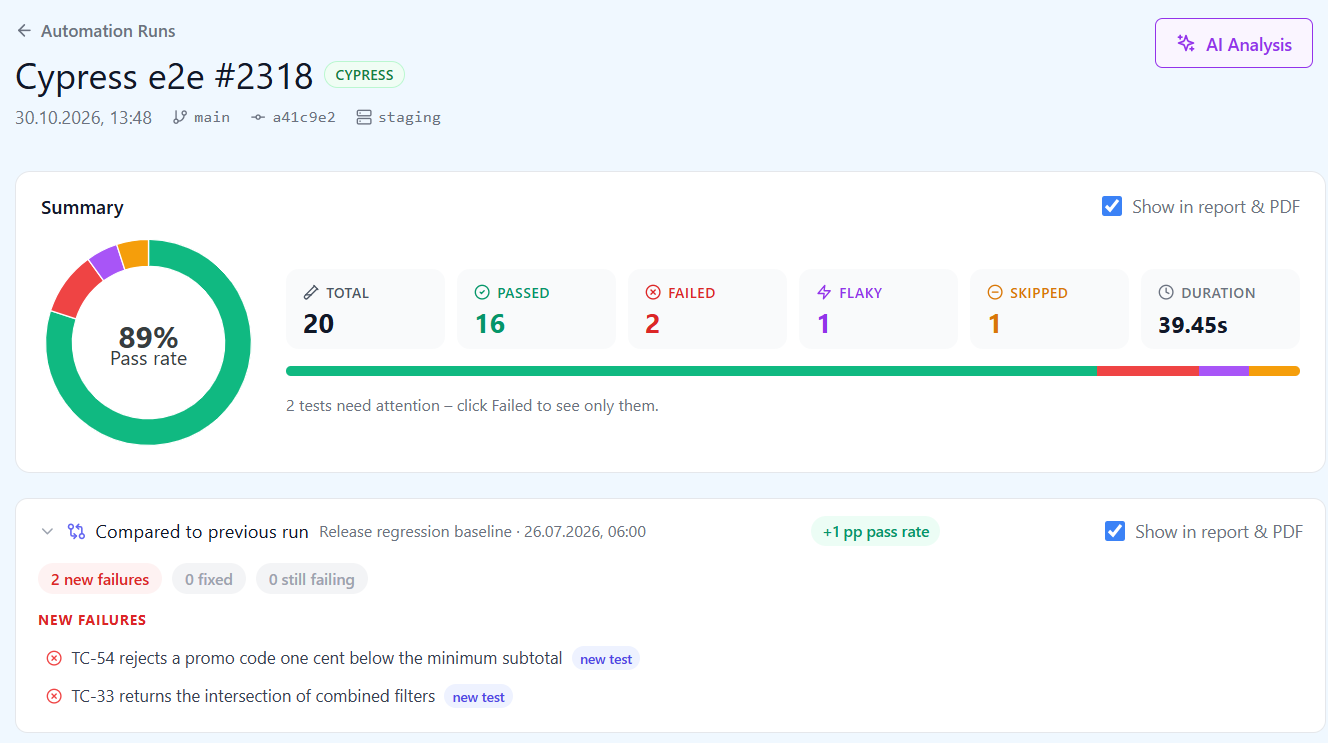
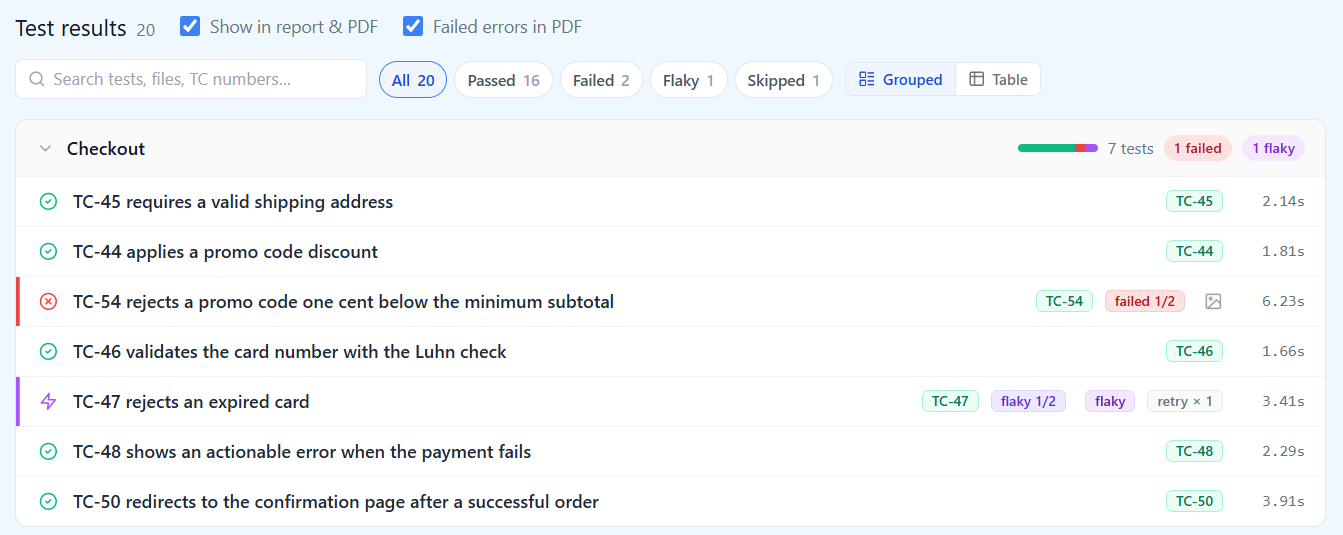
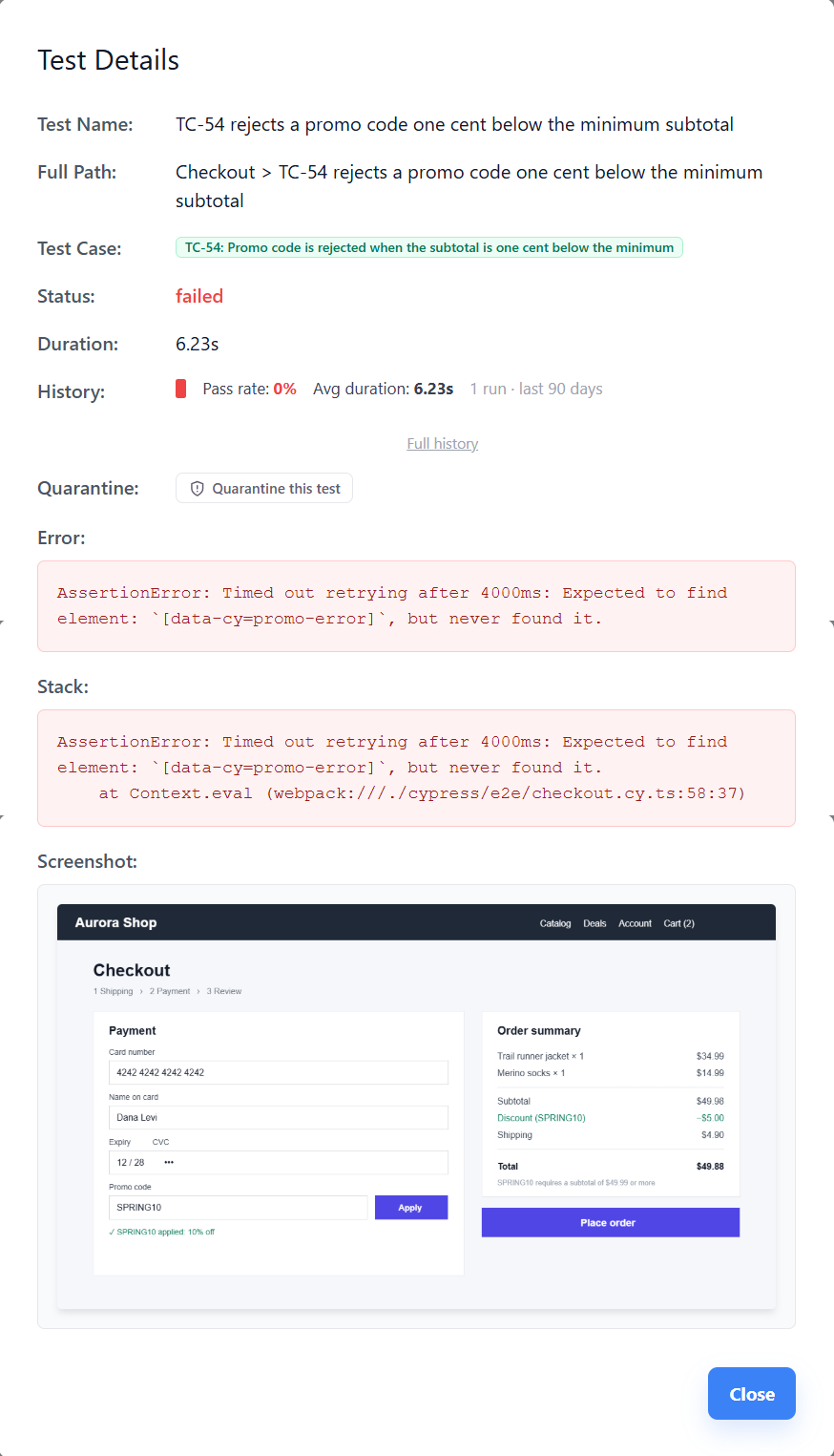
Cypress test reporting in QAM Hub works from the Mochawesome JSON your run already writes. The official helper, @qamadness/qam-cypress-reporter, runs as the last step of the CI job, reads that JSON and publishes one run to your project: every spec and it block, the status of each test, failure output, screenshots, and the branch and commit the build came from. Results sit next to the manual test cases they cover, so one page shows what Cypress proved in this build and what still waits for a person.
How Cypress test reporting works
There are two steps, and both are configuration rather than test code. First, Cypress writes its results as Mochawesome JSON, the format most Cypress teams already produce for an HTML report. Second, the helper publishes that JSON to QAM Hub once cypress run has finished, so the upload is a separate command in the job and your spec files stay untouched.
// cypress.config.js
const { defineConfig } = require('cypress');

module.exports = defineConfig({
  reporter: 'mochawesome',
  reporterOptions: {
    reportDir: 'cypress/results',
    json: true,
    html: false,
  },
});
# CI job, after the tests have run
npx cypress run
npx qam-submit-cypressThe command reads QAM_API_URL, QAM_PROJECT_ID and QAM_API_TOKEN from the environment and picks up the newest Mochawesome JSON in cypress/reports (set --reports-dir or --report-path to point elsewhere). The same package exports submitToQAM(), so the upload can also run from an after:run hook in cypress.config.js with no extra CI step. Either way the run link is printed to the log and handed to the CI job, so a later step can post it to Slack or a pull request.
The token is a personal API token created in Profile, "API & MCP", and stored in your CI secrets. It acts as the person who created it, and every upload is written to the audit log under their name. The project id is on the project's Automation page, next to a setup guide that shows the steps for GitHub Actions, GitLab CI, Jenkins and Azure Pipelines.
A run without CI, or one from a laptop that should be kept, is uploaded by hand: pick the Mochawesome JSON on the Automation page. The exact clicks are in uploading Cypress reports.
What arrives from a Cypress run
| In Cypress | In QAM Hub |
|---|---|
| Spec files, describe and context blocks, it blocks | The spec hierarchy, as a grouped results table or a flat list with search |
| Test outcome | passed, failed, flaky or skipped |
| Test retries | Each attempt is kept; a test that passes on a retry is flaky, not passed |
| Failure message and stack | On the test, and aggregated into the top failure reasons of the run |
| Durations | Per test and per run, with the slowest tests listed |
| Screenshots on failure | Attached to the test result and opened from the run |
| Videos | Not uploaded. Cypress keeps its recordings in cypress/videos; the Mochawesome report carries screenshots, not video. |
| CI environment | Branch, commit, commit message and build link, detected automatically |
There is no trace row because Cypress has no trace file; the trace viewer is specific to Playwright. For a Cypress failure the evidence is the screenshot taken at the failing command plus the error output, and both are on the result.
Linking Cypress specs to manual test cases
Write the case number into the test title: it('TC-123 adds a product to the cart', () => { ... }). The helper reads the number, the result appears on case 123, and the case counts as covered by automation. The coverage report then shows, per case, whether it is proven by Cypress, run by hand, or not covered at all. Case numbers are never reused in QAM Hub, so the link survives deleted cases and reorganized suites.
Reading a run and what changed since the last one
The runs list has one row per upload with a framework badge, branch, commit, date, duration, pass rate and the change against the previous run. Filters by framework and branch separate the nightly Cypress run on main from the per-branch runs of open pull requests, and the list is paginated, so the run that first went red a week ago is still a few clicks away.
Open a run and the first screen is the status distribution, the slowest specs and the top failure reasons. A Cypress suite where thirty tests fail on the same selector shows as one reason, not thirty rows to read. Under it, the results table keeps the describe and it structure or flattens it, with search and status filters. "Compared to previous run" lists the new failures and the pass rate delta against the previous run of the same framework and branch. Each row opens the failure output and the screenshot of that test.
For a run with many failures, AI analysis groups them by likely cause and reports health by area with what to look at first.
One pass rate formula
The pass rate is the same formula on every page: (passed + flaky) / (total - skipped). A test that passed on a Cypress retry is flaky and counts as passed; a skipped test did not run and is left out of the denominator. The number on the runs list, in the run detail, on the dashboard widget and in reports is therefore the same number, and a run with skipped specs never reads as a quality drop.
Flaky Cypress tests and history across runs
Every Cypress test is registered once and builds a record across runs. The Tests tab (Test Explorer) shows that record: status and duration run over run, the failure history, and the tests that started failing or passing since the previous run on the same branch. A test that flips between green and red is detected as flaky and can be quarantined while someone fixes the selector or the wait, so the rest of the suite stays readable. The detection rules are described on the flaky test detection page.
Cypress next to Playwright and everything else
| Cypress | Playwright | |
|---|---|---|
| Package | @qamadness/qam-cypress-reporter, a helper run after cypress run | @qamadness/qam-playwright-reporter, a reporter in the Playwright config |
| Input | Mochawesome JSON | The reporter hook, or a JSON report uploaded by hand |
| Media on a result | Screenshots | Screenshots, videos and traces |
| Linking to cases | TC-123 in the test title | TC-123 in the test title |
| Runs list, run detail, comparison, Test Explorer | Identical | Identical |
A team that runs both, or is moving from one to the other, sees both in one runs list, filtered by the framework badge, with the same coverage picture over the same manual cases; the Playwright side is described on the Playwright test reporting page. Other frameworks in the same pipeline report through JUnit XML and the qam-hub CLI. If the question is still which tool should hold Cypress results at all, the buyer's guide for Cypress teams is the place to start.
Plans. Cypress reporting is included on every plan. Test Explorer history and AI run analysis are part of the Standard and Advanced plans.
Frequently asked questions
Do I need to change my Cypress tests to report to QAM Hub?
No. Reporting is a reporter setting in cypress.config and one command after cypress run. Adding a case number such as TC-123 to a test title is optional and only needed for tests that should count toward the coverage of a manual case.
Can I keep using my Mochawesome HTML report?
Yes. The helper reads the Mochawesome JSON and nothing else, so an HTML report generated from the same JSON is unaffected. Your existing reporting stays in place and QAM Hub becomes one more destination.
What happens to a test that fails and then passes on a retry?
It is recorded as flaky with every attempt kept. It counts toward the pass rate because it did pass, and the Tests tab tracks how often the same test flips across runs, so a habitual offender shows up as flaky rather than as noise.
Can I upload a Cypress run without a CI pipeline?
Yes. Run Cypress locally with the Mochawesome reporter and upload the resulting JSON from the project's Automation page. The result is the same run as one published by the helper, with the same hierarchy, statuses and screenshots.