

Cypress Test Case Management: History, Reporting, and Traceability
Cypress test case management means connecting your Cypress runs to a test management system (TMS) so results gain history that does not expire, traceability to the manual test cases and requirements they verify, and one coverage view across manual and automated testing. Cypress is an excellent test runner and Cypress Cloud is an excellent debugging service. Neither is a system of record for your test cases. On the free Starter plan, Cypress Cloud keeps run data for 30 days and 500 test results per month; the paid Team and Business plans extend that to 90 days, and Enterprise to 180 (cypress.io/pricing, checked 17 August 2026). A TMS keeps that history for as long as you need it, links every automated result back to the case it covers, and reports manual and automated coverage together.
The short version
- Cypress has no built-in hook that fires once after a whole run, so publishing whole-run results needs Mochawesome or a plugin.
- Cypress Cloud is metered by test result and by retention window. History is a billing dimension, not a permanent record.
- Cypress Cloud answers "why did this test fail in CI." A TMS answers "what did we test, against which requirement, and are we ready to release."
- The two are complementary. Most teams that keep both use Cloud for debugging and a TMS for coverage, traceability, and release reporting.
- QAM Hub reads the Mochawesome JSON your suite already produces, so no rewrite of test code is needed beyond a title convention for linking.
Cypress test case management: what Cypress does and what it does not store
Cypress test case management is the part of your workflow that Cypress itself deliberately leaves out. The runner executes specs and reports the outcome of the current process. It holds no concept of a test case that exists independently of code, no requirement to trace back to, and no manual testing at all. That gap is normal for a runner and it becomes a problem the moment somebody asks a question about the release rather than about the build.
Three questions expose it quickly:
- Which of our documented test cases are covered by automation, and which are still executed by hand?
- Has this checkout scenario been getting more or less stable over the last quarter?
- Which requirements in this release have been verified, by whom, and with what evidence?
None of these can be answered from a Cypress report. They are test management questions, and they need a place where test cases, runs, requirements, and results live together. We cover the broader idea in what a test management system is.
Where Cypress's built-in reporting falls short
Teams hit the same limitations in roughly the same order:
- No native after-run reporter. Cypress has no built-in hook that fires once after an entire run completes, so there is no clean way to collect and publish whole-run results out of the box. Teams wire together Mochawesome and a plugin to get a usable JSON report at all.
- History is a paid, time-boxed feature. Local reporters show a single run. Historical dashboards, flake analytics, and run-over-run comparison live in Cypress Cloud, and each plan carries both a test-result allowance and a data retention window.
- Test Replay is Chromium-only. Cypress documents that Test Replay relies on the Chrome DevTools Protocol and therefore supports Chrome, Edge, and Electron. Runs in Firefox or WebKit still record artifacts, but Replay is disabled for them (Cypress Cloud documentation, updated 6 August 2026).
- No self-hosted option. The Cypress documentation states plainly that a self-hosted version of Cypress Cloud is not available. Teams with data-residency constraints have to solve reporting elsewhere.
- No link to manual tests or requirements. A Cypress report knows nothing about your manual test cases. Automated and manual coverage stay split across two tools and nobody holds the full picture.
What Cypress Cloud costs and how long it keeps your data
Cypress publishes its plans openly, which makes this easy to check rather than estimate. The figures below come from cypress.io/pricing, read on 17 August 2026. Prices are the monthly-equivalent rate on an annual commitment; verify before budgeting, because this page changes.
| Plan | Price | Included test results | Data retention | Notable additions |
|---|---|---|---|---|
| Starter | Free | 500 / month | 30 days | Parallelization, Test Replay, project analytics, Cloud MCP |
| Team | From $67/mo, billed annually at $799/yr | 120k / year | 90 days | Flake detection and flaky-test analytics, Jira integration, email support |
| Business | From $267/mo, billed annually at $3,199/yr | 120k / year | 90 days | Spec prioritization, auto cancellation, SSO, GitHub and GitLab Enterprise |
| Enterprise | Custom | 1.8M / year | 180 days | Enterprise reporting, Data Extract API, premium support |
Two details in that table matter more than the headline price.
Retention is the ceiling on your history. Even at the Business tier, run data ages out after 90 days. A quarterly stability trend is the longest one you can build, and a year-over-year comparison is not available on any plan below Enterprise, where it still stops at 180 days. If your reason for recording runs is to prove that the suite is getting healthier over time, that window is the constraint to plan around.
The billing unit is the test result. Cypress counts each execution of an it() function recorded with the --record flag. Skipped tests are not counted, and a test that retries still counts once. Cypress's own FAQ works the example: 100 CI builds a month averaging 50 tests each lands near 5,000 test results. Archiving a run has no effect on the amount already billed.
Cypress also documents what happens at the limit: recorded runs continue, but parallelization is disabled and new results are hidden from the dashboard until the plan is upgraded or the usage cycle resets. Open-source public projects can apply for an OSS plan with a substantially larger allowance.
Cypress Cloud or a test management system: which problem does each solve
This is framed as a choice more often than it should be. The two products answer different questions, and a team running serious Cypress suites usually has both questions.
| Question | Cypress Cloud | Test management system |
|---|---|---|
| Why did this test fail in CI? | Test Replay with DOM, network, and console state | Error message, stack trace, screenshot, retry history |
| Is this test flaky? | Flake detection and severity scoring, from the Team plan up | Flakiness rate, stability score, quarantine |
| How long is history kept? | 30 to 180 days depending on plan | For as long as the project exists |
| Which manual cases does this automation cover? | Not modelled | Case-level linking and coverage reporting |
| Which requirements are verified for this release? | Not modelled | Traceability matrix and release-readiness reports |
| Can I combine manual, exploratory, and automated results? | No | Yes, in one workspace |
| Can I run other frameworks through it? | Cypress only | Playwright, Cypress, and anything that emits XML |
| Self-hosting | Not available | Depends on vendor |
The practical split most teams settle on: developers keep Cypress Cloud open while debugging a red build, and QA reports release readiness out of the TMS. If budget forces a single tool, the deciding factor is whether your bottleneck is debugging CI failures or proving coverage to somebody outside the engineering team.
What a TMS adds to a Cypress workflow
When Cypress results flow into QAM Hub, each run becomes durable, searchable data instead of a CI log that disappears on the next build:
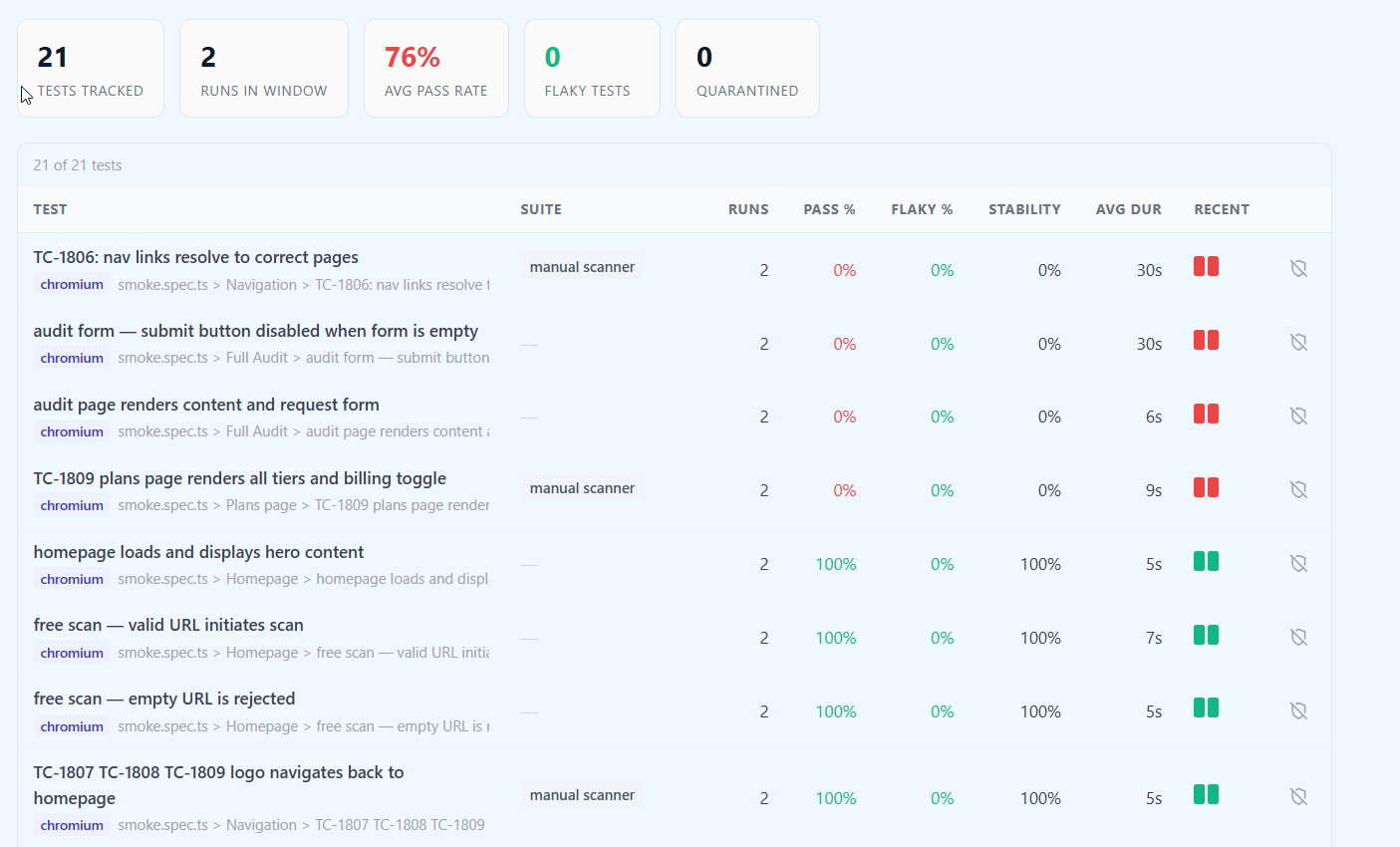
- Run history and trends. Pass rate, flakiness rate, a stability score, average duration, and trend sparklines across a 7 to 90 day window, so you can see whether the suite is actually getting healthier.
- Per-test detail. Every test with its status, error message and stack trace, retries, and a screenshot of the failure point.
- Cross-run intelligence. Automatic detection of regressions (passed last run, failing now), chronic failures (failing every run), top failing tests, and per-run flakiness.
- Traceability to manual cases. Automated results link back to your manual test cases, so manual and automated coverage sit side by side in one coverage report.
- CI context, when your pipeline supplies it. Branch, commit SHA, commit message, environment, build URL, and who triggered the run. These fields are populated only if the pipeline passes them along with the report.
The same model applies to Playwright, and the two frameworks report into the same coverage view. If you run both, see test management for Playwright and the cluster hub on managing automated test results in a TMS.
What the Cypress integration handles specifically
QAM Hub reads the Cypress Mochawesome JSON report, produced by cypress-mochawesome-reporter or standard Mochawesome. On top of the general capabilities, the integration handles the things that usually make Cypress reporting misleading:
- Embedded screenshots from the report are captured and stored with each failed test.
- All skip types are counted correctly, whether a test was
.skip()-ed, skipped at runtime, or aborted by a failing hook, so totals are never inflated. - Honest flaky detection. A test that only passed after a retry is marked flaky rather than counted as a clean pass.
- Flexible manual-case linking through the
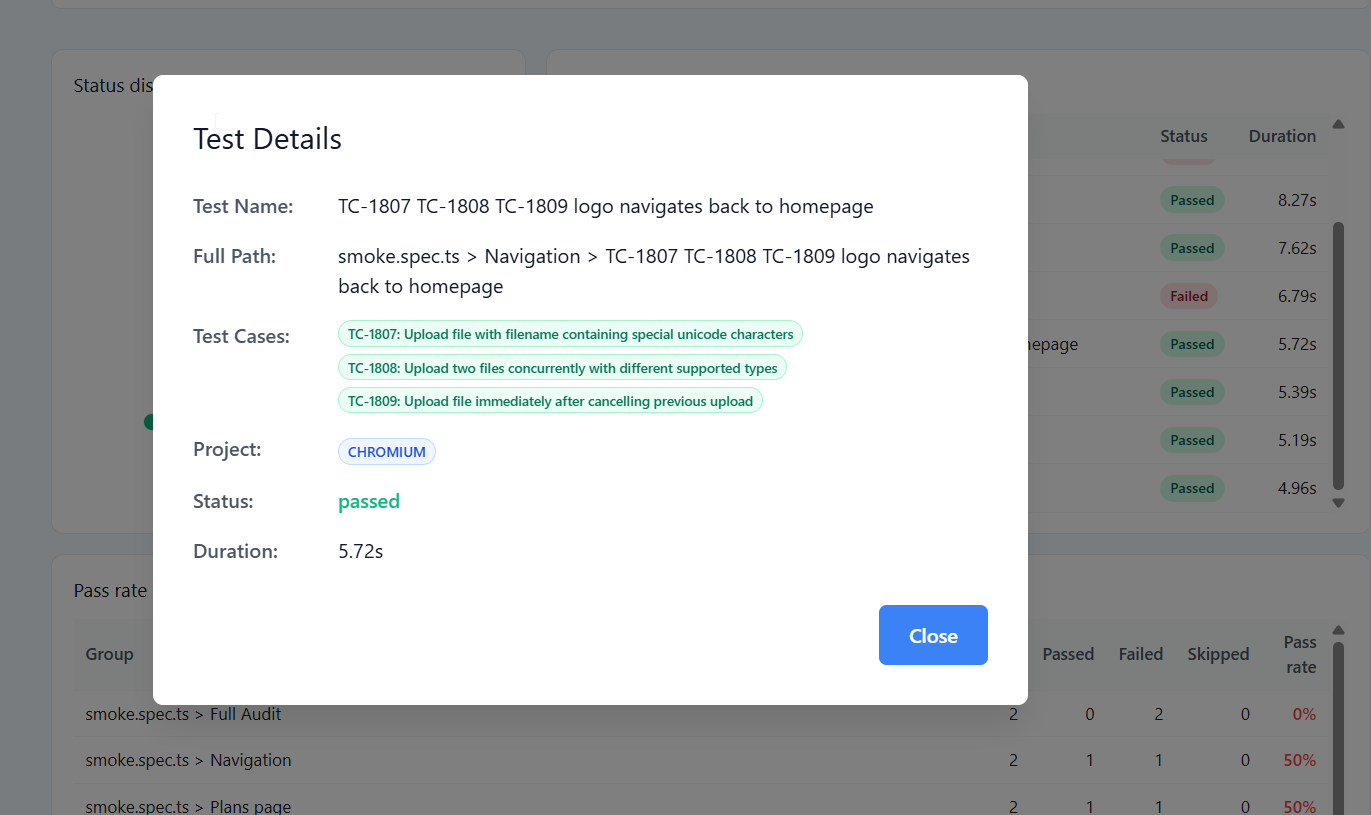
TC-<number>convention in test titles, with one Cypress test able to cover several manual cases.
That last point is where most integrations quietly go wrong, and it deserves its own article. We cover the general problem in mapping automated test results to test cases.
How to connect Cypress to QAM Hub
Because Cypress has no native after-run reporter, the integration builds on Mochawesome. Setup is three steps: enable Mochawesome, then submit the report either automatically from an after:run hook or through a CLI command in CI.
Step 1: install and enable Mochawesome
npm i -D @qamadness/qam-cypress-reporter cypress-mochawesome-reporter mochawesomeRegister the reporter in cypress/support/e2e.js:
import 'cypress-mochawesome-reporter/register';Then configure it in cypress.config.js so it writes a JSON report:
const { defineConfig } = require('cypress');

module.exports = defineConfig({
  reporter: 'cypress-mochawesome-reporter',
  reporterOptions: {
    reportDir: 'cypress/reports',
    overwrite: false,
    html: false,
    json: true,
    saveJson: true,
    embeddedScreenshots: true,
    inlineAssets: true,
  },
  e2e: {
    setupNodeEvents(on, config) {
      require('cypress-mochawesome-reporter/plugin')(on);
      return config;
    },
  },
});
Step 2, option A: submit automatically from an after:run hook
The fully automatic route. Results submit when cypress run finishes, with no extra script:
const { submitToQAM } = require('@qamadness/qam-cypress-reporter');

module.exports = defineConfig({
  // ...reporter options above...
  e2e: {
    setupNodeEvents(on, config) {
      require('cypress-mochawesome-reporter/plugin')(on);

      on('after:run', async () => {
        await submitToQAM({
          apiUrl: process.env.QAM_API_URL,
          projectId: process.env.QAM_PROJECT_ID,
          runName: `CI Run ${process.env.CI_BUILD_NUMBER ?? new Date().toISOString()}`,
          // apiToken is read from QAM_API_TOKEN by default
        });
      });

      return config;
    },
  },
});
Run npx cypress run and results submit on completion.
Step 2, option B: submit from CI with the CLI
If you prefer submission as an explicit pipeline step, use the bundled CLI after the run:
{
  "scripts": {
    "cy:run": "cypress run",
    "cy:submit": "qam-submit-cypress",
    "cy:test": "npm run cy:run && npm run cy:submit"
  }
}
The CLI reads QAM_API_URL, QAM_PROJECT_ID, and QAM_API_TOKEN from the environment; store the token as a CI secret. Generate it in QAM Hub under Profile then API Tokens. This is also where your pipeline can attach optional CI metadata such as branch, commit, environment, and build URL. Step-by-step screenshots are in the knowledge base article on uploading Cypress reports.
Alternative: upload the report by hand
You can drag and drop the Mochawesome JSON file into QAM Hub's automation section. The framework is detected automatically, so there is no separate Cypress versus Playwright setup on upload. This is a useful fallback while you wire up CI, though a manual upload carries none of the CI metadata a pipeline would attach.
Linking Cypress tests to manual cases
To connect an automated result to its manual test case, prefix the Cypress test title with TC-<number> matching the case in QAM Hub:
it('TC-17: adds item to cart', () => {
  // ...
});
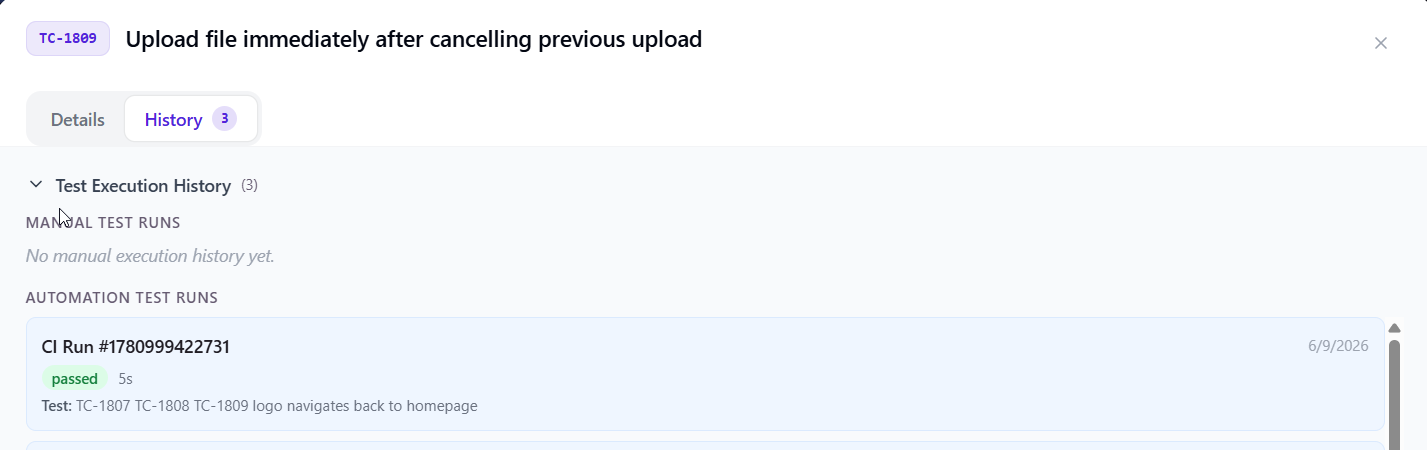
QAM Hub then builds a live bridge between the automated execution and the manual case, and one Cypress test can cover several cases at once. From a manual case you can trace straight to its automated execution history, which is what makes the coverage picture honest during a move from manual testing to automation. We cover that journey in manual to automation: what to automate first.
A worked example: one sprint of Cypress runs
Consider a team with 240 Cypress specs running on every merge to main, roughly 20 merges a week. That is around 4,800 recorded test results a week, or close to 19,000 a month, which sits comfortably inside a Team plan allowance and well outside the free tier.
Halfway through the sprint, one checkout spec starts failing intermittently. In Cypress Cloud, the developer opens Test Replay and finds a race condition against a slow API stub. That is the debugging question, answered well.
Then the release manager asks a different question: is checkout ready to ship. Answering it means knowing that the flaky spec covers TC-104 and TC-107, that TC-105 and TC-106 in the same suite are still manual and were last executed two sprints ago, and that all four trace to a payment requirement that has not been signed off. That answer comes out of the TMS, and none of its inputs exist in a Cypress report.
The follow-up decision is what to do with the flaky spec. Quarantining it removes the noise from the health metrics without deleting the coverage record, which is the difference between hiding a problem and parking it. We describe the policy side of this in a flaky test quarantine policy that actually holds.
Seeing whether your automation is trustworthy
Once runs flow in, QAM Hub's Test Explorer answers the questions a raw Cypress report cannot: is the suite green, is it stable, and is it covering the cases you care about. You can drill into any test for a run-by-run timeline and duration trend, quarantine flaky tests so they stop polluting health metrics, and slice by suite, framework, branch, or environment. Tied to requirements traceability, this connects the Cypress suite back to what the release needs to deliver. See the requirements traceability matrix for how that mapping is built.
Five mistakes teams make wiring Cypress into a TMS
- Renaming tests without updating the link. Title-based linking is convenient and brittle. Treat the
TC-prefix as an identifier that survives refactoring, and review it in code review the same way you review a public API name. - Submitting from a sharded pipeline as separate runs. If four CI workers each submit their slice, you get four partial runs instead of one. Use a single run identifier per build so results merge into one execution record.
- Counting a retried pass as a pass. If your reporting treats retry success as clean, flakiness disappears from the metrics and reappears in production. Check how your tool classifies retries before you trust its stability numbers.
- Assuming CI metadata appears by itself. Branch and commit fields are populated only when the pipeline sends them. A manual upload will leave them blank, which is fine as long as nobody builds a report on the assumption they are always there.
- Automating cases that were never documented. If a spec has no corresponding manual case, coverage reporting cannot see it. Automating first and documenting never is the most common reason a coverage report understates reality.
Frequently asked questions
What is Cypress test case management?
It is the practice of managing test cases, runs, and coverage for a Cypress suite in a system separate from the runner. Cypress executes specs; a test management system stores the documented test cases, links each automated result to the case and requirement it verifies, keeps run history beyond the runner's retention window, and reports manual and automated coverage together.
Does Cypress need a separate test management tool?
For running tests, no. For reporting on them across a release, usually yes. Cypress stores no test cases, no requirements, and no manual testing, and its historical dashboards live in the paid Cypress Cloud with a retention window that ends at 90 days on the standard paid plans. A TMS adds persistent history, traceability, and combined manual plus automated coverage.
How long does Cypress Cloud keep test history?
According to the Cypress pricing page as of 17 August 2026, data retention is 30 days on the free Starter plan, 90 days on Team and Business, and 180 days on Enterprise. Cypress documentation adds that downgrading a plan applies the new plan's limits to the account.
How much does Cypress Cloud cost in 2026?
Cypress publishes Starter as free with 500 test results a month, Team from $67 a month billed annually at $799 a year, and Business from $267 a month billed annually at $3,199 a year, both with 120,000 test results a year. Enterprise is quoted. Additional test results are sold on demand, listed at $6 per 1,000 on Team and $5 per 1,000 on Business. Figures read from cypress.io/pricing on 17 August 2026.
Do I still need Cypress Cloud if I use a TMS?
Only for what it is uniquely good at. Test Replay, which reconstructs the DOM, network, and console state of a CI failure, has no equivalent in a test management system. History, coverage, traceability, and release reporting move to the TMS. Many teams keep the free Starter tier for replay and let the TMS hold the record.
How do Cypress results get into the TMS?
Through the Mochawesome JSON report. You can submit it automatically from an after:run hook, run a CLI command as a CI step, or drag and drop the JSON file in the interface. The framework is detected automatically on upload.
How are flaky tests and skips handled?
A test that only passes after a retry is marked flaky rather than a clean pass, and all skip types (.skip(), runtime skips, and tests aborted by a failing hook) are counted correctly, so totals stay accurate. Worth checking on any tool you evaluate, because the two conventions differ across vendors and they change what your pass rate means.
Can one Cypress test cover several manual cases?
Yes. Using the TC-<number> convention in the test title, a single Cypress test can link to multiple manual test cases at once, which is common for end-to-end specs that walk through several documented scenarios in one flow.
Where does the branch and commit information come from?
From your pipeline. CI metadata covering branch, commit SHA and message, environment, build URL, and who triggered the run is optional: QAM Hub stores and displays it when your CI passes it with the report. On a manual upload through the interface, these fields are usually empty.
Can I use a TMS with Cypress if I never record to Cypress Cloud?
Yes. The integration reads the Mochawesome report produced by a plain cypress run, with no --record flag and no Cypress Cloud account involved. Teams that avoid the metered model entirely often take this route.
What is the best test management tool for Cypress?
The honest criteria are: does it read your report format without custom glue, does it handle retries and skips the way you would count them, does it link automated results to manual cases, and does it keep history for as long as you need. Testmo, Qase, Allure TestOps, and QAM Hub all ingest Cypress results, with differences in depth and pricing model. We compare the field in best test management tools in 2026.
Summary
Cypress is a strong test runner whose reporting is deliberately narrow, and Cypress Cloud fills the debugging gap on a metered plan with a retention window measured in months. Connecting Cypress to a test management system gives those runs history that outlasts a billing cycle, honest flakiness and skip handling, traceability to manual cases and requirements, and one combined coverage view, all built on the Mochawesome report your suite can already produce.
QAM Hub is a test management system built by QA Madness, a software testing and QA automation company, and it is our own product. Cypress facts in this article come from Cypress's public documentation and pricing page and are cited below so you can check them. QAM Hub ingests Cypress and Playwright results through official npm reporters and any other framework through a generic XML reporter, links results to manual cases, and reports coverage and trends in one workspace.
References
- Cypress Cloud pricing page, cypress.io/pricing, read 17 August 2026 (plan prices, test result allowances, data retention windows, on-demand result rates).
- Cypress Cloud FAQ, docs.cypress.io/cloud/faq, last updated 6 August 2026 (test result definition, behaviour at the usage limit, downgrade behaviour, flaky test management plan requirement, no self-hosted option).
- Cypress Test Replay documentation, docs.cypress.io (Chromium-only browser support, Cypress v13 requirement).
- QAM Hub product documentation (reporter behaviour, skip and retry handling, TC-number linking, Test Explorer metrics).