

Execution Statuses Explained
QAM Hub records each test case in a run with one of five statuses: pass, fail, blocked, skip, or untested. The distinction that matters day to day is between fail, blocked, and skip, because all three mean "not passed" while carrying completely different information about what to do next. This guide covers what each status means, when to pick it, and how the choice shows up in reports.
Before you start#
- An active test run in your project. See running tests and recording results if you have not created one yet.
- Project role USER or higher. A VIEWER can read results but cannot set them.
The five statuses#
| Status | Means | Pick it when |
|---|---|---|
| Pass | The case was executed and the actual result matched the expected result | Every step behaved as documented. Partial success is not a pass |
| Fail | The case was executed and the product behaved incorrectly | You have a defect. Link or file the bug from the result |
| Blocked | The case could not be executed for reasons outside the case itself | Environment down, missing test data, a dependency failed, access denied |
| Skip | The case was deliberately not executed this time | Out of scope for this run, feature flagged off, platform not covered |
| Untested | Nobody has touched the case yet in this run | Never set by hand. It is the starting value for every case in a new run |
Fail, blocked, and skip are not interchangeable#
This is where teams lose information, so it is worth being precise.
Fail says the product is wrong. You ran the case, you saw incorrect behaviour, and there is something for a developer to fix. A fail without a linked defect is an unfinished piece of work: somebody will read it later and have no idea what broke.
Blocked says the test is wrong or the environment is. You wanted to run the case and could not. The product might be perfectly fine. Blocked is a request for help, and it is directed at whoever owns the blocker, not at the development team. Marking a case as failed when it was actually blocked creates a phantom defect; marking it blocked when the app genuinely broke hides a real one.
Skip says the decision was ours. Nobody was prevented from running the case, the team chose not to. That distinction matters at release time, because a blocked case is an open question and a skipped case is an accepted risk somebody already signed off.
A quick test if you are unsure: ask who has to act. Fail goes to a developer. Blocked goes to whoever controls the environment, the data, or the access. Skip goes to nobody, because it is already resolved.
Recording a status#
- Open the run and select the case you executed.
- Set the status.
- Add a comment. For fail and blocked this is not optional in practice: a bare status tells the next person nothing. Write what you saw, or what stopped you.
- Attach a screenshot, log, or file where it helps.
- Link a defect for a fail, so the result carries a tracker ID rather than a description somebody has to re-triage.
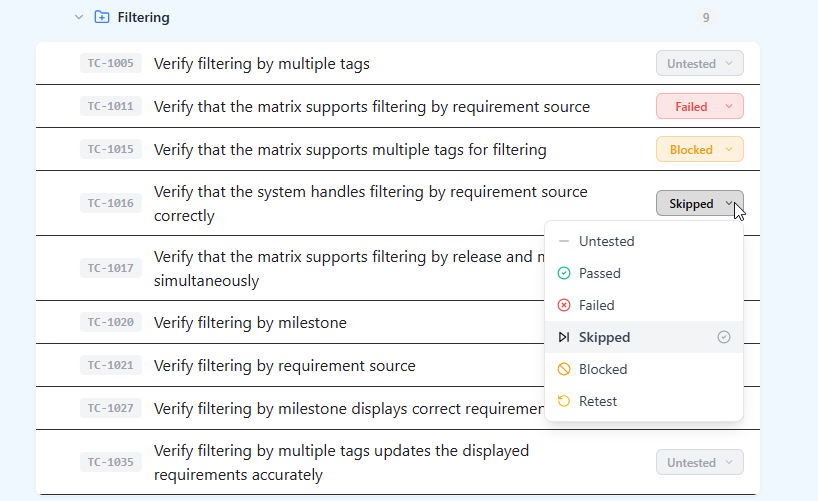
Statuses are per run. Setting a case to fail in one run leaves its result in every other run untouched, which is what makes the execution history per case readable across releases.
How statuses show up in reports#
- Run progress counts anything other than untested as executed, so a run of blocked cases can read as complete while nothing was actually verified. Read progress next to the status breakdown, not on its own.
- Release readiness treats fail and blocked as open items. A wall of blocked cases is the most common reason a run looks finished and the release is not.
- Execution history per case keeps every status across runs, which is how a case that alternates between pass and fail becomes visible as unstable rather than as bad luck.
- Defect reports build on failed results with linked bugs, so failures without links are invisible there.
Custom statuses#
If your process needs something the five defaults do not express, an admin can add custom statuses at project level. Two cautions from practice. Keep the set small, because every extra status is a decision each tester has to make on every case. And decide up front how a new status is treated in reporting, otherwise "retest" and "partially passed" quietly become buckets that nothing ever moves out of.
Statuses on automated results#
Automated runs map their own outcomes onto the same vocabulary. A test that passed only after a retry is recorded as passed and flagged as flaky, which is why a green automated result is not automatically evidence of stable behaviour. Tests the framework skipped arrive as skipped. See automation coverage reporting for how those results feed coverage.