

The AI-First Test Management System for Manual & Automated QA
QAM Hub keeps your test cases, checklists, test runs, and automation results in one place – so your team stops piecing together spreadsheets and CI logs and starts releasing with confidence.
The problem
Spreadsheets and disconnected tools don't scale with your releases
Test cases live in five different spreadsheets, and nobody's sure which version is current.
Automated results from Playwright, Cypress or Selenium sit in CI logs, disconnected from what QA actually covers.
Release day arrives and nobody can say, with confidence, what's tested and what isn't.
Manual test runs take longer than they should because there's no structured way to execute and track them.
The solution
One workspace for manual and automated QA testing
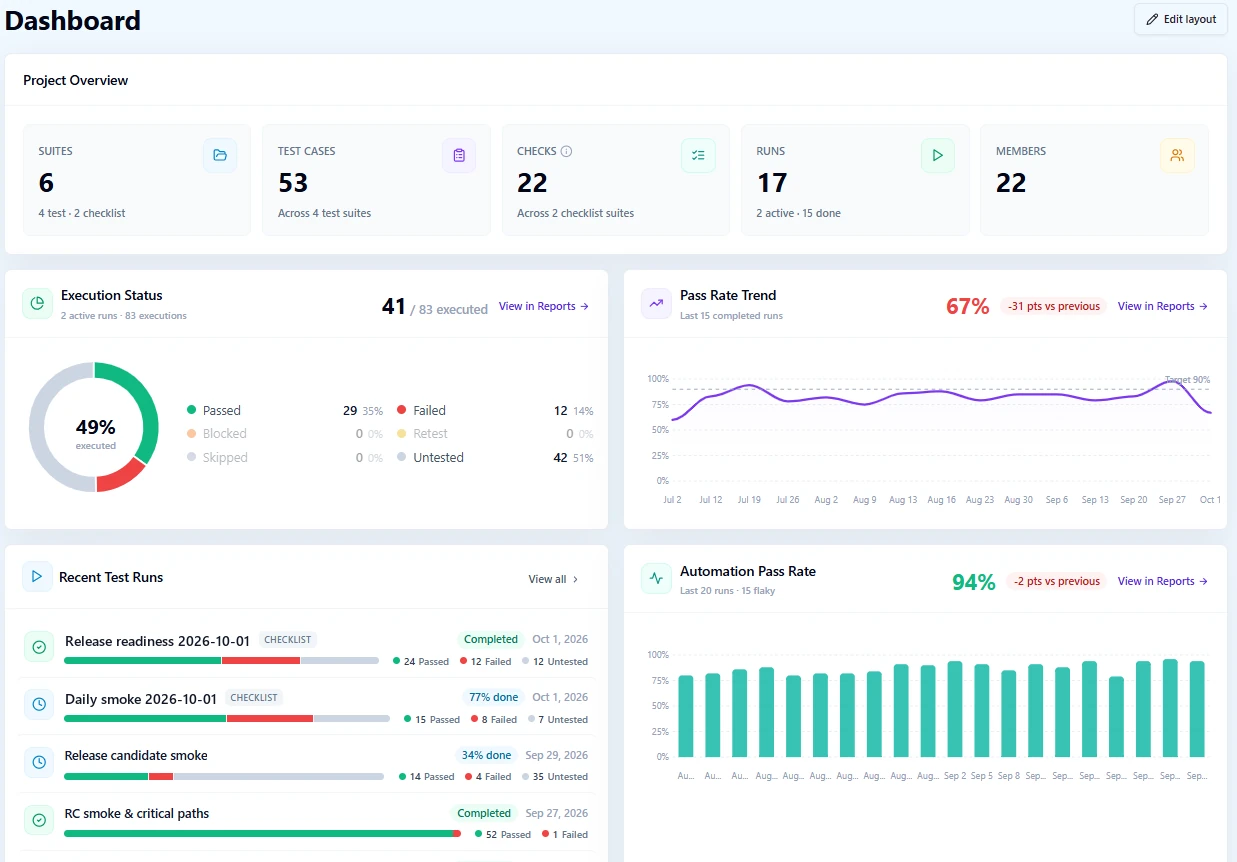
QAM Hub brings test cases, checklists, test runs, and automation results into a single, structured system. Write a test case once, run it manually or through Playwright and Cypress, and see everything – coverage, defects, release readiness – on one dashboard. No more piecing together spreadsheets, CI logs, and Slack threads to know if you're ready to release.
Workflow
From test case to release-ready in four steps
Organize
Write structured test cases and checklists with templates, custom fields, and AI-assisted generation. Link cases to requirements and milestones for full traceability.
Execute
Run tests manually with screenshots, comments, and per-tester assignment, and record Pass / Fail / Blocked / Skip results – or let automated runners handle regression.
Automate
Connect Playwright, Cypress, WebdriverIO, Selenium or any framework that writes JUnit XML. Automated results land next to manual results, case by case, after every run.
Analyze
Get release readiness, coverage, and team activity in dashboards and 10+ report types, with PDF export and scheduled email digests.
Key benefits
What changes when QA has one source of truth
Faster releases
See release readiness at a glance, not in a Friday-afternoon scramble.
Full visibility
Manual and automated coverage side by side, case by case.
Less manual work
AI-assisted test case generation, always reviewed by a human.
Fewer regressions slip through
Structured test runs instead of ad hoc spot checks.
A predictable QA process
The same workspace whether you're testing manually, automating, or both.
Lightweight when you need it
Checklists for quick checks that don't need a full test case.
Features
Everything a QA team actually uses, in one product
Test Management
- Test Cases & Suites, Checklists
- Custom Fields & Templates
- Requirements & Traceability, Milestones
- Full version history with rollback
Execution & Automation
- Test Runs with screenshots & comments
- Per-tester assignment, defects tracking
- Playwright, Cypress, WebdriverIO, Selenium & JUnit XML
- Automation coverage next to manual coverage
- TestRail & Qase migrationNew
AI
- AI-assisted test case generation
- Quality Analyzer
- Autonomous AI-driven regression runs, in beta (human-in-the-loop)
- MCP server for AI agents
Reporting & Admin
- Project dashboard
- 10+ report types with PDF export
- Release Readiness, audit logs
- Role-based access, 2FA, multi-project support
Product tour
See QAM Hub in action
A look inside the product – test cases, runs, automation, dashboards, and AI.
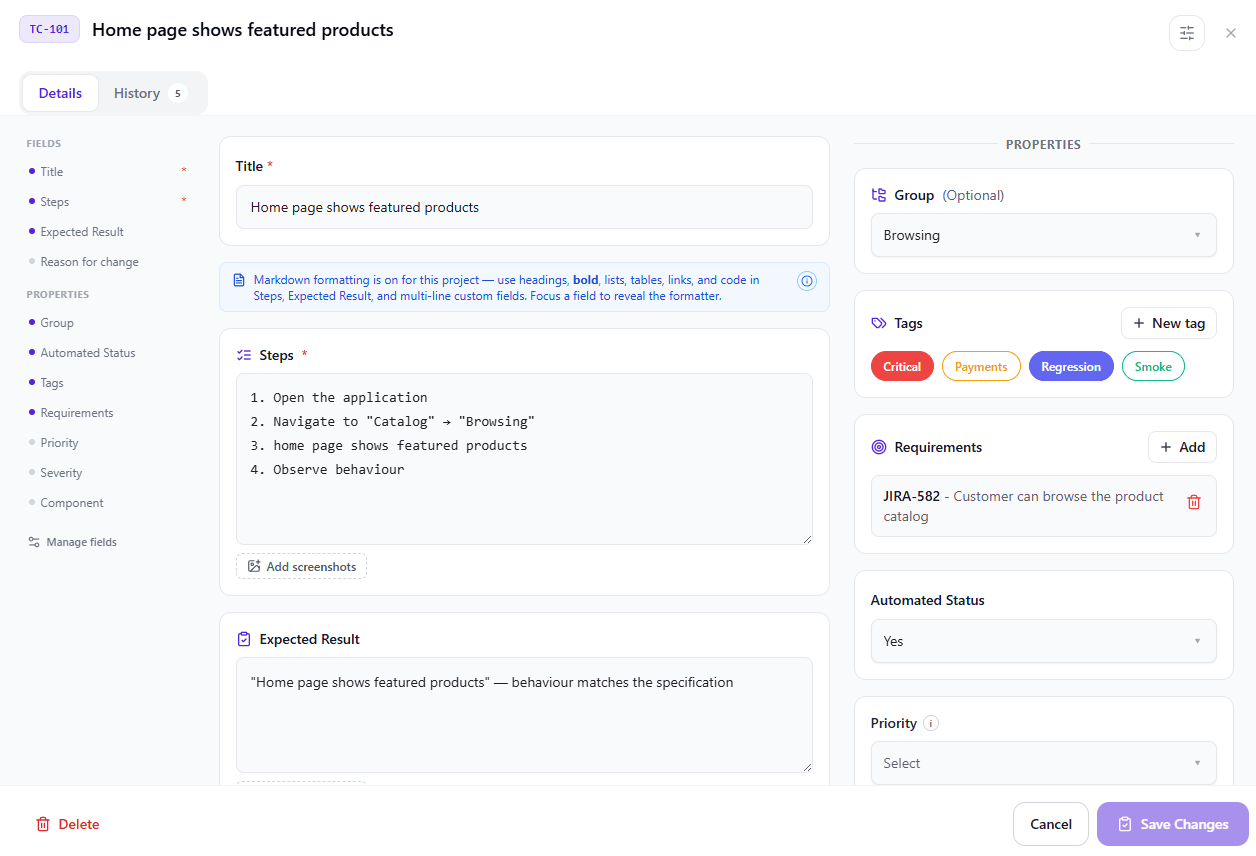
Test cases & suites
Structured suites with groups, tags, custom fields, templates, and full version history with rollback.
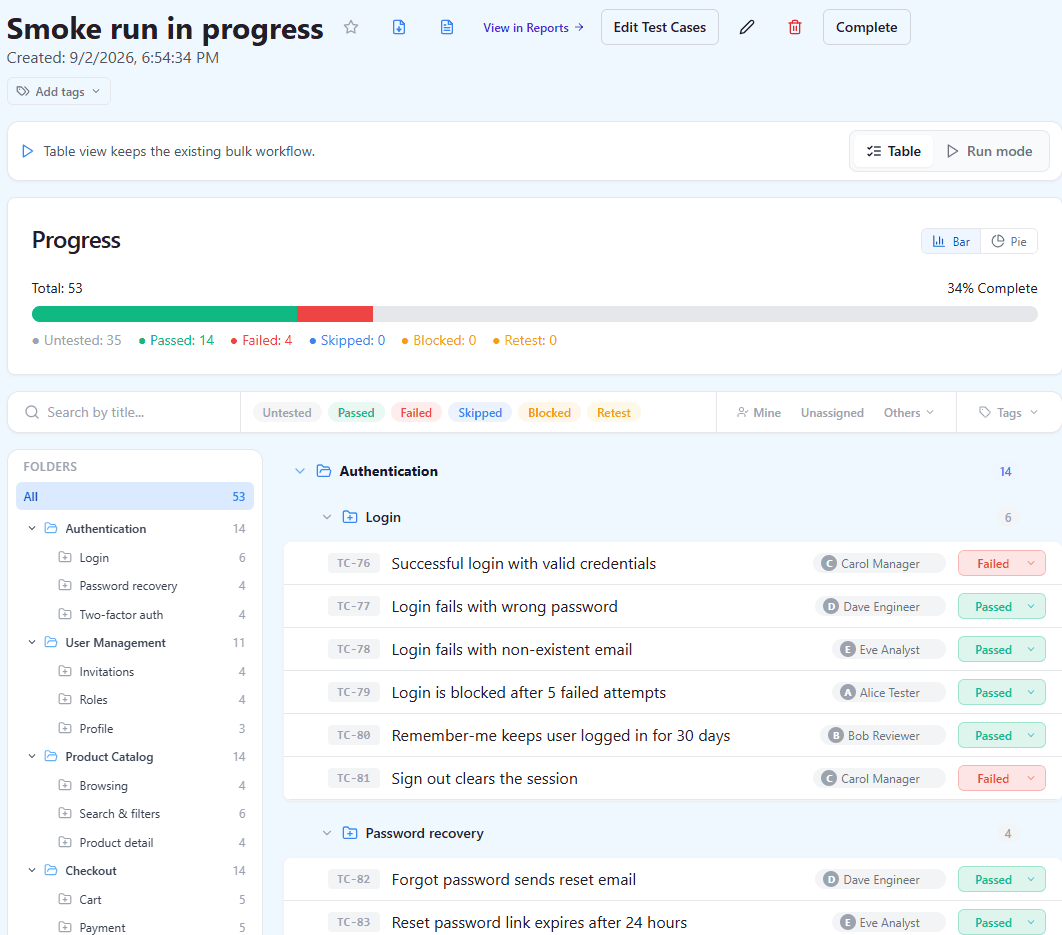
Test runs
Plan runs, assign testers, and record results with screenshots and comments – progress is visible in real time.
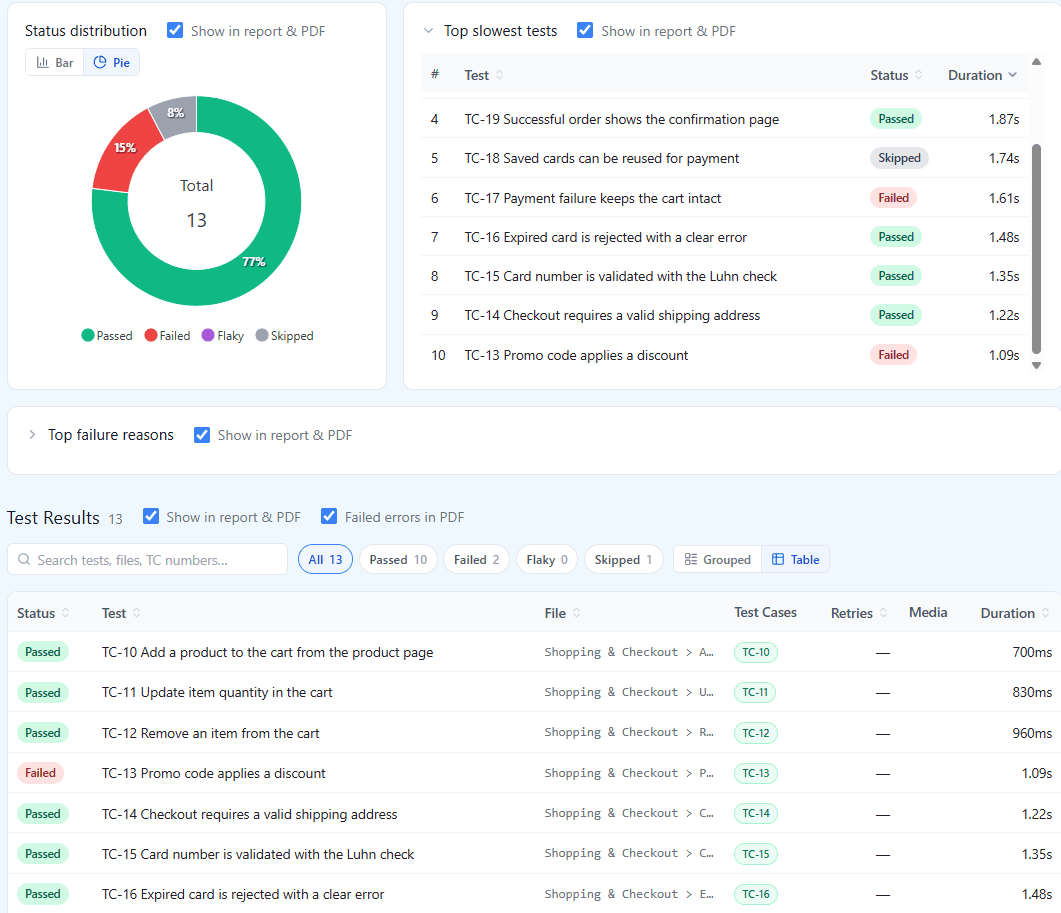
Test Automation Integration
Playwright, Cypress, WebdriverIO, Selenium and JUnit XML results land next to manual results, linked back to test cases by case number.
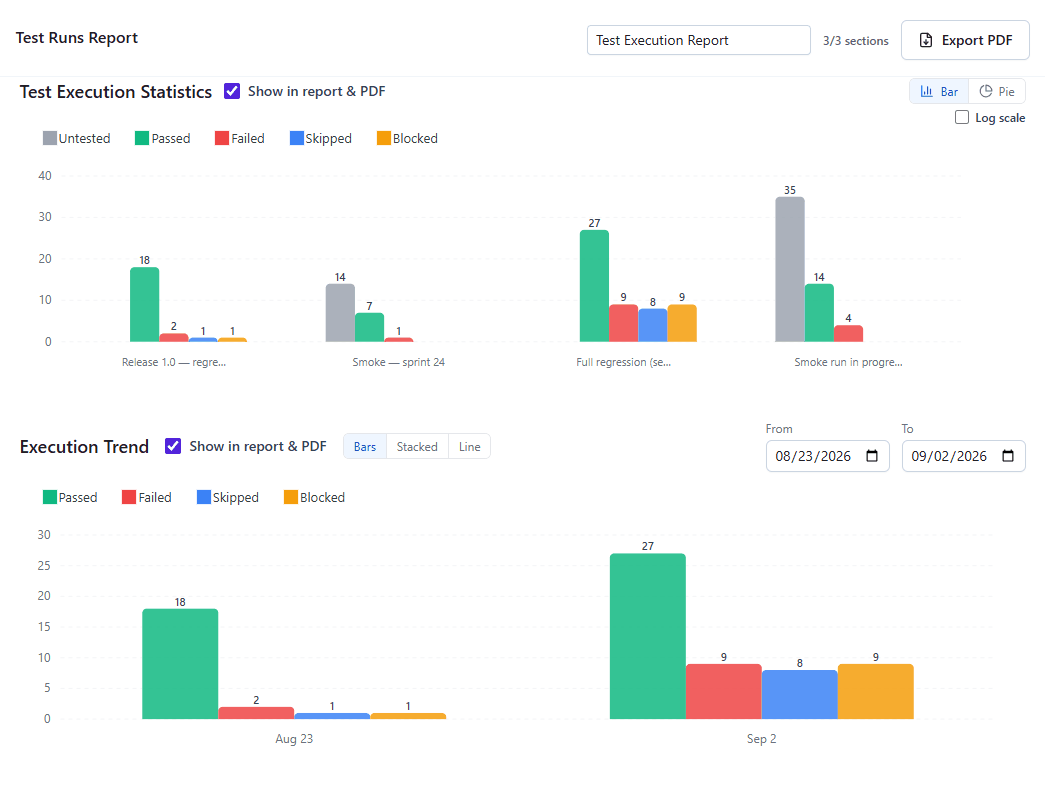
Dashboards & reports
Release readiness, coverage, trends, and team activity across 10+ report types with PDF export.
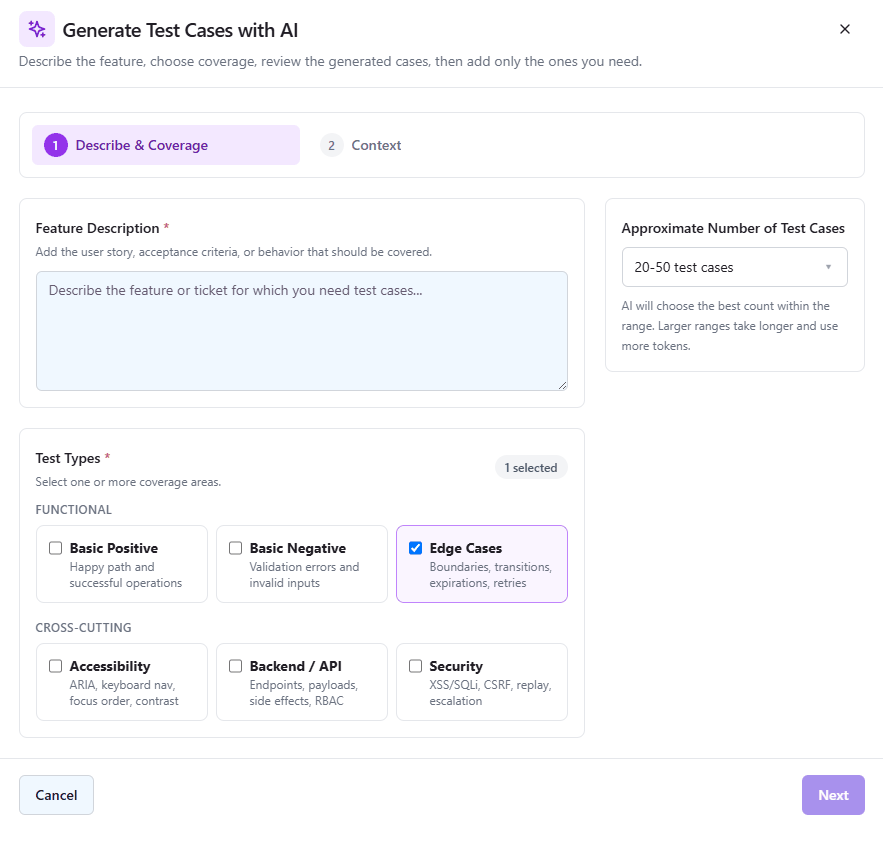
AI generation & Quality Analyzer
Generate test cases and checklists with AI, and let the Quality Analyzer flag duplicates and vague cases – a human reviews everything.
Integrations
Fits into the stack you already use
Connect QAM Hub to your issue tracker and automation tools – no workflow disruption, no duplicate data entry. Playwright and Cypress connect through official npm reporters, WebdriverIO, Selenium and any JUnit XML framework through the qam-hub CLI, Google SSO handles sign-in, and an MCP server lets AI agents like Claude manage test cases directly.
Migrating from TestRail or Qase? Move your test cases, test runs, attachments and team in a few clicks.New
Use cases
Built for teams that have outgrown spreadsheets
Scaling QA
Growing product teams that need structure without slowing down.
Release-heavy products
Frequent releases that need fast, reliable release-readiness checks.
Hybrid manual + automation teams
Teams running Playwright, Cypress, WebdriverIO or Selenium who need automated and manual coverage in one view.
Migrating off legacy tools
Teams leaving TestRail, Qase, or spreadsheets who need traceability and history from day one – including import wizards for TestRail and Qase.
Teams
Built for the whole QA team, not just one role
QA Engineer
Write structured test cases fast with templates, custom fields, and AI-assisted generation. Execute runs with screenshots, comments, and per-tester assignment.
Automation Engineer
Gather Playwright, Cypress, WebdriverIO, Selenium or JUnit XML results into the same workspace as manual testing. See automation coverage next to manual coverage, case by case.
QA Lead / QA Manager
Get release readiness, coverage, and team activity at a glance: dashboards, 10+ report types, milestones, audit logs, and role-based access.
CTO / VP Engineering
Know, not guess, whether a release is ready – without pinging QA for a status update.
Built by QA, for QA – literally
QAM Hub isn't a generic project tracker with a QA skin. It's built by QA Madness, a QA outsourcing company with 13+ years of hands-on testing experience. Every feature exists because a real QA team needs it: full version history with rollback, requirements traceability, automation-native workflows, and AI that proposes but never decides without a human in the loop.
New to test management? Start with what a test management system is, see how QAM Hub compares to other tools, or read more about the product and the team.
Comparison
QAM Hub vs. spreadsheets vs. fragmented tools
Swipe the table sideways to see every column
| Aspect | Spreadsheets | Fragmented tools | QAM Hub |
|---|---|---|---|
| Test case version history | No | Scattered across tools | Full history with rollback |
| Automated + manual coverage in one view | No | No | Yes, case by case |
| Release readiness at a glance | No | Manual, ad hoc | Dashboard + reports |
| AI-assisted test case generation | No | No | Yes, human-reviewed |
| Lightweight checklists alongside test cases | No | No | Yes |
| Import wizards for TestRail and Qase | – | – | Yes |
| Built for QA workflows specifically | No | Partially | Yes – by QA, for QA |
Blog
Latest from the QAM Hub blog
Guides and practical notes on test management, QA process, and automation – written by the team behind the product.
A Flaky Test Quarantine Policy That Actually Holds
Quarantine fails at the exit, not at detection. A policy with concrete entry thresholds, a non-blocking quarantine job, owners and deadlines, a hard cap, and three ways out: fixed, rewritten or deleted with the lost coverage recorded.
Mapping Automated Test Results to Test Cases Without Breaking It
The link between an automated test and its documented case is a string, and nothing in JUnit XML protects it. What each tool does, what breaks, and how to catch it in CI.
AI-Generated Test Cases: Best Practices and Common Mistakes
AI generates a plausible test case as fast as a correct one, and plausible is the expensive kind. What to review, why a screenshot is the wrong input, and how to stop the suite filling up with cases that cannot fail.
FAQ
Frequently asked questions
What is QAM Hub?
QAM Hub (short for QA Management Hub) is a test management system (TMS) for manual and automated QA. It stores test cases and checklists, tracks test runs, links automated results from Playwright, Cypress, WebdriverIO, Selenium and any JUnit XML framework back to manual test cases, and generates test cases with AI. It is built by QA Madness, a QA company with 13+ years of testing experience.
Is there a free trial?
Yes. Sign up with your work email, confirm it, and your team gets a free trial workspace – no credit card required. Explore QAM Hub with your own team before committing to a plan.
Does QAM Hub support test automation?
Yes. Playwright and Cypress connect through official npm reporters; WebdriverIO, Selenium, Robot Framework, pytest, JUnit, TestNG, NUnit and any other framework that writes JUnit XML upload with the qam-hub CLI. Automated results appear next to manual test results, case by case, so you always see full coverage in one place.
What does QAM Hub integrate with?
Jira, GitHub Issues, GitLab, Asana, Linear, Redmine, Trello, Google SSO, plus an MCP (Model Context Protocol) server that lets AI agents like Claude work with your test artifacts directly.
How does AI test case generation work?
QAM Hub can generate test cases and checklists with AI, but a QA engineer always reviews and approves them before they become part of the suite: AI proposes, your team decides.
Can we migrate from TestRail, Qase, or spreadsheets?
Yes. TestRail and Qase each have their own import wizard: QAM Hub brings across your test cases, test runs with their results, milestones, attachments and your team, with an editable field mapping you review before anything is written. Coming from spreadsheets, import test cases, checklist checks and requirements from CSV.
Is QAM Hub secure enough for our team?
QAM Hub includes role-based access, two-factor authentication (2FA), Google SSO, and full audit logs, so you can control who sees and changes what.
Who is QAM Hub for?
QA engineers, automation engineers, QA leads and managers, and engineering leaders at product teams who need one place to plan, run, and report on testing – manual and automated.
See what your QA process looks like with everything in one place
Start a free trial and bring your test cases, checklists, test runs, and automation results into QAM Hub – or book a demo and we'll walk you through it.