

WebdriverIO Test Reporting: Sending Results to a Test Management System
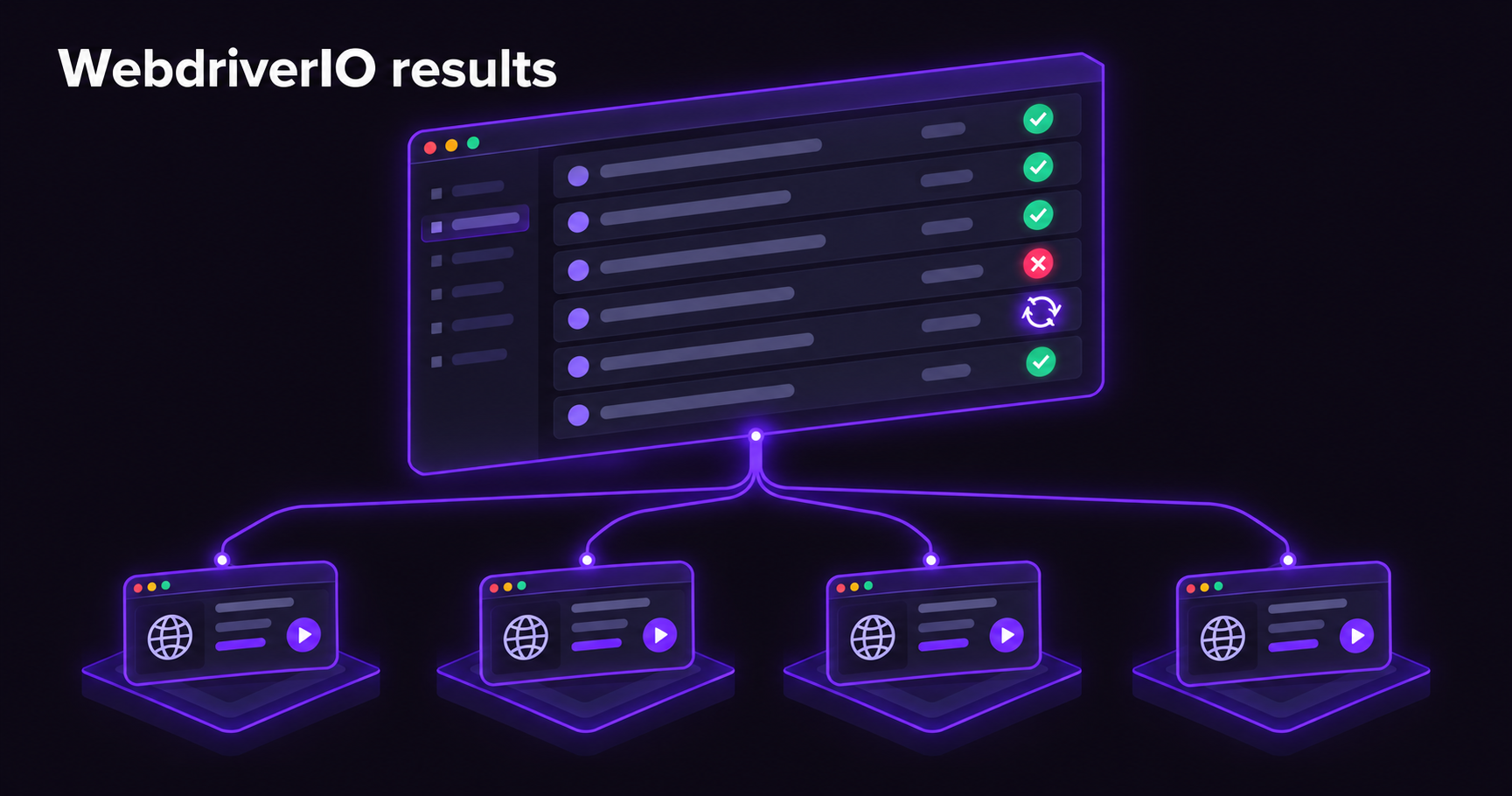
WebdriverIO ships seven reporters, and for sending results to a test management system only one of them matters: @wdio/junit-reporter. Spec and Dot write to the console, Allure and the HTML reporters build a report for one run, and the JUnit reporter writes the file every TMS can read. Getting it right comes down to four settings that the defaults get wrong for this purpose: the file name (the default ends in .log), the test name (the default strips the hyphen out of TC-12), the classname (the default puts the browser version into it, which forks test history on every Chrome update), and worker logs (off by default, so a screenshot link printed from a hook never reaches the report). Retries are the fifth thing, and they deserve their own section, because WebdriverIO has three retry mechanisms and each one hides retries from the XML in a different way.
Everything below was checked on WebdriverIO 10.1 with @wdio/junit-reporter 10.1 and the Mocha framework, by running a small suite and reading the XML it wrote. Where a behaviour comes from the documentation and not from a run, the text says so.
Which WebdriverIO reporter a TMS reads
The reporters are not alternatives to each other. They answer different questions, and most suites run two or three at once.
| Reporter | What it is for | Where it falls short for a TMS |
|---|---|---|
spec, dot | Reading the run in the terminal or the CI log | Nothing is written to disk |
junit | Results, durations, errors and stack traces in a format every CI server and TMS parses | No screenshots or video, no browser metadata unless you put it in the name |
allure, json, HTML reporters | A rich report for one run, with steps and attachments | No history across runs, no link to manual test cases, each tool has its own format |
| Vendor reporters and services | Push results straight into one specific tool | Tie the pipeline to that tool |
The practical split is: keep Spec for humans watching the pipeline, keep Allure or an HTML report as a CI artifact if your team debugs from it, and add JUnit for the test management system. The JUnit file is small, it is written by the same process that ran the tests, and uploading it is one CI step after the run. Nothing in your test code changes.
What the JUnit reporter writes, and the defaults to change
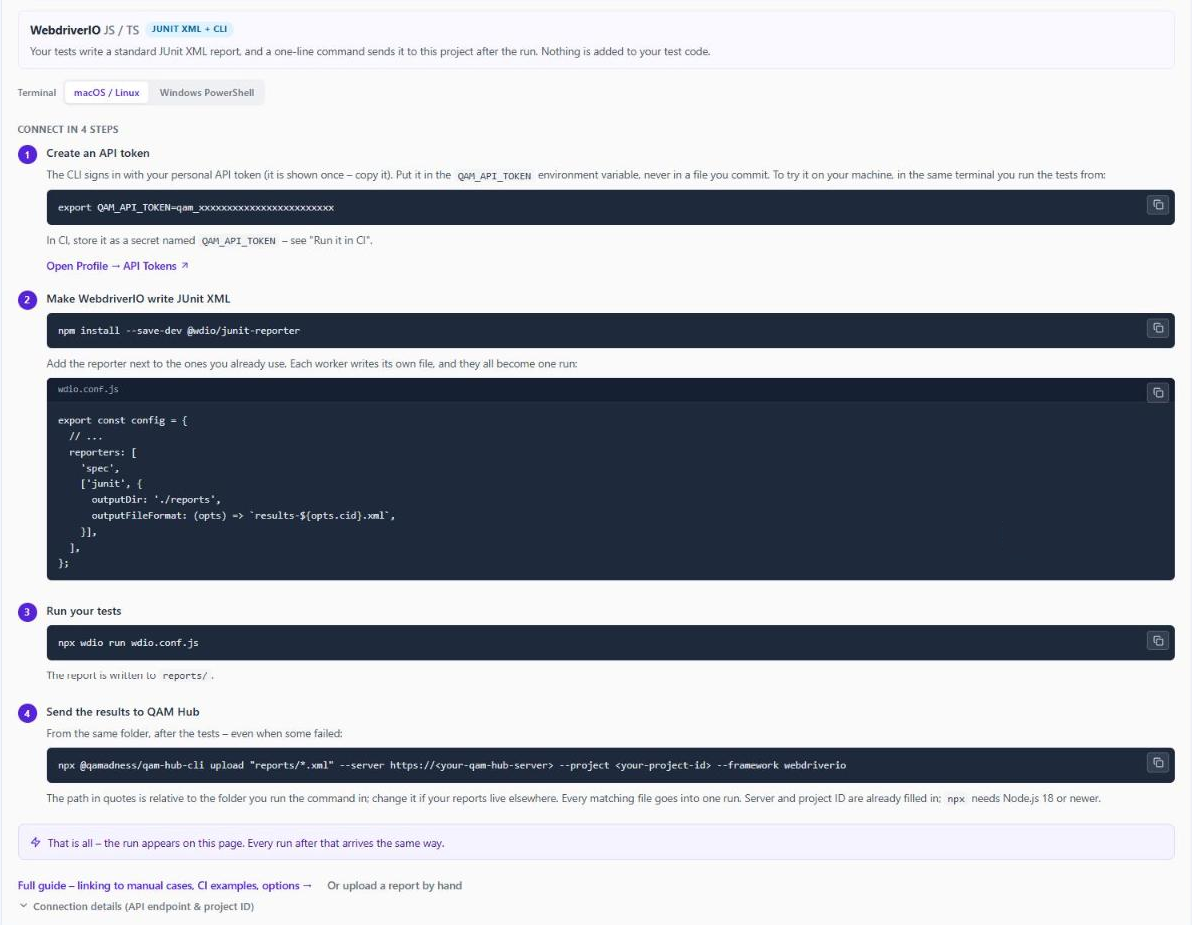
Install the reporter as a dev dependency and add it next to the reporters you already use:
npm install --save-dev @wdio/junit-reporter// wdio.conf.js
export const config = {
// ...
reporters: [
'spec',
['junit', {
outputDir: './reports',
// 1. a .xml name per worker; the default is wdio-<cid>-junit-reporter.log
outputFileFormat: (opts) => `results-${opts.cid}.xml`,
// 2. keep the hyphen, so TC-12 survives in test names
suiteNameFormat: /[^a-zA-Z0-9@-]+/,
// 3. browser name in the classname, browser version out of it
classNameFormat: ({ packageName, suite }) =>
`${packageName.split('.')[0]}.${(suite.fullTitle || suite.title).replace(/\s/g, '_')}`,
// 4. console output from the test lands in its <system-out>
addWorkerLogs: true,
}],
],
};Each numbered line fixes a default that is fine for Jenkins and wrong for a TMS. Here is why, with the XML the reporter writes when you leave them alone.
One file per worker. WebdriverIO runs each spec file in its own worker, and the JUnit reporter writes one XML file per worker, named after the worker's cid (0-0, 0-1 and so on). With the default outputFileFormat the files end in .log, and a glob such as reports/*.xml matches nothing. Every upload glob in every guide sets this option, and now you know why.
Names are sanitised. Suite and test names are split on the suiteNameFormat regular expression and joined back with spaces. The default is /[^a-zA-Z0-9@]+/, which keeps letters, digits and @ and drops everything else. So it('TC-12 user can log in', ...) is written as:
<testcase classname="chrome.141_0_7390_37.linux.Login_flow"
          name="TC 12 user can log in" time="0.004"/>
The hyphen is gone, and a TMS that looks for TC-12 or TC_12 in the name will not find it. Adding - to the character class keeps it. The @ is in the default so that tag-reading reporters still see @smoke in names, and keeping it costs nothing.
The classname carries the browser version. The default classname is the sanitised capabilities followed by the suite title: chrome.141_0_7390_37.linux.Login_flow. That string changes on every browser update. A test management system that keys per-test history on suite, classname and name (which is all a JUnit XML report offers) then sees a brand-new set of tests after each Chrome release, and trends, flaky detection and "new failure since last run" start from zero. The classNameFormat function above keeps the first segment, the browser name, and drops the rest. The browser name is worth keeping: a suite that runs the same specs on Chrome and Firefox gets a separate history per browser, so a Firefox-only failure does not look like a 50% flaky test.
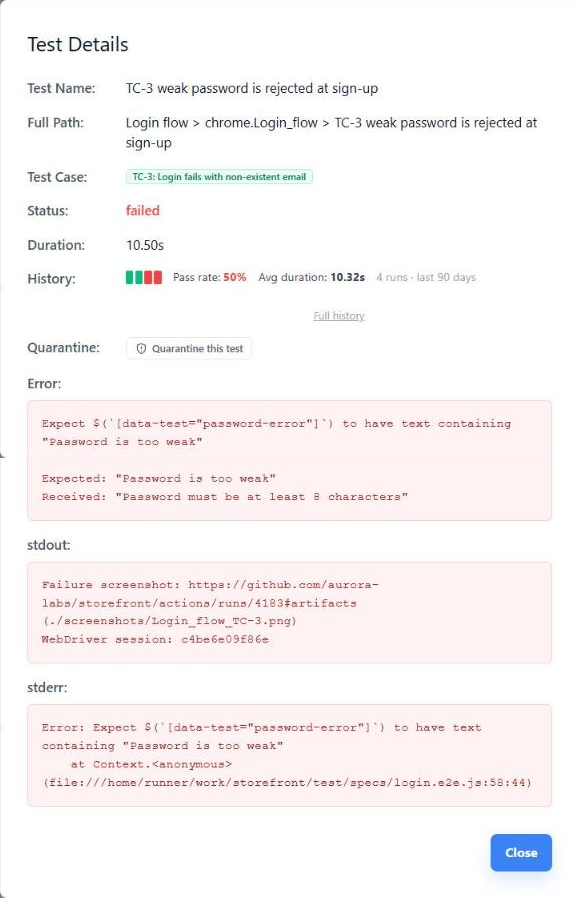
Console output is not in the report unless you ask. With addWorkerLogs off, a test's <system-out> holds only WebdriverIO's own command log. With it on, whatever the test writes to stdout is attached to that test, which is how a screenshot link gets from a hook into the result. More on that below.
Two more things to know about the structure. Each describe becomes its own <testsuite>, and nested blocks are written as sibling suites, with the parent suite left empty, so a TMS that builds a tree from the XML sees the inner suite's name, and the full nesting only through the classname. And the suite-level <properties> carry suiteName, capabilities and file, which is where the spec path lives if you need it later.
Linking automated tests to manual test cases
The reason to send WebdriverIO results to a TMS instead of a dashboard is that a manual test case can then show its automated runs and count as covered. That needs the case ID to travel inside the report. There are two places to put it.
In the test title. This is the cheapest and the most durable, because the title is the one thing every reporter, every CI server and every TMS preserves. One test can cover several cases:
describe('Login flow', () => {
  it('TC-12 user can log in with valid credentials', async () => { /* ... */ });
  it('TC-12 TC-13 login and logout', async () => { /* ... */ });
});
This only works with the suiteNameFormat fix from the previous section. Without it the report says TC 12, and the test is uploaded as an unlinked test with no error to tell you why. It is the single most common reason a WebdriverIO suite shows zero linked tests after a first upload, and it is invisible until you open the XML.
In a test property. @wdio/junit-reporter exports addProperty, which writes a <property> into the current test case. It keeps the title clean and is immune to name sanitising:
import { addProperty } from '@wdio/junit-reporter';

it('weak password is rejected', async () => {
  addProperty('qam.caseNumber', '9');   // QAM Hub reads this; other tools read other names
  // ...
});
<testcase classname="chrome.Login_flow" name="weak password is rejected" time="0.003">
<properties>
<property name="qam.caseNumber" value="9"/>
</properties>
<failure message="Expected values to be strictly equal: ..."/>
</testcase>The property name is tool-specific. QAM Hub reads qam.caseNumber, TestRail's CLI reads test_id, and other tools have their own. The title form, TC-<number>, is the one most tools agree on, which is a reason to prefer it when the suite may change TMS one day. Whichever you pick, the rule from how test case ID mapping breaks applies: the ID lives in the test, never in a spreadsheet that maps test names to case numbers.
Cucumber suites follow the same logic with different objects. The reporter writes one <testsuite> per feature and one <testcase> per scenario, with the steps rendered into the scenario's <system-out>, so the case ID goes into the scenario name. The step text is not a test name and carries nothing.
Retries: three mechanisms, three different holes in the report
WebdriverIO documents three ways to re-run a failing test, and they are not interchangeable once a TMS is reading the output. In the checked configuration, each one does something different to the XML.
| Mechanism | How it is set | What the JUnit XML shows |
|---|---|---|
| Mocha retries | this.retries(2) in a suite or test, or mochaOpts.retries | Every attempt. A failed attempt is written as a <testcase> with <skipped/> and the error stack in <system-err>, followed by a second <testcase> with the same name holding the final result |
| WebdriverIO retries | A number as the last argument: it('...', async () => {...}, 2) | Only the final result. A test that failed twice and passed on the third attempt is a plain pass with no trace of the first two |
| Spec file retries | specFileRetries: 1 in the config | Only the last attempt. The retried spec runs under the same cid, so its XML file is overwritten and the first attempt's failures are gone |
Why it matters: a retry that is not in the report is a failure the team never sees. The pass rate stays green while a growing share of tests pass only on their second try, and the real race conditions among them, the ones where the product sometimes loses, hide behind the same green. Our flaky test quarantine policy is built on the gap between pass rate and first-attempt stability, and that gap can only be measured if attempts are recorded.
So the recommendation is firm. Use Mocha's this.retries() or mochaOpts.retries, which keeps the attempts in the file, and avoid the per-it WebdriverIO retry count on anything you report to a TMS. Keep specFileRetries for the case it was made for, a whole spec file dying with its browser session, and accept that it erases the first attempt. If you must use WebdriverIO-level retries (they are the only option on Jasmine, and they retry hooks too), record the attempt count yourself in the afterTest hook, where result.retries.attempts is available, with addProperty('wdio.retries', String(retries.attempts)). That puts the number in the XML for a human to find, even if no tool turns it into a flakiness metric.
How a TMS reads the Mocha form depends on the tool, because the pair is unusual: two test cases with one name, the first skipped with a stack trace, the second carrying the result. QAM Hub reads the pair literally. The failed attempt shows up as a skipped entry with its stack trace, the passing retry as a second entry marked [2], so nothing is lost from the run, but the test is not counted as flaky the way a Surefire flakyFailure or a pytest-rerunfailures repeat is, where the first attempt is written as a failure. Other tools will do something else again. Check the first retried test after your first upload and see what you got.
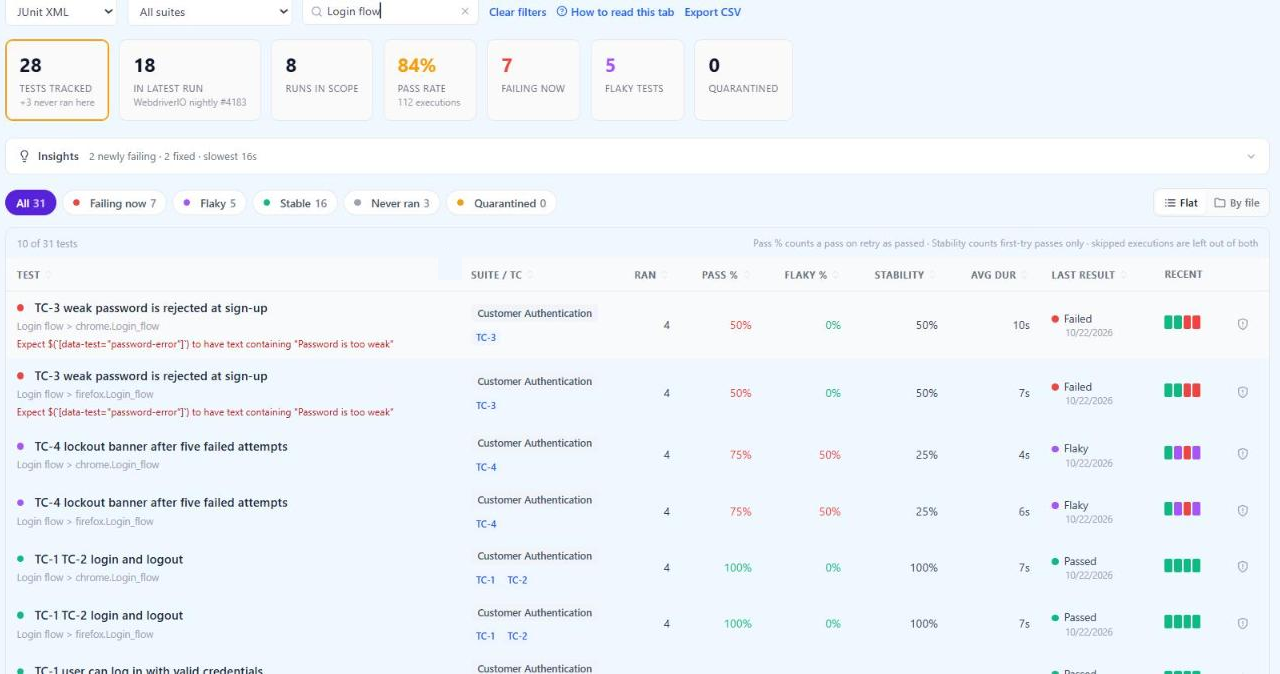
Once attempts are recorded, two numbers per test stop agreeing, and the gap between them is the useful signal. A test that needed a retry in two of its last four runs has a 100% pass rate and a 50% stability score. The pass rate says the pipeline is fine. The stability score says the test is leaning on retries, and that whatever it waits for is the thing to fix.
Screenshots and other evidence the report cannot hold
JUnit XML has no attachment element, so a WebdriverIO failure screenshot lives somewhere else and the report carries a link. WebdriverIO makes the capture part easy: the afterTest hook runs after every test, including timeouts, and browser.saveScreenshot() writes a PNG. The two details that matter are the file name and getting the link into the test's <system-out>.
// wdio.conf.js
import { mkdirSync } from 'node:fs';

export const config = {
  // ...
  afterTest: async function (test, context, { error, passed }) {
    if (passed) return;
    const name = `${test.parent} ${test.title}`.replace(/[^a-zA-Z0-9-]+/g, '_');
    mkdirSync('./screenshots', { recursive: true });
    const file = `./screenshots/${name}.png`;
    await browser.saveScreenshot(file);
    // GITHUB_SERVER_URL etc. are GitHub Actions variables; use your CI's equivalent
    console.log(`Failure screenshot: ${process.env.GITHUB_SERVER_URL}/${process.env.GITHUB_REPOSITORY}/actions/runs/${process.env.GITHUB_RUN_ID}#artifacts (${file})`);
    console.log(`WebDriver session: ${browser.sessionId}`);
  },
};
Name the file after the test, so the file and the result can find each other without a lookup table. Upload the screenshots/ folder as a CI artifact with the retention you want for failure evidence. And switch on addWorkerLogs in the reporter options, because without it the two console.log lines above never reach the XML. With it, they appear inside the failed test:
<testcase classname="chrome.Login_flow" name="TC-12 TC-13 login and logout" time="0.001">
  <system-out><![CDATA[
Failure screenshot: https://github.com/aurora/storefront/actions/runs/4183#artifacts (./screenshots/Login_flow_TC-12_TC-13_login_and_logout.png)
WebDriver session: 7f3a9c...
]]></system-out>
</testcase>
The session ID is worth printing when tests run on a Selenium Grid or a cloud provider, because video and logs on those services are keyed on it. On a local run it is noise, and nobody minds.
WebdriverIO's Allure reporter can attach the same screenshot to its own report, and if your team debugs from Allure, do both. The JUnit report carries the link, Allure carries the image, and the TMS result points at the artifact for anyone who needs the picture. QAM Hub, for one, stores console output and stack traces from JUnit XML but no media, so for a WebdriverIO suite the artifact link is the evidence path. Its Playwright and Cypress reporters are the ones that carry screenshots and traces into the result itself.
Sending the files from CI
The upload is one step after the tests. Two details decide whether it runs on the days you need it.
It has to run when the tests fail, which in most CI systems means telling the step so explicitly. In GitHub Actions that is if: always():
- name: Run WebdriverIO tests
  run: npx wdio run wdio.conf.js

- name: Keep failure screenshots
  if: always()
  uses: actions/upload-artifact@v4
  with:
    name: screenshots
    path: screenshots/
    if-no-files-found: ignore

- name: Send results to QAM Hub
  if: always()
  run: npx @qamadness/qam-hub-cli upload "reports/*.xml" --framework webdriverio --server <your server address> --project <your project ID>
  env:
    QAM_API_TOKEN: ${{ secrets.QAM_API_TOKEN }}
The --framework webdriverio flag is there because a WebdriverIO JUnit file looks like any other JUnit file. Nothing in it says which framework wrote it, so the label has to come from you. Without it the run is still parsed correctly and simply labelled as generic JUnit.
Think about where the run boundary is. With the QAM Hub CLI every file matched by one upload becomes one run, up to 50 files and 40 MB, which fits the one-file-per-worker layout: four workers, four files, one run. A pipeline that shards the suite across several CI jobs, each with its own workers, produces one run per job unless the XML is collected into a final job and uploaded once. If the shards are different browsers and you want them side by side, upload per job and label them with --environment or --name. Start from an empty reports/ folder on every run, or last night's files ride along.
Branch, commit and build link come from the CI environment. The CLI detects them on GitHub Actions, GitLab CI, Jenkins, Azure Pipelines, CircleCI, Bitbucket, TeamCity and several others, and outside CI from local git. A report uploaded by hand from the Automation page has none of that, which is fine for a one-off and a poor habit for anything nightly. The step-by-step setup, including GitLab CI, Jenkins and a curl route for agents without Node.js, is in Uploading JUnit XML Reports with the CLI.
What the run looks like once it lands
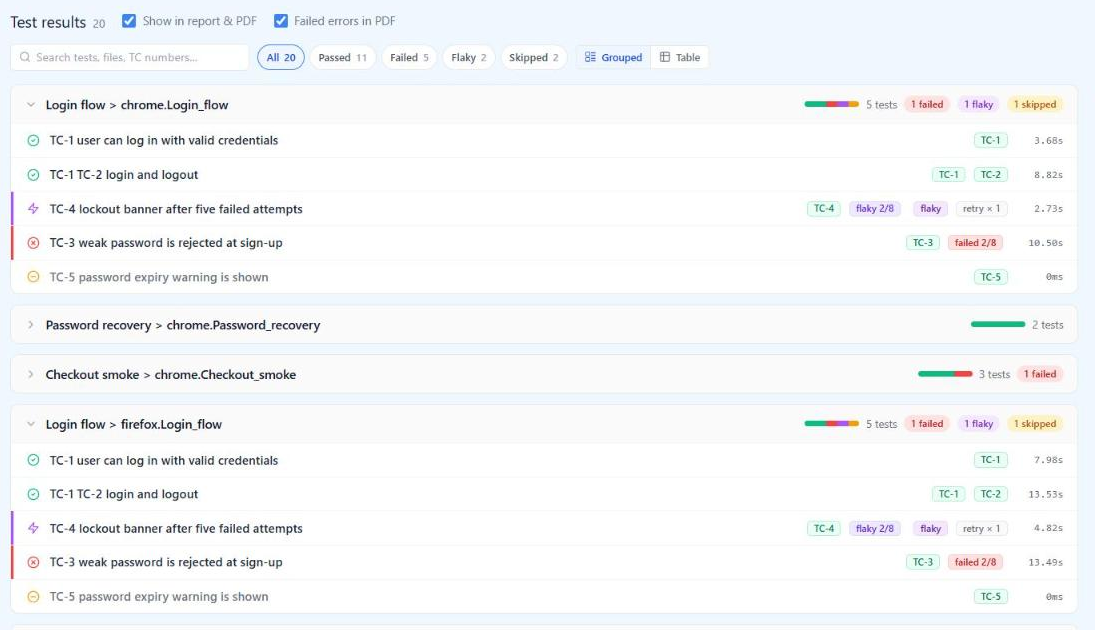
After the upload, the run shows totals, the pass rate and what changed since the previous run of the same project. That comparison is the first thing to read on a red morning, because a new failure and a failure that is three nights old call for different people.
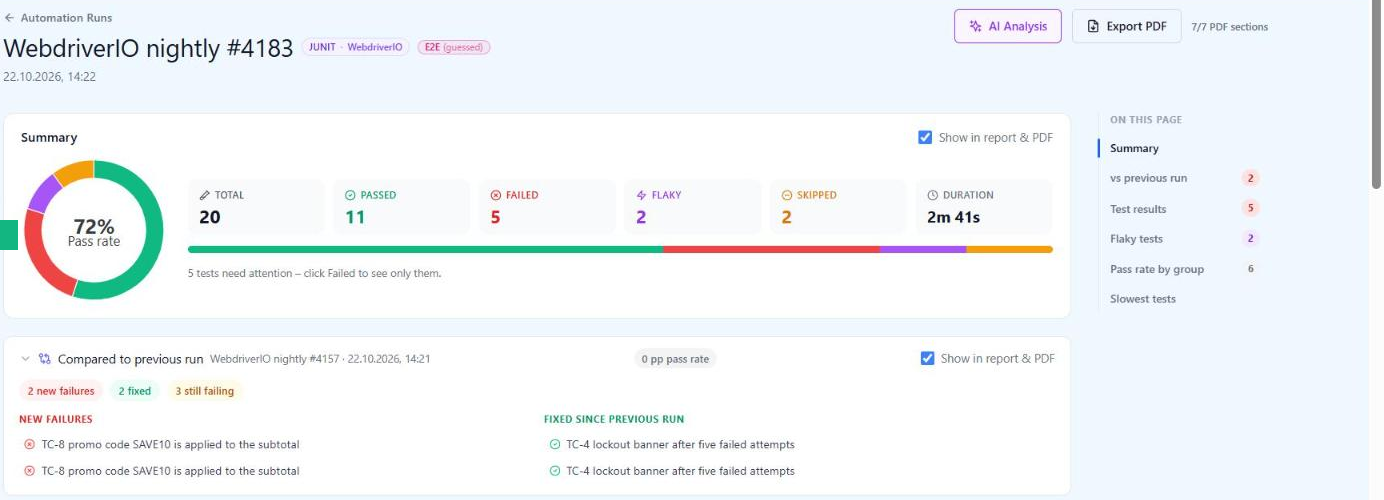
Below the summary, results are grouped the way the XML grouped them: by suite, then by the browser-prefixed classname. Every test that carries a case number shows it as a badge. Tests without one are listed the same way and count as unlinked in coverage, which is the quickest way to find the specs that still need an ID.
Opening a failed test shows the linked manual case, its recent history, the error and stack trace, and the console output, which is where the screenshot link from the afterTest hook ends up.
What QAM Hub does with WebdriverIO results, and where it stops
QAM Hub is the test management system built by QA Madness, the team that publishes this blog. For WebdriverIO it works the way this article describes, because the article was written against it:
- JUnit XML from
@wdio/junit-reporteruploads throughnpx @qamadness/qam-hub-cli upload, on every plan including Start. The in-app setup guide has a WebdriverIO path with the reporter config and the upload command filled in for your project. TC-<number>orTC_<number>in a test title, or aqam.caseNumberproperty, links the result to the manual case, and one test can cover several cases.- Per-test history is keyed on the suite, the classname and the test name, which is why the classname advice above matters: keep the browser, drop the version.
- The Tests tab, on the Standard and Advanced plans, tracks each test across runs with its pass rate, flakiness rate, stability and average duration, and lets a Project Admin or Organization Admin quarantine a test with a reason. Standard and Advanced also add AI analysis of an automation run.
The limits are the ones the format sets. No screenshots or video arrive with JUnit XML. WebdriverIO-level retries and spec file retries are invisible in the report before it ever reaches a TMS, so no tool can recover them. Branch and commit appear only when the upload runs in CI.
If you are choosing a framework for a new suite rather than wiring up an existing one, test management for Playwright shows what changes when the framework can send its own traces and video. For a WebdriverIO suite that already works, and especially for a mobile suite on Appium where WebdriverIO is the natural runner, none of that is a reason to rewrite. The report you already produce is enough once four options are set.
Where to start
If your WebdriverIO results currently live in a CI log, do this in order and stop when the next step stops paying for itself.
- Add the JUnit reporter with the four options from the config block above, and make the upload step run on every pipeline with
if: always(). One week of nightly runs in one place is worth more than any later refinement. - Open the first uploaded run and check two things: that a test with
TC-in its title shows a case badge, and that a test which ran on two browsers shows up twice. If either is wrong, the fix is insuiteNameFormatorclassNameFormat, and it is cheaper to fix now than after a month of history. - Move retries to Mocha's
this.retries()where they are WebdriverIO-level today, and watch stability, not pass rate. - Add the
afterTestscreenshot hook andaddWorkerLogs, so evidence is one click away from the result.
What not to do: do not write a custom WebdriverIO reporter for your TMS before you have tried the JUnit file. A custom reporter is a second integration to maintain, it breaks on major WebdriverIO upgrades, and it cannot carry anything the JUnit file plus an artifact link does not already carry.
Frequently asked questions
Does this change for Appium tests run through WebdriverIO?
No. The reporter does not know or care whether the session is a browser or a device, and the file layout, the naming rules and the retry behaviour are the same. What changes is the classname prefix, which is built from the sanitised capabilities, so with a mobile capability set it is a different string that still carries version numbers. The advice is the same: open the first XML your Appium suite writes, see what the prefix contains, and keep only the part of it that should separate histories (the platform, usually) in classNameFormat.
Can I upload the JSON reporter's output instead?
Not to most test management systems. @wdio/json-reporter writes WebdriverIO's own structure, which is useful for custom dashboards and for feeding other tools, but a TMS expects JUnit XML, a Playwright or Cypress report, or its own reporter. Running both reporters at once costs nothing, so there is no need to choose.
We run Cucumber with scenario-level retries. What does the report show?
WebdriverIO's Cucumber scenario retry (the retry option with scenarioLevelReporter: true) is documented, and the JUnit reporter writes one test case per scenario with the steps in its console output. How retried scenarios appear in the XML was not part of the run behind this article, so treat it the way the article treats every other retry mechanism: run one retried scenario, open the file, and see whether the first attempt is there before you rely on it.