

Qase Alternatives: Which TMS Fits Your Team
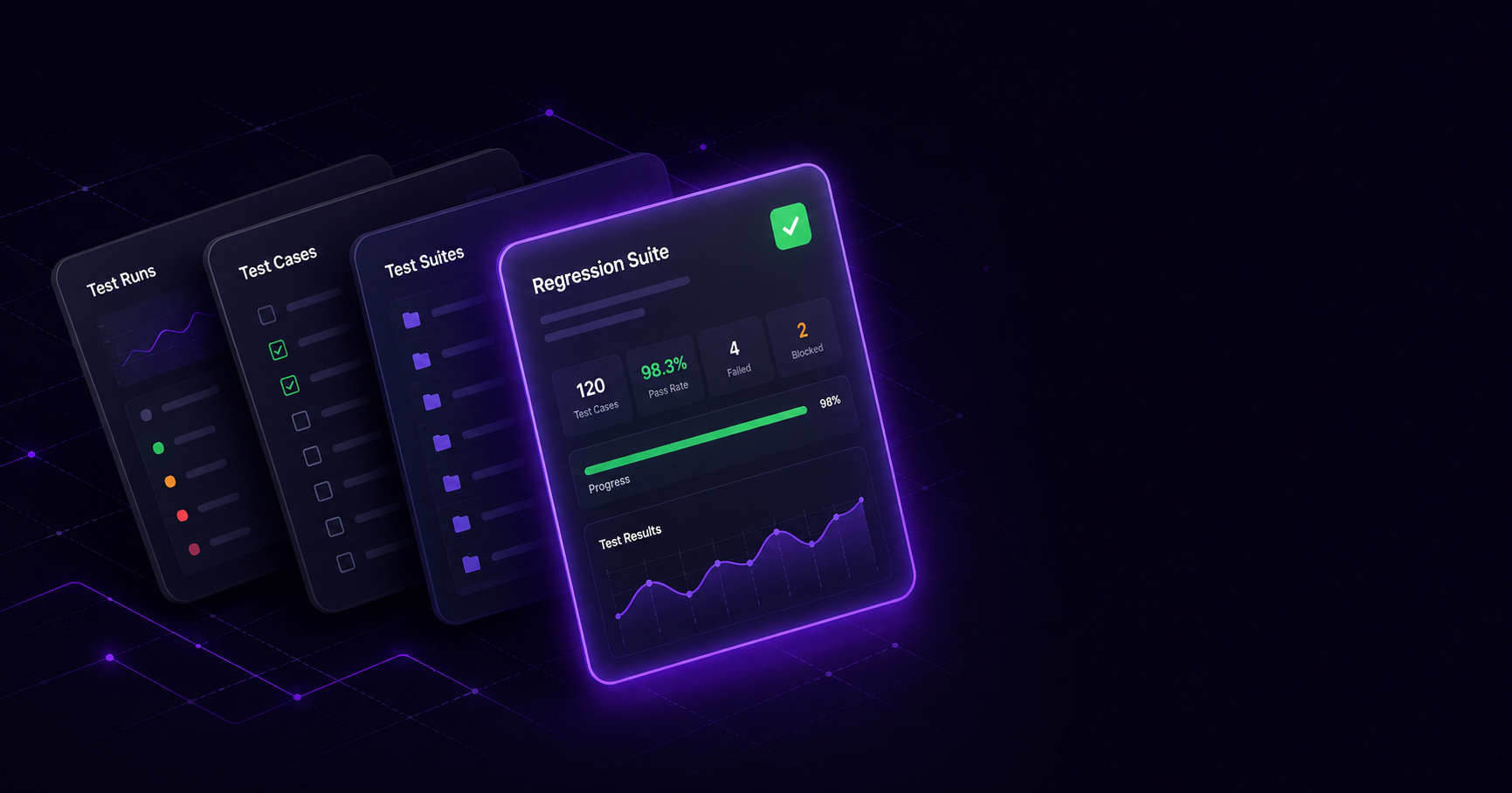
If you are looking for a Qase alternative in 2026, the short answer is: pick QAM Hub if you want AI included in every plan, native Playwright and Cypress reporting, and a Qase import wizard that brings your cases, runs and results across in one pass. If your constraints are different, the fit changes: TestRail for on-prem deployment and Enterprise-tier governance, Xray or Zephyr Standard (formerly Zephyr Scale) if your tests should live inside Jira, PractiTest for traceability across several trackers, and Tuskr or an open-source tool when licence cost is the hard limit. Most teams that leave Qase do so for a short list of mechanical reasons: AI usage counted in monthly credits, a five-seat minimum on the paid plan, read-only seats billed separately, and a free plan that stops at four users. This guide compares realistic replacements with prices read on vendor pages on 13 October 2026, so you can match a tool to how your team actually tests.
Quick verdict: the best Qase alternatives in 2026
| Tool | Best for | AI (as of 13 Oct 2026) | Automation depth | Jira model |
|---|---|---|---|---|
| QAM Hub (Best Overall) | Teams that want AI, native automation reporting, checklists and a direct Qase import in one tool | AI features included in every plan; Agent Flows in beta on Advanced | Playwright and Cypress reporters, JUnit XML through the qam-hub CLI | Integration with 7 trackers; two-way sync on Standard and Advanced |
| TestRail | On-prem deployment, Enterprise-tier governance, structured manual QA at scale | "All AI features included" on all three plans (Sembi IQ) | API and CI integrations | Integration |
| PractiTest | Traceability across several trackers | SmartFox AI and AI Test Value Score on both plans | Integration-based | Integration (multi-tracker) |
| Xray | BDD teams already inside Jira | AI test prioritization with per-run caps by edition | Framework integrations | Native (tests are Jira issues) |
| Zephyr Standard (formerly Zephyr Scale) | Jira-native test management from SmartBear | SmartBear Halo AI step suggestions, Rovo agent, SmartBear MCP | Framework integrations | Native |
| qTest (Tricentis) | Large, regulated enterprises | Copilot AI; agentic quality platform since March 2026 | Part of a wider Tricentis suite | Integration |
| Testmo | Manual, exploratory and automated results in one dashboard | AI test case generation live; more features marked Coming Soon | CI integrations | Integration |
| Tuskr | Small teams with a tight budget | Not covered in this comparison | Integrations | Integration |
| Kiwi TCMS / TestLink | Self-hosted, zero-licence setups | None built in | API | Integration or manual |
Pricing compared, read 13 October 2026
All figures were read on vendor pricing pages on 13 October 2026 unless the row says otherwise. Per-seat prices are per user per month in US dollars. Re-check before you buy, because three of these vendors changed their price lists in 2026.
| Tool | Free option | Paid entry point | Notes |
|---|---|---|---|
| QAM Hub | No free plan; 30-day trial on Advanced, no card | Start $15 annual / $17 monthly; Standard $24 / $27; Advanced $42 / $45 | One free viewer seat per paid seat on every plan; Start is capped at 10 paid seats |
| Qase | Free up to 4 users, 2 projects, 30-day history | Teams $35 annual / $42 monthly, 5-seat minimum; Enterprise custom | Collaborator (read-only) seats $10; AI credits 2,000/month on Teams, 4,000 on Enterprise, none on Free |
| TestRail | No free plan | Essentials $22 annual (up to 5 users); Professional $39 annual; Enterprise $78 annual | No viewer or read-only licence; on-prem on Professional and Enterprise, 10+ seats |
| PractiTest | No free plan | Team $47, sold as a 10-tester pack at $5,640/year; Corporate by quote | Corporate needs at least 10 licences, yearly only |
| Testmo | No free plan | Team $59/month with 5 users; Business $249/month with 15; Enterprise $599/month with 25 | Block pricing, 15% off annual |
| Tuskr | Free up to 5 users | Team $90/user/year; Business $150; Enterprise $290 | 5-user minimum on paid plans |
| Xray | No | Not printed on the product page; bought through Atlassian Marketplace | Licence covers every user in the Jira instance |
| Zephyr Standard | No | SmartBear does not publish prices; a third-party source (2 July 2026) cites about $10/month for 1 to 10 users | Licence covers every Jira user |
| qTest | No | Quote only; third-party estimates around $1,000 to $1,200 per user per year | Enterprise sales process |
| Allure TestOps | No | $39 per user per month, cloud or server | Automation-first |
Read the table honestly: for a team of up to four people, Qase's free plan costs nothing, and Tuskr's free plan covers five. QAM Hub has no free plan; Start is the cheapest paid tier, and the 30-day trial is how you evaluate it. The comparison shifts once you pass the free limits. At Qase's five-seat minimum on Teams, you pay for five seats at $35 annual; the same five people on QAM Hub Standard pay $24 each and get five free viewer seats alongside. For a broader view of the TestRail side of this math, see TestRail pricing explained.
Why teams look for a Qase alternative
For straightforward manual test management, Qase does its job well, and it ships an MCP server on every plan, including Free. The reasons teams start shopping around are usually specific and mechanical rather than vague dissatisfaction.
AI usage is counted in monthly credits
Qase's AI layer, AIDEN, runs on a monthly credit allowance: 2,000 credits per month on Teams and 4,000 on Enterprise, with none on the Free plan, according to qase.io/pricing on 13 October 2026. Credits do not roll over, and usage beyond the allowance is billed at $0.40 per credit. Qase's own documentation (read 1 September 2026) lists both a "step generation attempt" and "a successful step generation" as billable actions, so a retry costs credits too. Agentic Mode, which runs on Qase's cloud, is available on Teams and Enterprise. None of this is hidden, but it means someone on the team has to watch a balance, and AI use competes with a budget line rather than with the work.
The paid entry point is a five-seat Teams plan
Qase retired its Startup and Business tiers in June 2026. Today the step up from Free is Teams at $35 per user per month billed annually ($42 monthly), with a five-seat minimum, then Enterprise on a custom quote. A three-person team that outgrows the free plan's four-user, two-project, 500 MB and 30-day-history limits pays for five seats. Read-only stakeholders are not free either: Collaborator seats cost $10 per user per month. Together these make the real monthly cost harder to predict than the headline per-user figure.
The free plan is easy to outgrow
Thirty days of history and two projects are fine for a pilot. They are tight for a team that wants to compare this release's regression results with last quarter's, or that runs separate projects for web and mobile. If your history matters for audits, that 30-day window decides the timing of your move more than any feature does.
Automation reporting at CI scale is worth testing before you commit
If you push thousands of automated tests through parallel CI, test how any candidate tool (Qase included) groups results from sharded workers into runs, and how quickly reports load on your largest suite. This is a trial question rather than a spec-sheet one: run your real pipeline against the tool for a week and look at the run list it produces.
Three categories of Qase alternative
Before comparing individual tools, decide the architecture, because that choice narrows the list faster than feature-by-feature reading. Standalone tools (QAM Hub, TestRail, PractiTest, Testmo, qTest) run independently of your issue tracker and connect through an integration, which suits teams that want one test system regardless of where tickets live. Jira-native tools (Xray, Zephyr Standard) store tests inside Jira, so there is no second system to keep in sync. The cost is licensing: on Atlassian Marketplace an app has to be licensed at the same user tier as the host Jira, "even if only some of your licensed users need to use the app", so a 200-user Jira site pays for 200 test-management seats. Open-source tools (Kiwi TCMS, TestLink) trade a subscription for self-hosting, which fits teams with the infrastructure to run another service and little appetite for a commercial contract.
QAM Hub: best overall Qase alternative
QAM Hub is a test management system built by QA Madness, a QA outsourcing company, under a "by QA, for QA" brief. It is the strongest all-round replacement for teams leaving Qase because it answers the most common reasons to leave directly: AI features are included in every plan, automation results from Playwright, Cypress and JUnit XML land in one place, checklists sit next to test cases, and a dedicated Qase import wizard moves your suite and its history in one pass.
A Qase import wizard, not a CSV round-trip
QAM Hub has a Qase import wizard on every plan. You paste a Qase API token (it is deleted after the import), see a preview with counts before anything is written, and then the wizard brings across suites, test cases with steps, fields and custom fields, tags, linked issues as requirements, milestones, and runs and results, including failed-step notes, stack traces and defects. Images on cases and results come across too, up to five per case or result. That means your execution history moves with the cases instead of staying behind in an export file. Details are on the Qase migration page.
AI features included in every plan
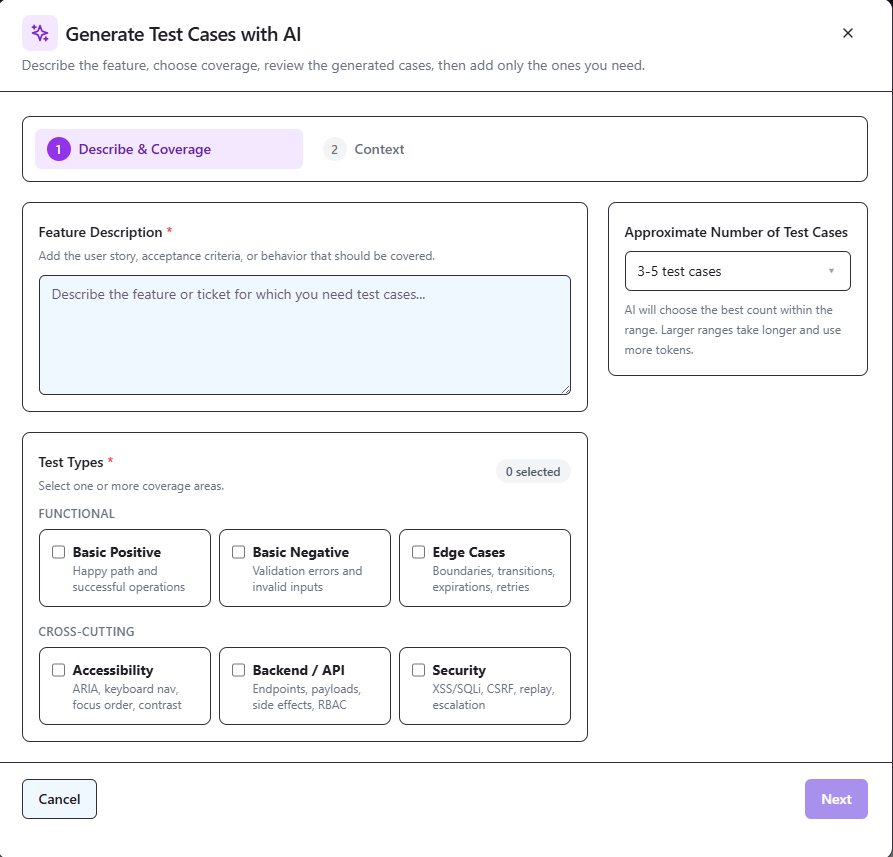
AI features are included in every plan. On every plan, including Start, that covers AI test case and checklist generation (from a description or a screenshot), AI bug analysis and the in-app AI Assistant. Standard adds AI fix suggestions, automation run analysis and retrospectives. Advanced adds Quality & Coverage Analytics, which flags duplicate cases and unclear steps and gives each case an A to D score with evidence per finding, plus a knowledge base for AI context (beta). The framing is deliberately human-in-the-loop: the AI proposes, a QA engineer decides. Read AI-generated test cases: best practices for how to review what the model drafts.
Agent Flows (beta)
On Advanced, Agent Flows (listed on the pricing page as AI Testing Agents, beta) let an AI agent execute test flows in a real browser. They run through a runner process you start yourself with npx @qamadness/tms-runner start, on Chromium, Firefox or WebKit with device profiles. Treat them as a beta: useful for assisted exploratory and regression passes, with a QA engineer reviewing what the agent reports. Background on the approach is in autonomous regression testing with AI agents.
Consolidated automation reporting
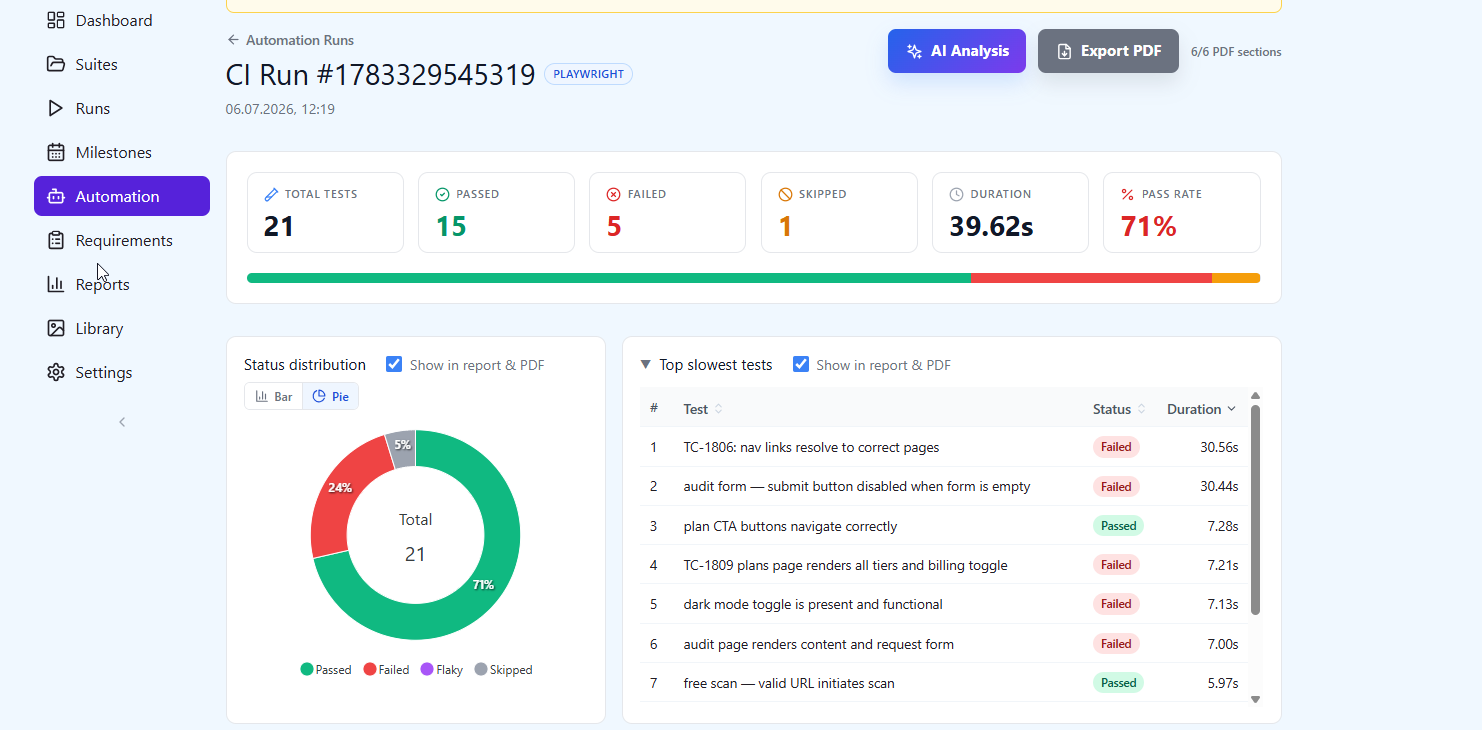
QAM Hub ingests Playwright and Cypress results through official npm reporters (@qamadness/qam-playwright-reporter and @qamadness/qam-cypress-reporter), and anything else (WebdriverIO, Selenium, Robot Framework, pytest, Jest, TestNG and more) as JUnit XML through the qam-hub CLI from your CI. Traces, video and screenshots are stored against each result, kept for 14 days on Start, 30 on Standard and 60 on Advanced. Automated results link to the matching manual case through a TC-<number> reference in the test title, and one automated test can cover several manual cases. On Standard and Advanced, Test Explorer shows pass rate, stability score, flakiness rate and average duration over the last 5 to 100 runs or a date range, highlights regressions and chronic failures, and lets a Project Admin or Org Admin quarantine a flaky test. See JUnit XML and the CLI and writing a flaky test quarantine policy.
Checklists, trackers and MCP
Checklists are a first-class object next to test cases, unlimited on every plan, which suits release checks and exploratory sessions that do not need full step-by-step cases. QAM Hub works with seven trackers: Jira, GitHub Issues, GitLab, Linear, Asana, Redmine and Trello. Creating an issue from a failed result works on every plan. On Standard and Advanced, two-way sync adds this: requirements come in from your tracker, and each linked issue gets a QAM Hub comment listing the test cases that cover it, their latest results and the bugs found. For AI-forward teams, the REST API and an MCP server are available on every plan, self-serve: under Profile, then API & MCP, you generate a token and pick a client such as Claude Code, Claude Desktop, Cursor or VS Code. The agent acts as the token owner, a Viewer stays read-only, and changes are audit-logged. MCP is not a reason to switch on its own, since Qase has one too; the reason is what the agent can reach once it is connected.
Reporting, customization and plans
Every plan includes dashboards, run reports, milestones, requirements traceability and PDF or CSV export. Standard adds cross-project reports, Projects Health, saved reports, case templates, version history with rollback (last 20 versions), up to 20 custom fields per project (5 on Start) and up to three custom execution statuses. Advanced adds Release Readiness, scheduled email reports, Google SSO, org-wide 2FA enforcement and org audit logs. There are three plans, Start, Standard and Advanced, billed per seat, and every plan gives one free viewer seat for each paid seat, so stakeholders who only read reports do not need their own licence. Plan detail is in plans, seats and what each plan includes; security and compliance are on the security page.
Honest cons
Four caveats worth stating plainly. QAM Hub has no free plan: a team of four or fewer pays nothing on Qase Free and nothing on Tuskr Free up to five users, while QAM Hub starts at $15 per seat on annual Start after a 30-day trial. It launched self-service in September 2026, so it has no G2 or Capterra record yet and a smaller community than tools that have been around for a decade. It integrates with Jira but is not Jira-native, so a team that wants tests stored as Jira issues should look at Xray or Zephyr Standard. And Agent Flows are in beta and need a runner process on your side.
TestRail: for governance and on-prem
TestRail, part of Idera's Sembi group, is the structured incumbent. It organizes cases into suites and sections, and it deploys in the cloud or on-premise; on-prem is available on Professional and Enterprise with at least 10 seats and a 12-month minimum, which matters for regulated teams. On testrail.com/pricing, read 13 October 2026: Essentials $22 per user per month billed annually (cloud only, up to 5 users), Professional $39, Enterprise $78. TestRail states "All AI features included" on all three plans, with AI-generated test cases, BDD scenarios, test automation generation, test prioritization and an MCP Server listed on every plan. Versioning, review and approvals, SSO, MFA, audit logs, parameterization and cross-project reporting are Enterprise only, and there is no viewer or read-only licence. API limits are 100, 180 and 300 requests per minute by plan, which is worth checking against a parallel CI pipeline. G2 shows 4.4 from 610 reviews (13 October 2026). Choose TestRail if on-prem and Enterprise governance outweigh the per-seat cost. See our TestRail alternatives guide and TestRail vs Qase.
PractiTest: for traceability and tracker independence
PractiTest is a full-lifecycle quality management platform built around requirements-to-test-to-defect traceability, with connectors to several trackers rather than one. SmartFox AI and the AI Test Value Score are on both plans; MCP integration is on Corporate only. Pricing read 13 October 2026: Team is $47 per user per month, sold as a 10-tester pack at $5,640 a year; Corporate is by quote with a minimum of 10 licences, yearly only. Each licence comes with free read-only users who can comment, though the vendor does not publish how many. G2 shows 4.3 from 235 reviews. Pick PractiTest if end-to-end traceability across several tools is the core requirement and you buy in blocks of ten.
Xray and Zephyr Standard: for Jira-native teams
If your team already runs everything inside Jira, a Jira-native tool removes the second system. Xray stores tests as Jira issues and suits BDD teams; it comes in Standard and Advanced editions, with Xray Enterprise as a separate Marketplace listing. Its AI test prioritization has per-run caps published by the vendor (30 June 2026): up to 75 tests on Standard, 150 on Advanced and 300 on Enterprise. The product page no longer prints prices (checked 13 October 2026), so pricing comes from Atlassian Marketplace. On Marketplace, Xray shows 4.3 from 552 reviews and 25,325 installs (20 September 2026), which is where its buyers actually review it.
Zephyr Standard (formerly Zephyr Scale) is SmartBear's Jira-native option; SmartBear also renamed Zephyr Squad to Zephyr Essential and added Zephyr Advanced. Its AI includes SmartBear Halo AI step suggestions, a Rovo agent and the SmartBear MCP server. SmartBear does not publish prices; one third-party source (2 July 2026) cites about $10 per month for 1 to 10 users and about $6.81 per user per month for 11 to 100. Its Marketplace listing shows 4.1 from 492 reviews and 15,204 installs (20 September 2026).
The trade-off for both is reach and licensing. The licence covers every user in the Jira instance, not just testers, which is the most common source of sticker shock, and you cannot use either outside Jira. On monthly Marketplace subscriptions, billing is based on the peak user count in the period; annual subscriptions are not affected. Our Xray alternatives and Zephyr alternatives pages go deeper, and choosing a test management tool for Jira covers the architecture choice.
qTest, Testmo, Tuskr, Allure TestOps and open source
qTest (Tricentis) targets large, regulated enterprises with a modular suite. It is quote-only, with third-party estimates around $1,000 to $1,200 per user per year. Its AI is Copilot, Tricentis launched an agentic quality platform in March 2026, and Tricentis acquired Tabnine on 31 July 2026. G2 shows 4.3 from 104 reviews.
Testmo, also a Sembi brand, puts manual, exploratory and automated results in one dashboard with block pricing: Team $59 per month with 5 users included, Business $249 with 15, Enterprise $599 with 25, and 15% off on annual billing (read 13 October 2026). On testmo.com/ai, AI test case generation is live, "Update Test Cases with AI" and "AI Test Optimization" are marked Coming Soon, and MCP is in private beta. G2 shows 4.6 from 27 reviews.
Tuskr has a free plan for up to 5 users, then Team at $90 per user per year, Business $150 and Enterprise $290, with a 5-user minimum on paid plans (read 13 October 2026). G2 shows 4.6 from 665 reviews. For a small team, that free plan is the main reason to look at it.
Allure TestOps is automation-first, at $39 per user per month in the cloud or on a server (qameta.io/pricing, 13 October 2026); it is a narrower fit for manual-heavy teams. Open-source options such as Kiwi TCMS and TestLink cost nothing to license but require you to host, upgrade and back them up yourself. Match each of these to a specific constraint (enterprise scale, unified execution, budget, automation-only, or full control) rather than treating them as general-purpose swaps.
How to choose: a quick decision framework
- Choose QAM Hub if you want AI included in every plan, native Playwright and Cypress reporting plus JUnit XML from everything else, checklists, a choice of seven trackers, and a Qase import that keeps your runs and results.
- Stay on Qase Free or choose Tuskr if you are four or five people, licence cost is the deciding factor, and 30 days of history is enough.
- Choose TestRail if you need on-prem deployment and Enterprise-tier audit and approval features, and the $78 annual Enterprise seat is acceptable.
- Choose PractiTest if traceability across multiple trackers is non-negotiable and you buy licences in packs of ten.
- Choose Xray or Zephyr Standard if tests must live inside Jira and you accept that the licence covers your whole Jira user base.
- Choose qTest for large regulated enterprises already working with Tricentis.
- Choose Testmo if block pricing for a fixed team size suits your budget better than per-seat pricing.
- Choose open source when you have the infrastructure to self-host and no budget for a subscription.
For a structured way to score candidates, use the test management tool evaluation checklist.
Migrating off Qase without losing your suite
The mechanics depend on the destination. Most tools accept a CSV export of your Qase cases, which moves the cases and their structure but usually leaves runs, results and attachments behind. If you move to QAM Hub, the Qase import wizard pulls directly from Qase through an API token instead: suites, cases with steps, custom fields, tags, linked issues as requirements, milestones, and runs and results with failed-step notes, stack traces, defects and images (up to five per case or result). You see a preview with counts before anything is written. See the Qase migration page for the full field list.
For automation, point your framework at the new system: in QAM Hub that means the Playwright or Cypress npm reporter, or JUnit XML uploaded through the qam-hub CLI for anything else, configured with QAM_API_URL, QAM_PROJECT_ID and QAM_API_TOKEN in your pipeline. Then keep both systems live for one release cycle so you can confirm that coverage and reporting match before you switch Qase off. If you are on Qase Free, plan the move with its 30-day history window in mind. The guides on mapping automated test results to test cases and managing automated test results in a TMS cover the linking step.
Frequently asked questions
What is the best free Qase alternative?
Tuskr's free plan covers up to 5 users, and Kiwi TCMS and TestLink are free to license if you self-host them. Qase's own free plan covers up to 4 users, 2 projects and 30 days of history (read 13 October 2026), so for a very small team staying put may be the cheapest option. QAM Hub has no free plan; it offers a 30-day trial on Advanced with no card, and after the trial nothing is deleted, but the workspace is blocked until a plan is paid. See signing up and starting your trial.
How does Qase charge for AI?
Through monthly AIDEN credits: 2,000 per month on Teams, 4,000 on Enterprise, none on Free, no rollover, and $0.40 per extra credit (qase.io/pricing, 13 October 2026). Vendor docs count both generation attempts and successful generations as billable actions. In QAM Hub, AI features are included in every plan; what changes between plans is which AI features you get, not how they are billed.
Will my Qase run history come with me?
It depends on the destination. A CSV export moves cases, not execution history. QAM Hub's Qase import wizard brings runs and results across, including failed-step notes, stack traces and linked defects, along with milestones and images.
Which Qase alternative has the deepest automation support?
For automation-heavy teams, QAM Hub combines Playwright and Cypress reporters, JUnit XML through the qam-hub CLI, stored traces and video, and (on Standard and Advanced) Test Explorer with regression, chronic-failure and flakiness analysis plus quarantine. Allure TestOps is another automation-first option, though weaker for manual-focused teams. See test management for Playwright.
Can I connect an AI agent like Claude to my test management tool?
Yes, in several tools. QAM Hub offers an MCP server on every plan, self-serve under Profile, then API & MCP; Qase and TestRail list one on every plan as well, and PractiTest on Corporate. In QAM Hub the agent acts as the token owner, so a Viewer token stays read-only and every change is audit-logged. More detail in connecting Claude to your TMS via MCP and giving AI agents write access to your TMS.
What should I check before committing to any alternative?
Check the per-seat price at your real team size, including seat minimums and what read-only users cost; confirm the reporter or upload path for your framework; check history retention against audit needs; confirm whether runs and results migrate or only cases; and run a one-release parallel trial before switching. For a broader shortlist, see our best test management tools in 2026.
The bottom line
QAM Hub is the closest all-round upgrade from Qase for teams that have outgrown the free plan: AI features are included in every plan, Playwright, Cypress and JUnit XML results land in one place, checklists sit next to cases, and the Qase import wizard keeps your runs and results instead of leaving them in an export. Qase remains a reasonable choice for small manual-first teams, and for four people or fewer its free plan is hard to beat on cost. Match any tool to how your team actually tests rather than to a feature count, and trial it against your real suite for a full release before you switch. If you are still deciding what a test management system should do at all, start with what is a test management system.
QAM Hub is built by QA Madness, who published this guide. Competitor prices, plans and ratings were read on vendor pages and G2 on 13 October 2026 unless another date is given, and should be re-verified before purchase.