

Selenium Test Results in a Test Management System
Selenium does not produce test results. It drives the browser, and the test runner around it (JUnit 5, TestNG, pytest, NUnit, Mocha) decides what passed, what failed and what gets written down. So getting Selenium results into a test management system comes down to three decisions: have the runner write a JUnit XML report on every run, upload that report from CI after the tests even when they fail, and give each test a name that stays stable and carries the ID of the manual case it covers. Screenshots are the part people trip on. JUnit XML has no place for them, so they live in your CI artifacts and the report carries a link.
The rest of this article goes through those decisions in the order they bite: where each Selenium stack writes its report, what the format keeps and what it throws away, why test identity matters more than any dashboard, how to link automated tests to manual cases, what to do with retries and flaky tests, and how to keep failure evidence one click away from the result.
Where Selenium results actually come from
The Selenium documentation treats the test runner as a separate layer you add for hooks, grouping and parallel runs, and it leaves assertions to an assertion library. Reporting sits with the runner as well. That is good news for a TMS integration, because nearly every runner used with Selenium can write the same format: JUnit XML. You rarely need a plugin. You need to know where the file lands and which file to pick when the runner writes more than one.
| Stack | What writes JUnit XML | Where it lands by default | Watch out for |
|---|---|---|---|
| Java, JUnit 5, Maven | Maven Surefire, on every mvn test | target/surefire-reports/TEST-*.xml | The report holds the Java method name, not @DisplayName, unless you configure Surefire's reporter |
| Java, JUnit 5 or TestNG, Gradle | The Gradle test task | build/test-results/test/TEST-*.xml | TestNG needs useTestNG() in the test task |
| Java, TestNG, Maven | Surefire, plus TestNG's own reporters | target/surefire-reports/ | The folder also holds testng-results.xml (TestNG's format, not JUnit) and a junitreports/ copy. Pick one source or every test is counted twice |
| Python, pytest | pytest itself, with --junitxml | Wherever you point it, for example reports/junit.xml | Captured output is written only as configured by junit_logging |
| C#, NUnit, xUnit or MSTest | The JunitXml.TestLogger package for dotnet test | TestResults/<assembly>.xml per test project | dotnet test writes no JUnit XML on its own, and NUnit's TestResult.xml is NUnit's format |
| JavaScript, selenium-webdriver with Mocha | mocha-junit-reporter | Set by MOCHA_FILE | Mocha's default reporter writes to the console only |
| Robot Framework with SeleniumLibrary | robot --xunit xunit.xml | The output directory | output.xml is Robot's own format. Upload the xUnit file |
The TestNG row is the easiest one to get wrong. A glob such as target/surefire-reports/**/*.xml picks up Surefire's files and the junitreports/ copies, and the run suddenly has twice the tests. Use target/surefire-reports/TEST-*.xml, which matches Surefire's own files whether it writes one per class or a single TEST-TestSuite.xml for a suite file.
What a JUnit XML report keeps, and what it drops
Here is one Selenium test from a Surefire report. It timed out on the first attempt and passed when Surefire re-ran it:
<testcase name="tc_4_lockoutAfterFiveAttempts"
          classname="com.aurora.tests.auth.LoginTest" time="15.1">
  <flakyFailure type="org.openqa.selenium.TimeoutException"
      message="Expected condition failed: waiting for visibility of element
               located by By.cssSelector: [data-test='lockout-banner']">
    <stackTrace>org.openqa.selenium.TimeoutException: ...
      at org.openqa.selenium.support.ui.WebDriverWait.timeoutException(...)
      at com.aurora.tests.auth.LoginTest.tc_4_lockoutAfterFiveAttempts(LoginTest.java:88)
    </stackTrace>
  </flakyFailure>
</testcase>
That is most of what the format can say about a test: a name, a class, a duration, an outcome, and for anything that did not pass, an exception type, a message and a stack trace. A <skipped> element can carry a reason. <system-out> and <system-err> carry console output. <properties> can carry key-value pairs, at suite level in every dialect and at test level in some.
What it does not carry matters more for Selenium than for unit tests:
- No screenshot, video, page source or browser log. There is no attachment element in the format.
- No browser, browser version or capabilities, unless your framework puts them into the test name or a property.
- No WebDriver session ID, which is the key you need to find the matching video on a Grid or a cloud provider.
- No link to a manual test case, unless you encode one.
One distinction the format does keep is worth using. JUnit semantics separate a <failure> (an assertion did not hold) from an <error> (the test threw something else). In Selenium suites a large share of the red is the second kind. TimeoutException, NoSuchElementException and StaleElementReferenceException are errors, and they usually point at a locator, a wait or the environment rather than at the product. An AssertionError means the page loaded and showed the wrong thing, which is more likely to be a real bug. If your triage starts with "assertion failures first, timeouts second", you will spend the first hour of a red morning on the failures most likely to matter. QAM Hub, for one, shows both kinds as failed, so keep the exception type visible in the message. The first line of the stack trace already does that.
Test identity decides whether history works
A TMS can show one run from any XML file. Trends, flaky detection, "new failure since the last run" and per-test history all depend on something less visible: recognising that the test in tonight's report is the same test as in last night's. The only identity a JUnit XML report offers is the combination of suite name, classname and name. Change any of them and, as far as the report is concerned, one test disappeared and a new one was born.
In practice that means four rules for Selenium suites:
- Treat test names as an interface. Renaming
loginWorkstovalidLoginforks the history in every tool keyed on names. TestRail's CLI documentation says the same about its own automation ID, which is built fromclassnameandname: rename a test and it no longer maps to the existing case. Rename deliberately, and in one commit. - Put the browser into the name when one test runs on several. A cross-browser matrix that runs
validLoginon Chrome and Firefox produces two results with the same identity. Some tools merge them into one history, which makes a Firefox-only failure look like a 50% flaky test. pytest does this right by default:@pytest.mark.parametrize("browser", ["chrome", "firefox"])producestest_valid_login[chrome]andtest_valid_login[firefox]. In Java, a TestNG factory or a test class per browser gets you the same result. - Keep data-provider rows in a fixed order. A TestNG
@DataProvideror JUnit 5@ParameterizedTestcan emit the same method name several times. Tools tell the rows apart by position or by the generated display name, so a shuffled data source shuffles history. - Do not put run-specific values into names. Timestamps, random emails or build numbers in a display name make every run look like a brand-new suite.
Linking automated Selenium tests to manual test cases
The point of sending Selenium results to a test management system, as opposed to a standalone report, is that a manual test case can then show its automated runs, and coverage reports can count it as automated. That needs a link from the test to the case, and the cheapest durable link is the case ID in the test name. Why that mapping breaks as a suite grows, and how to stop it, is covered in how test case ID mapping breaks. For Selenium the obstacle is mostly syntactic: Java, C# and Python method names cannot contain a hyphen, so TC-12 cannot be part of one.
There are three ways around it, in order of how little they change your code.
An underscore prefix. Start the method name with the case number. QAM Hub reads TC_12 the same as TC-12, and one test can carry several:
// TestNG or JUnit 5
@Test
public void tc_12_validLogin() { ... }

// One test covering two manual cases
@Test
public void tc_12_tc_13_loginAndLogout() { ... }

# pytest
def test_tc_12_valid_login(driver):
    ...
A readable display name, on JUnit 5 with Maven. By default Surefire writes the method name into the report and ignores @DisplayName. Surefire 3.0.0-M4 and newer can write the display name instead:
<plugin>
  <groupId>org.apache.maven.plugins</groupId>
  <artifactId>maven-surefire-plugin</artifactId>
  <version>3.5.2</version>
  <configuration>
    <statelessTestsetReporter implementation="org.apache.maven.plugin.surefire.extensions.junit5.JUnit5Xml30StatelessReporter">
      <usePhrasedTestCaseMethodName>true</usePhrasedTestCaseMethodName>
    </statelessTestsetReporter>
  </configuration>
</plugin>

@Test
@DisplayName("TC-12 User can log in with valid credentials")
void validLogin() { ... }
Switching this on renames every test in the report at once, so do it on a quiet day and expect one break in history.
A property, in pytest. record_property("qam.caseNumber", "12") keeps the function name clean and puts the ID into the XML. The pytest documentation warns that record_property breaks schema verification against the latest JUnit XML schema, which some CI servers check, and recent pytest versions print a warning unless junit_family = xunit1 is set in pytest.ini. If you have no reason to keep names clean, the underscore prefix avoids both.
Whichever route you pick, other tools use other conventions. TestRail's CLI, for example, reads a test_id property with values like C123 and otherwise matches on classname plus name. The principle carries across tools: the ID travels inside the report, and nobody maintains a mapping spreadsheet.
Retries and flaky Selenium tests
Browser tests fail for reasons unrelated to the product, and most Selenium teams end up re-running failures. How you re-run them decides whether the TMS can tell you the truth.
Maven Surefire does it natively. mvn -Dsurefire.rerunFailingTestsCount=2 test re-runs failing tests up to twice, for JUnit 4.12+, JUnit 5 and TestNG. The report keeps every attempt: a test that failed and then passed gets <flakyFailure> or <flakyError> children, and a test that failed every time keeps its first <failure> plus a <rerunFailure> per re-run. pytest-rerunfailures takes a different route and repeats the <testcase> element. Both are recorded, which is the property that matters. A retry loop written by hand inside the test, or a CI step that re-runs the whole job and uploads only the second report, hides the first failure from everything downstream.
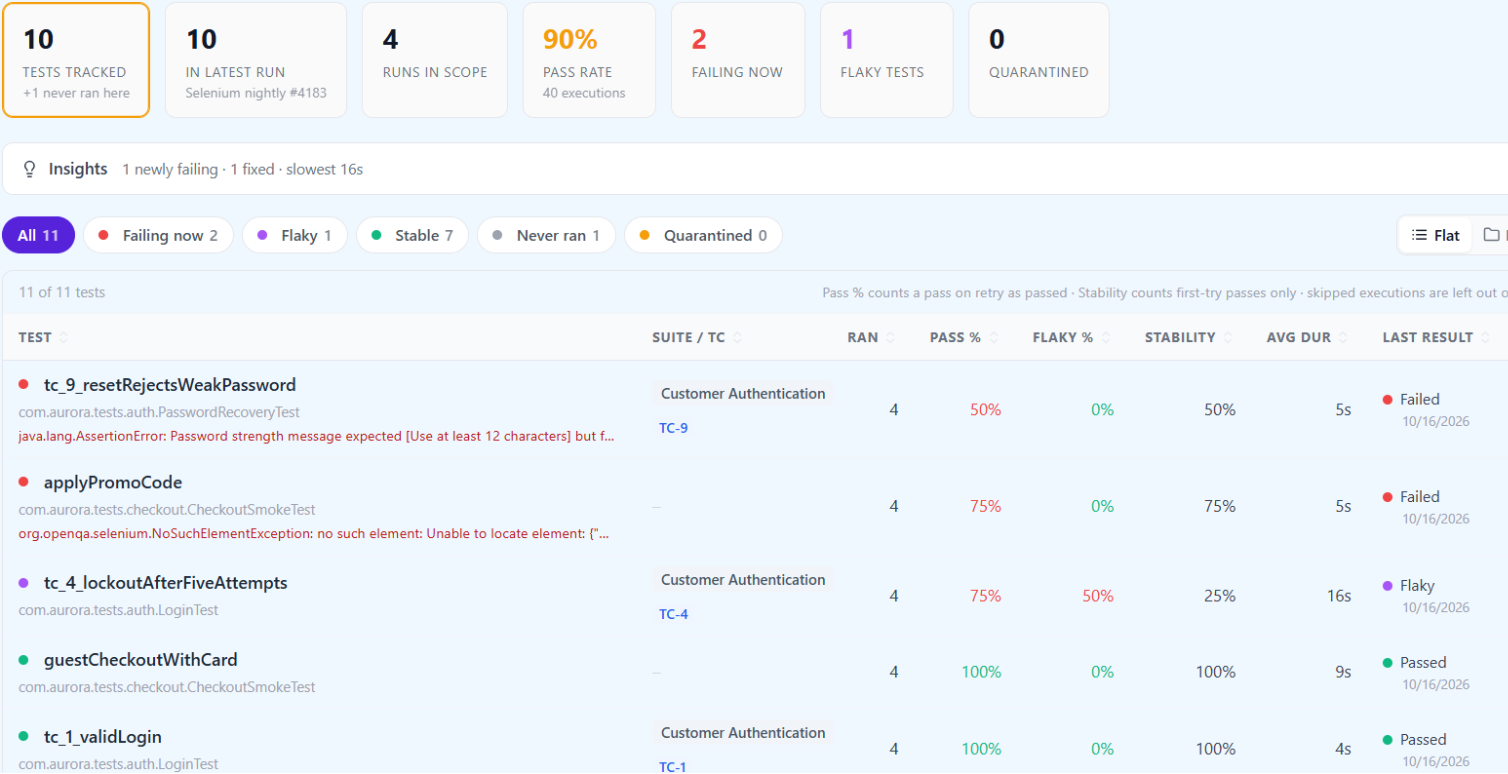
Once attempts are recorded, two numbers per test stop agreeing, and the gap between them is the useful signal. In the four sample runs behind the screenshots in this article, tc_4_lockoutAfterFiveAttempts passed outright once, failed every attempt once, and needed a retry twice:
| Measure | How it is counted | tc_4 over 4 runs |
|---|---|---|
| Pass rate | Runs that ended green, retries included | 75% |
| Flakiness rate | Runs that needed a retry to end green | 50% |
| Stability | Runs that passed on the first attempt | 25% |
A 75% pass rate looks like a test with a bad week. A 25% stability score says the retries are holding up a test that almost never passes on its own, and that the lockout banner wait is the thing to fix. Retries keep the pipeline usable. Stability tells you how much you are leaning on them.
The way this usually goes wrong is gradual. A team adds rerunFailingTestsCount=2 to get a nightly Selenium suite back to green, the pass rate settles above 95%, and nobody opens the attempts again. Over the following months the suite gets slower, because more tests now pass only on their second or third try. Some of those are slow waits. One or two are real race conditions in the product, such as a banner rendered after an asynchronous call that sometimes loses, and they have been passing on retry the whole time. The pass rate never moved. The stability column would have shown it in the first week.
When a test like that cannot be fixed this sprint, quarantine it with a reason and an owner rather than deleting it or wrapping it in another retry. Our flaky test quarantine policy covers the rules that keep a quarantine list from turning into a graveyard.
Screenshots, video and other evidence the report cannot hold
A Selenium failure without a screenshot costs a re-run to diagnose. Since JUnit XML has no attachment element, the evidence has to be stored somewhere else and referenced from the result. The arrangement that holds up in practice has three parts.
Capture on failure, in the framework. Selenium's TakesScreenshot interface (save_screenshot() in Python) does the capture. Call it from the runner's failure hook, not from individual tests: a TestNG ITestListener, a JUnit 5 TestWatcher extension or a pytest pytest_runtest_makereport hook. Name the file after the test's identity, so the file and the result can find each other:
public class FailureScreenshotListener implements ITestListener {
  @Override
  public void onTestFailure(ITestResult result) {
    WebDriver driver = DriverManager.current(); // however your framework exposes it
    if (!(driver instanceof TakesScreenshot shooter)) return;
    String name = result.getTestClass().getRealClass().getSimpleName()
        + "." + result.getMethod().getMethodName() + ".png";
    try {
      Path target = Paths.get("target", "screenshots", name);
      Files.createDirectories(target.getParent());
      Files.copy(shooter.getScreenshotAs(OutputType.FILE).toPath(), target,
          StandardCopyOption.REPLACE_EXISTING);
      // CI_JOB_URL is GitLab's variable; use your CI's equivalent
      System.out.println("Failure screenshot: " + System.getenv("CI_JOB_URL")
          + "/artifacts/file/" + target);
      if (driver instanceof RemoteWebDriver remote) {
        System.out.println("WebDriver session: " + remote.getSessionId());
      }
    } catch (IOException e) {
      System.out.println("Screenshot not saved: " + e.getMessage());
    }
  }
}
Keep the files as CI artifacts. Upload target/screenshots/ as a job artifact with the same retention you want for failure evidence. On a Selenium Grid built from the official Docker images, the video recorder can name each file after the session ID (SE_VIDEO_FILE_NAME=auto), which is why the snippet prints the session ID too. Cloud grids key their session pages on the same ID.
Put the link into the report. Anything printed to stdout during a test can end up in that test's <system-out>, and a TMS that stores console output per test then shows the link next to the failure. Two settings decide whether it gets there. In Maven, redirectTestOutputToFile=true moves output into separate -output.txt files and out of the XML. In pytest, set junit_logging = system-out in pytest.ini. Check the first failing run's XML before relying on it, because whether output printed from a listener is attributed to the test depends on the runner and its version.
Some TMS CLIs go a step further and upload files named in the report. TestRail's CLI, for example, reads a testrail_attachment property with a file path. QAM Hub stores console output and stack traces from JUnit XML but no media. Screenshots and other media reach it only through its Playwright and Cypress reporters. For a Selenium suite, the CI artifact link is the evidence path.
Sending the report from CI
The upload is one more step after the tests, and two details decide whether it works on the days you need it.
The step has to run when the tests fail. The red run is the one you want in the TMS, and in most CI systems a failed test step skips every step after it. In GitHub Actions that is if: always():
- name: Run Selenium tests
  run: mvn -B clean test -Dsurefire.rerunFailingTestsCount=2

- name: Keep failure screenshots
  if: always()
  uses: actions/upload-artifact@v4
  with:
    name: screenshots
    path: target/screenshots/
    if-no-files-found: ignore

- name: Send results to QAM Hub
  if: always()
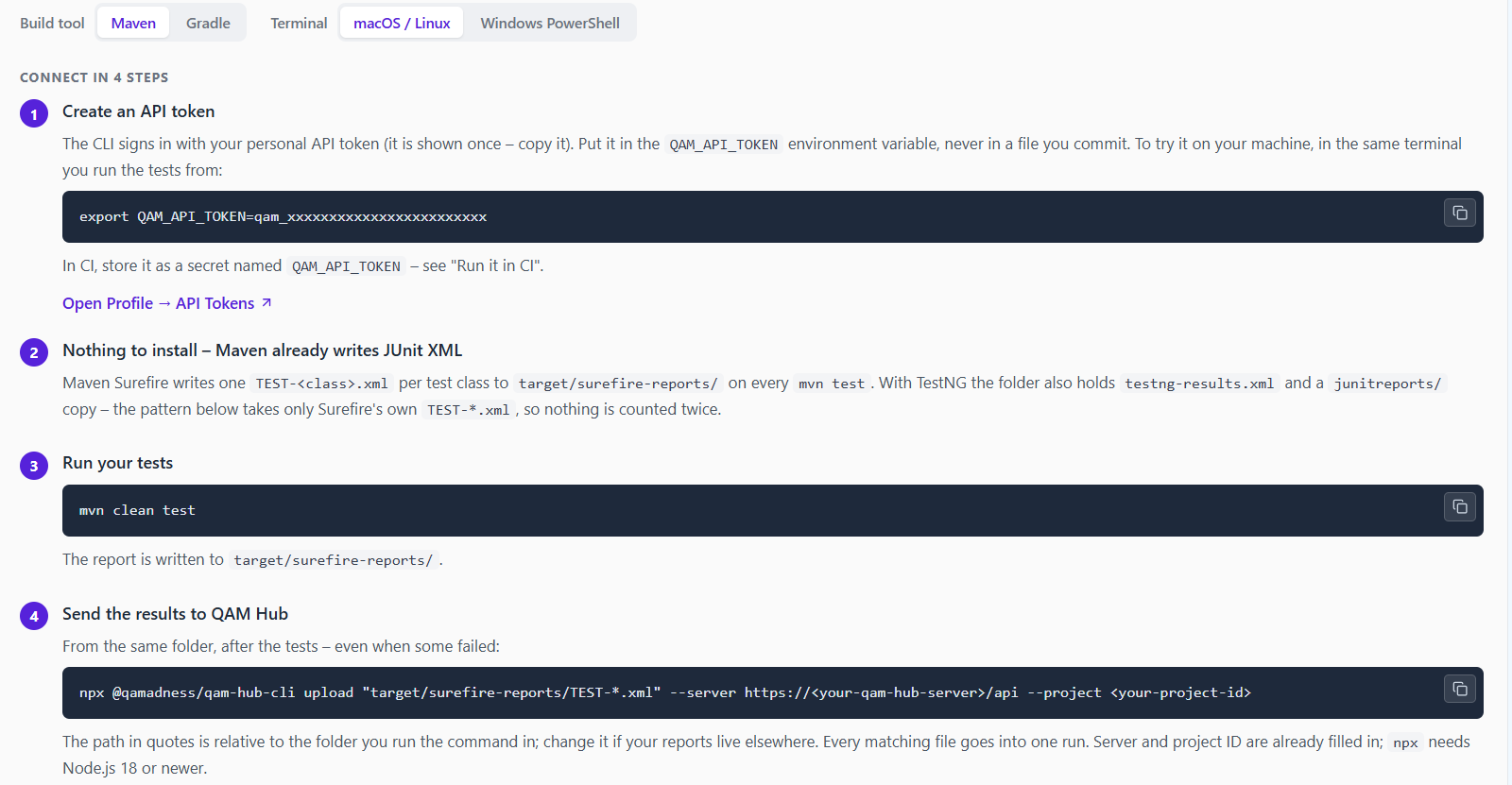
  run: npx @qamadness/qam-hub-cli upload "target/surefire-reports/TEST-*.xml" --server <your server address> --project <your project ID>
  env:
    QAM_API_TOKEN: ${{ secrets.QAM_API_TOKEN }}
Think about where the run boundary is. With the QAM Hub CLI, every matching file in one upload becomes one run, up to 50 files and 40 MB. A pipeline that shards Selenium tests across five parallel jobs and uploads from each job produces five runs. If the release question is "what did tonight's pipeline do", collect the XML from all shards into one final job and upload once. If the shards are different browsers and you want to see them separately, upload per job and say which is which with --environment or --name.
Read the duration with that in mind as well. A run's duration is the sum of the time attributes in its files. For tests that ran in parallel on a Grid, that is total test time, not how long the pipeline took.
The branch, commit and build link come from the CI environment. The CLI detects them on GitHub Actions, GitLab CI, Jenkins, Azure Pipelines, CircleCI, Bitbucket, TeamCity and several others. A report uploaded by hand from the Automation page has none of that, which is fine for a one-off and a poor habit for anything nightly. The step-by-step setup, including GitLab CI, Jenkins and a curl route for agents without Node.js, is in Uploading JUnit XML Reports with the CLI.
What the run looks like once it lands
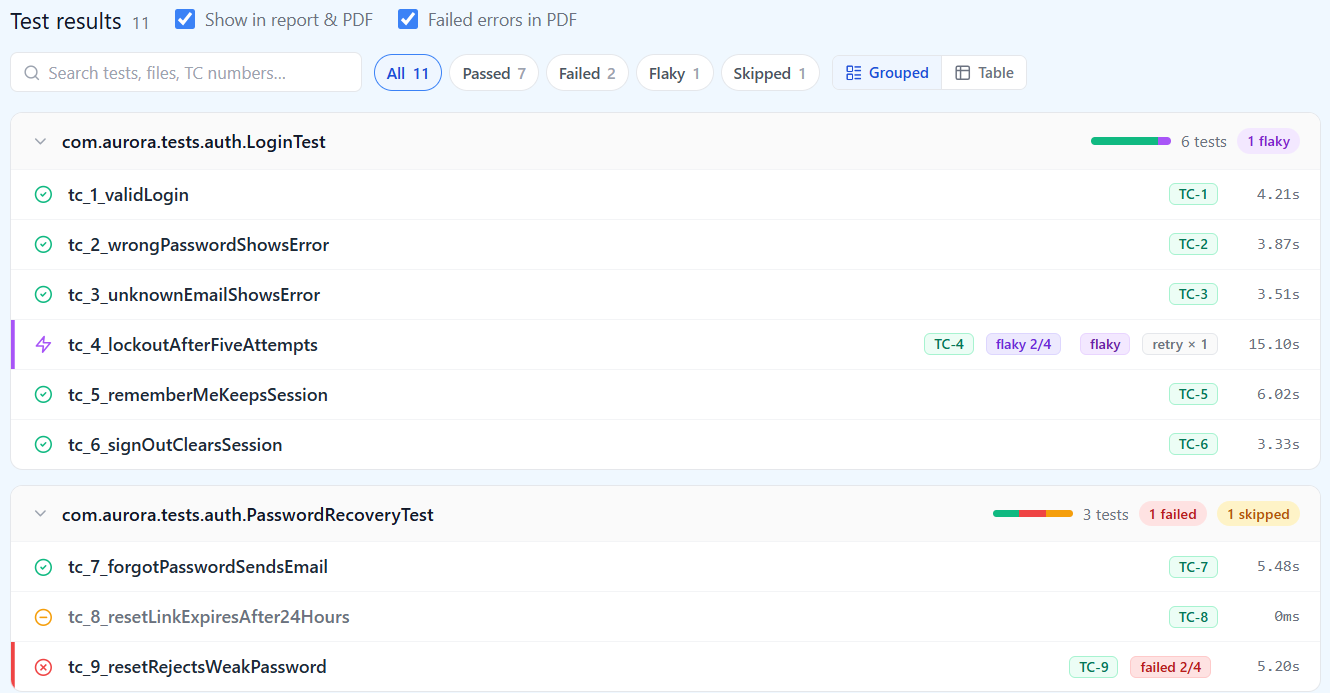
After the upload, the run shows totals, the pass rate and what changed since the previous run of the same project. In the run below, applyPromoCode broke tonight, the lockout test recovered with a retry, and the weak-password test failed for the second night running. That comparison is the first thing to read on a red morning, because "new failure" and "still failing" call for different people.
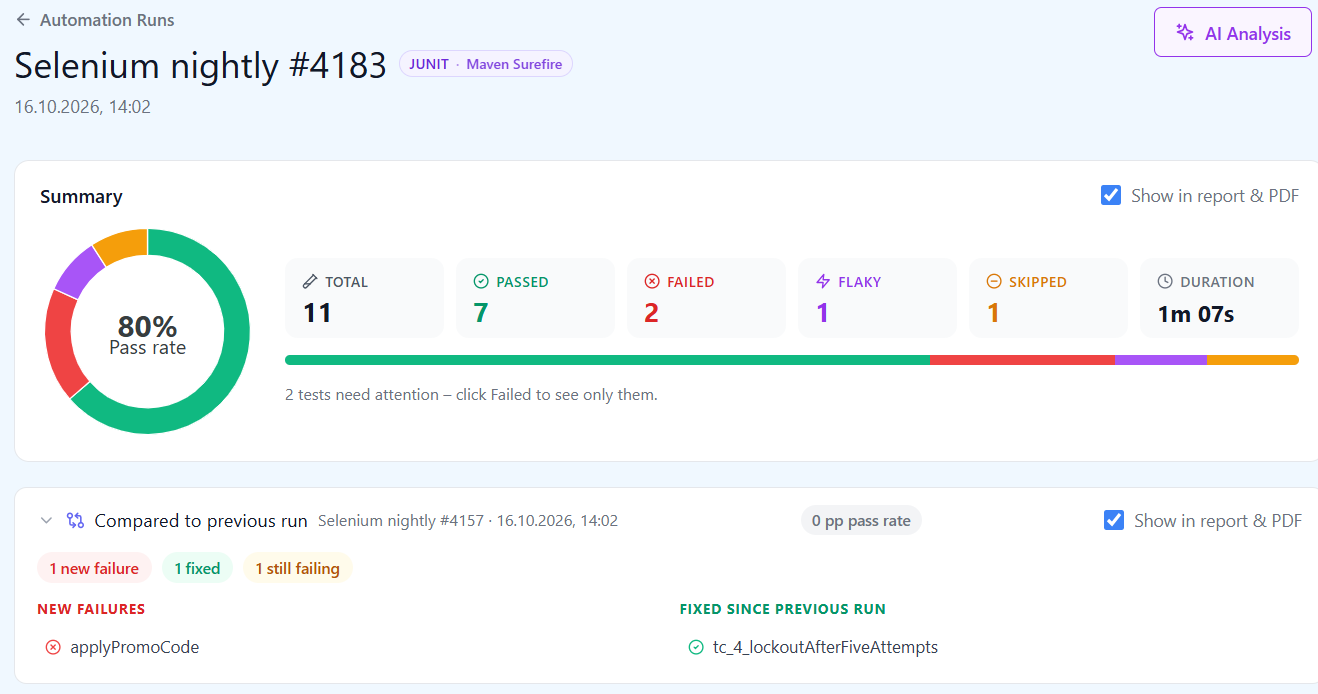
The pass rate in that summary is (passed + flaky) / (total − skipped): 8 of 10. The skipped password-expiry test is left out of the denominator, so a growing pile of skips will not drag the number down. That is also why a skip deserves a reason in the XML, and why a test that has been skipped for a month deserves a ticket.
Below the summary, results are grouped by class, and every test that carries a case number shows it as a badge. Tests without one, such as the two checkout smoke tests in this suite, are listed the same way but count as unlinked in coverage.
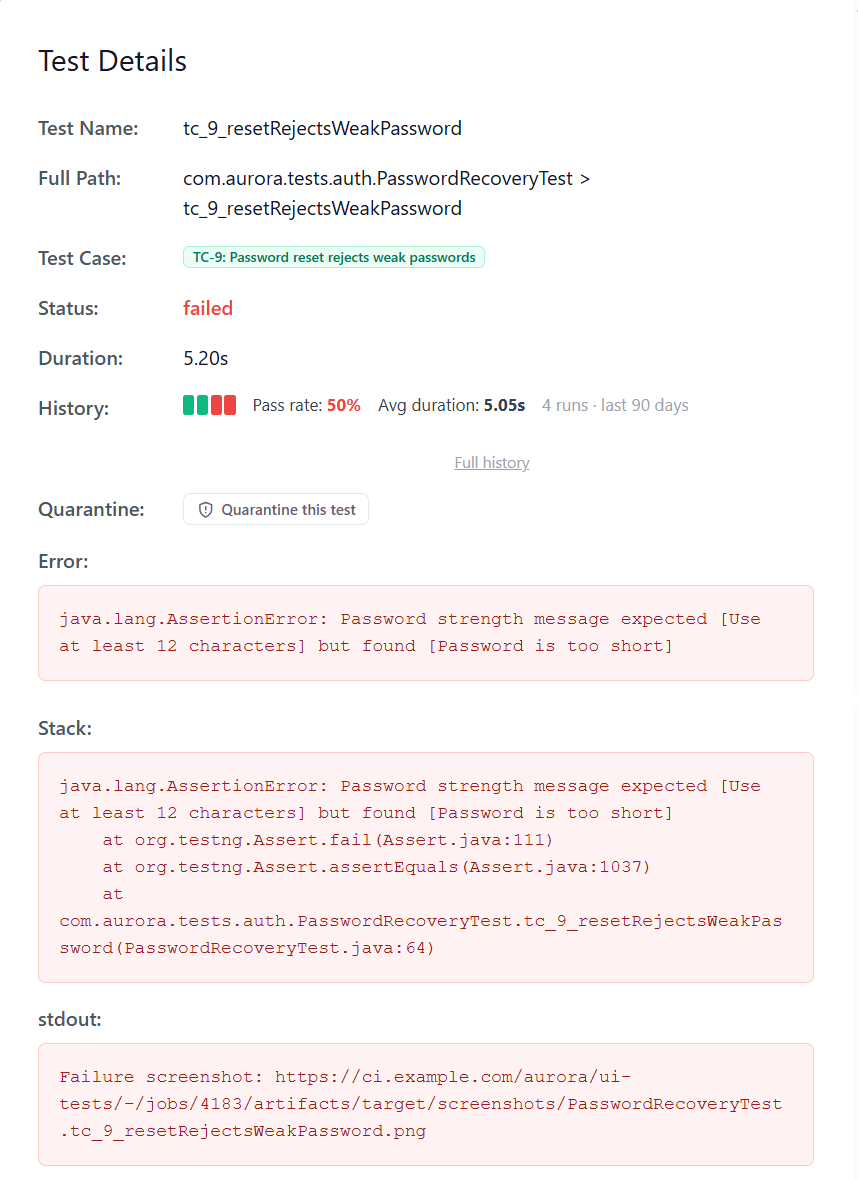
Opening a failed test shows the linked manual case, its recent history, the error and stack trace, and the console output, which is where the screenshot link from the listener above ends up.
What QAM Hub does with Selenium results, and where it stops
QAM Hub is the test management system built by QA Madness, the team that publishes this blog. For Selenium it works the way this article describes, because the article was written against it:
- JUnit XML from Surefire, Gradle, pytest,
JunitXml.TestLogger, Mocha and Robot Framework uploads throughnpx @qamadness/qam-hub-cli upload, on every plan including Start. The in-app setup guide has separate paths for Selenium with JUnit 5, TestNG, pytest and NUnit. - Surefire's
flakyFailureandrerunFailureelements and pytest-rerunfailures repeats become one test with its attempts, marked flaky when the last attempt passed. TC-<number>orTC_<number>in a test name, or aqam.caseNumberproperty, links the result to the manual case, and one test can cover several cases.- The Tests tab, on the Standard and Advanced plans, tracks each test across runs with its pass rate, flakiness rate, stability and average duration, and lets a Project Admin or Organization Admin quarantine a test with a reason. Standard and Advanced also add AI analysis of an automation run.
The limits are the ones the format sets. No screenshots or video arrive with JUnit XML. A test's history is keyed on its path, so the same test run on two browsers needs the browser in its name to keep two histories. Branch and commit appear only when the upload runs in CI.
If you are starting a new UI suite rather than wiring up an existing one, the comparison in test management for Playwright shows what changes when the framework can send its own traces and video. For a Selenium suite that already works, none of that is a reason to rewrite it. The report you already produce is enough.
Where to start
If your Selenium results currently live in a CI log, do this in order and stop when the next step stops paying for itself:
- Make the upload step run on every pipeline with
if: always()or your CI's equivalent, from the right glob. One week of nightly runs in one place is worth more than any later refinement. - Freeze test names, and add case IDs to the tests that cover cases someone reports on. Start with the smoke suite. Nobody needs the whole regression suite linked on day one.
- Turn on runner-level retries and watch stability, not pass rate. The tests with the widest gap between the two are your first fixes.
- Print artifact links and session IDs on failure, so evidence is one click away from the result.
What not to do: do not write a custom reporter or a REST integration before you have tried the JUnit XML your runner already writes. In most Selenium stacks it carries everything a TMS can use, and the one thing it cannot carry, the screenshot, is better kept in CI storage anyway.
Frequently asked questions
Does running on Selenium Grid or a cloud grid change the report?
No. The grid runs the browser, and the runner on your CI agent still writes the JUnit XML, so the upload is the same. What changes is where the evidence lives. Video and logs sit on the grid or the provider's session page, keyed on the WebDriver session ID. Print that ID on failure and it lands in the result's console output.
We use Cucumber with Selenium. Does the same approach work?
Yes. Cucumber-JVM writes JUnit XML with its junit plugin, for example --plugin junit:target/cucumber.xml, and each scenario becomes a test case. Scenario names become test names, so put the case ID in the scenario name and keep names stable, the same rules as above.
We already have Allure or Extent Reports. Why add a TMS?
They answer a different question. Allure and Extent produce a rich report for one run, with steps and screenshots, and they are good at it. A test management system puts that run next to manual testing, links automated results to the cases they cover, and tracks each test across runs and releases. Many teams keep the HTML report as a CI artifact for debugging and send the JUnit XML to the TMS for history and coverage.