

How to Write Test Cases: Format, Worked Examples and the Detail-Level Decision
A test case is written well when a tester who has never seen it can run it on a fresh build and reach the same verdict you would. Everything else follows from that one requirement: one behaviour per case, concrete values instead of "a valid user", an expected result the tester can observe rather than assume, and preconditions that describe a state, not a route to it. How much step-by-step detail to add is a separate decision, and it depends on who will run the case, how often, and whether anyone has to prove later that it was run. This guide covers the format, the design techniques that turn a requirement into the right set of cases, a full worked example for a promo-code feature, the detail-level decision, and the review that keeps weak cases out of the suite.
What a test case is, and what it is not
The ISTQB glossary defines a test case as a set of preconditions, inputs, actions where applicable, expected results and postconditions, developed based on test conditions. The useful part of that definition is the last clause. A test case does not come from the UI or from a tester's imagination. It comes from a test condition, which is one thing about the system you want to check ("the minimum order amount for a promo code is enforced"). One condition usually produces several cases, because the same rule has to be checked at its boundary, below it, and with the inputs that would break it.
Four artefacts get confused with each other, and mixing them is the most common reason a suite becomes unmaintainable.
| Artefact | What it answers | Typical size | Example |
|---|---|---|---|
| Test condition | What could be checked | One sentence | Promo code minimum order amount is enforced |
| Test scenario | Which user journey is covered | One line, no steps | Customer applies a promo code at checkout |
| Test case | Exactly what to do and what must happen | Title, preconditions, steps, data, expected result | Order total $49.99 with code SAVE10: code is rejected with the minimum-order message |
| Test procedure / script | In which order to execute a set of cases, with setup and teardown | A run, a checklist, or an automated test | Regression run for the checkout release |
Scenarios and cases serve different readers. The scenario tells a reviewer what the suite covers; the case tells a tester what to do. Checklists sit between the two: a short line per check, no steps, fast to execute and fast to maintain, right for smoke checks and release sign-offs where the people running them already know the product. Writing a 12-step case for "the home page loads" is waste; writing a one-line checklist item for a tax calculation with four input classes is a bug waiting to be missed.
Two more things a test case is not. It is not a record of a result: "Actual result" and "Status" belong to the test run, where they are stored per execution, per build and per environment. A template that carries those columns is a spreadsheet artefact from the days when the case and its single result lived in the same row. And it is not documentation of how to use the product. If a case explains where the Settings menu is, that explanation belongs in a shared setup case or a project wiki, referenced once, not copied into forty cases that all have to change when the menu moves.
The fields that matter, and the fields that only look like they do
ISO/IEC/IEEE 29119-3, the test documentation standard, lists the elements of a test case specification: an identifier, an objective, priority, traceability to what is being tested, preconditions, inputs, expected results, and the environment needs. Most tool templates and most articles expand that into nine to twelve fields. In practice the fields split into three groups by how much they change the quality of the case.
The fields that decide whether the case can be run. Title, preconditions, steps, test data, expected result. If any of these is vague, the case fails its only job. The rest of this article is mostly about these five.
Then the ones that decide whether the case can be found and prioritised. A stable ID (TC-54, never renumbered), the suite or feature it belongs to, priority, the requirement or user story it traces to, tags such as smoke, regression or payments, and whether it is automated. None of these make the case better to execute, but without them a 2,000-case suite cannot be filtered, a release run cannot be assembled, and a changed requirement cannot be followed to the cases it invalidates. The requirement link is the one teams skip most and regret most, and a requirements traceability matrix is only as good as the links behind it.
And the ones that belong to the run, not the case. Actual result, status, executed by, execution date, defects found, environment the test was run on. Keep these out of the case definition. A test management system stores them per run, which is what makes it possible to see that TC-54 passed on the last eight builds and failed on the ninth. A spreadsheet with one status column cannot, and that is the strongest argument in test management versus spreadsheets.
Postconditions deserve a note. The standard includes them, most templates include them, and most written cases leave them empty. Fill them in only when the case changes shared state that the next case depends on: a created order, a consumed one-time code, a changed account setting. "User is logged out" after a login test is not a postcondition worth writing.
A worked example: from a requirement to the test cases
Login is the example in almost every guide on this topic, and it is a poor one, because the interesting decisions in test case writing only appear when a feature has rules. Here is a feature with rules.
Requirement (from the user story): A customer can apply one promo code at checkout. The code SAVE10 gives 10% off the merchandise subtotal when the subtotal is $50.00 or more. Each customer can use a given code once. Codes have an expiry date and cannot be applied after it. Only one code can be active on an order; applying a second code replaces the first. The discount never applies to shipping.
Before writing any case, list the test conditions. Reading the requirement sentence by sentence gives seven of them, and the act of listing them already exposes a question for the product owner (what happens to a code applied before expiry on an order paid after it?). That question is the first defect this test case writing finds, before any test is run.
- A valid code reduces the merchandise subtotal by 10%.
- The $50.00 minimum is enforced at the boundary.
- A code already used by this customer is rejected.
- An expired code is rejected.
- Applying a second code replaces the first instead of stacking.
- Shipping is excluded from the discount.
- Unknown or malformed codes are rejected without exposing anything about valid codes.
Now one of these, written as a case a stranger can run.
| TC-54 · Promo code is rejected when the subtotal is one cent below the minimum | |
|---|---|
| Suite | Checkout → Promo codes |
| Priority | High |
| Traces to | US-482 "Promo codes at checkout", acceptance criterion 2 |
| Preconditions | Customer [email protected] exists, is logged in, and has never used SAVE10. Code SAVE10 is active with expiry 31 Dec 2026, minimum subtotal $50.00. The cart contains exactly one item priced $49.99. Shipping method "Standard, $5.00" is selected. |
| Test data | Code: SAVE10. Subtotal: $49.99. Shipping: $5.00. |
| Steps |
1. Open the checkout page. 2. In the promo code field, enter SAVE10 and click Apply.3. Read the order summary. |
| Expected result |
Step 2: inline message "SAVE10 requires a subtotal of $50.00 or more" is shown under the field. No discount line appears in the summary. Step 3: Subtotal $49.99, Shipping $5.00, Total $54.99. |
| Postconditions | SAVE10 remains unused for this customer (it can be applied in a later case). |
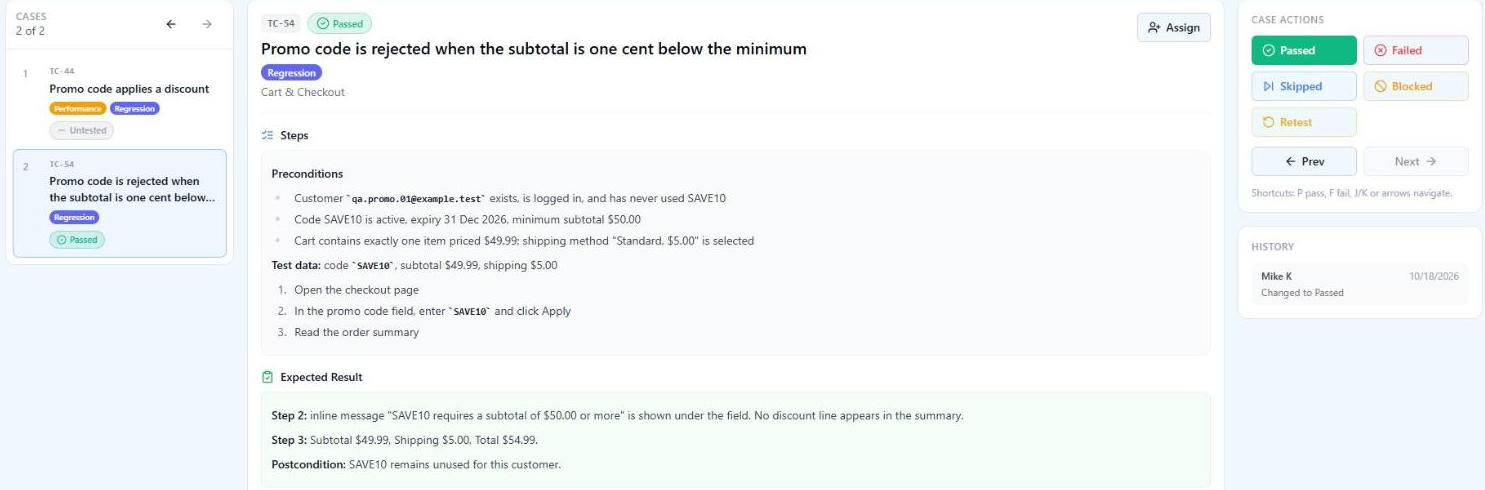
Compare this with how the same check is usually written: "Apply an invalid promo code. Expected: error message is displayed." That version fails the stranger test in four places. It does not say which invalidity is being tested, so a code rejected for being expired would pass the case even though the minimum-order rule is broken. It does not give the amount, so one tester uses $30 and another uses $49, and neither of them tests the boundary. It does not say which message, so a generic "Something went wrong" passes. And it says nothing about the total, so a bug where the rejected code still removes 10% from the summary goes unnoticed.
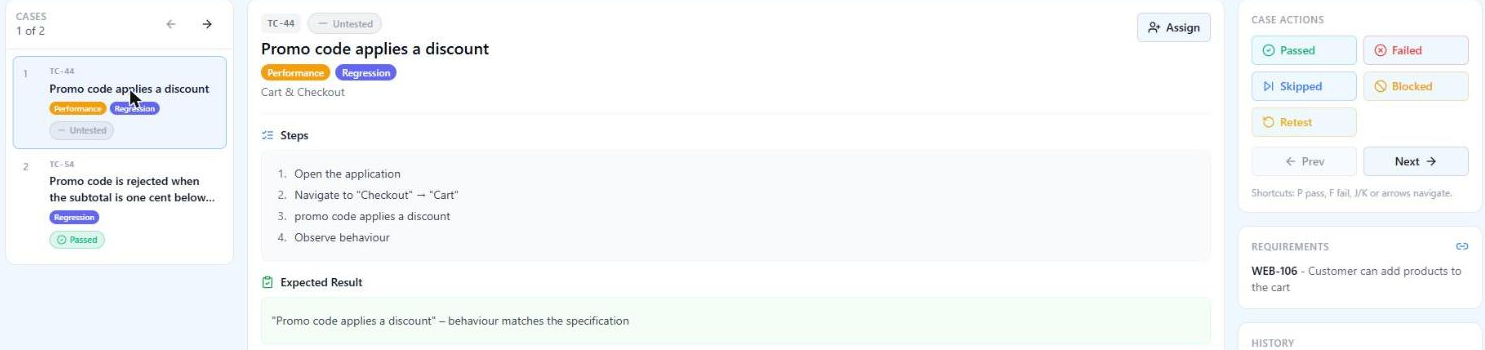
Notice what the good version does not contain. It does not explain how to add an item to the cart. That is a shared setup case, referenced by the preconditions. It does not check that the checkout page renders correctly. That is TC-201. It does not also try an expired code "while we are here". That is TC-217, and if both were in one case a failure would not tell you which rule broke. One behaviour per case is not a style preference. It is what makes a failed result mean something.
Test design techniques: how the seven conditions become the right number of cases
The conditions above could produce five cases or fifty. Test design techniques are how you decide, and they are the part of test case writing most guides name and then skip. Four of them do almost all the work for a feature like this.
Equivalence partitioning: one case per class of input, not per input
The subtotal can be any amount, but the rule only distinguishes two classes: below $50.00 and $50.00 or above. One representative from each class is enough to check the rule works at all. Testing $20, $30 and $40 adds three cases and no information. The same reasoning applied to the code field gives five classes: a valid unused code, a used code, an expired code, a code that does not exist, and an input that is not a code at all (empty, 300 characters, a string with quotes and semicolons that looks like code rather than a coupon). Five classes, five cases, and the first one also serves as the happy-path case for condition 1.
Boundary value analysis: the cases that actually find bugs
Most defects in rules like "$50.00 or more" are off-by-one: a developer writes > where >= was intended, or compares in dollars while the cart stores cents. Partitioning gives you $49.99 and $50.00 only if you are lucky. Boundary analysis gives them to you deliberately, plus the value one step above.
| Subtotal | Why this value | Expected |
|---|---|---|
| $49.99 | One cent below the boundary | Rejected, minimum-order message |
| $50.00 | On the boundary ("or more" includes it) | Accepted, discount $5.00 |
| $50.01 | One cent above the boundary | Accepted, discount $5.00 (rounded from $5.001) |
The third row quietly introduces a second boundary: rounding. 10% of $50.01 is $5.001, and the requirement says nothing about rounding, so this is the second question for the product owner. Boundary analysis finds specification gaps as reliably as it finds code defects. Apply it to dates as well: a code expiring 31 Dec 2026 needs a case at 23:59 on 31 Dec and one at 00:00 on 1 Jan, and the expected result depends on which time zone "expiry" is evaluated in, which is question number three.
Decision tables: when rules combine
Conditions 3, 4 and 5 interact. What happens when a customer applies an expired code they have also already used? Or a valid second code on top of a first one that has since expired? Writing these out as prose produces either gaps or duplicates. A decision table makes the combinations visible and lets you prune the ones that cannot occur or do not matter.
| Rule | Code known | Not expired | Unused by customer | Subtotal ≥ $50 | Expected |
|---|---|---|---|---|---|
| R1 | Y | Y | Y | Y | Applied, 10% off subtotal |
| R2 | Y | Y | Y | N | Rejected: minimum order |
| R3 | Y | Y | N | any | Rejected: already used |
| R4 | Y | N | any | any | Rejected: expired |
| R5 | N | any | any | any | Rejected: unknown code |
Five rules, five cases, and the dashes are deliberate: once a code is unknown, nothing else is evaluated, so there is no reason to write four unknown-code cases for every combination of the other columns. The table also forces a decision about precedence. If a code is both expired and already used, which message does the customer see? The requirement does not say. Question four.
State transitions: when the order of events matters
Condition 5 (a second code replaces the first) is about sequence, and sequence is where single-step cases miss bugs. Apply SAVE10, then apply FREESHIP, then remove FREESHIP: is the order back to full price, or is SAVE10 silently restored? Apply a code, change the cart so the subtotal drops below $50, return to checkout: is the discount removed, and does the customer see why? A small state diagram (no code, one code, code invalidated by cart change) gives you the transitions, and each transition is a case. Three to five cases cover it. Without the diagram, teams write the happy path and discover the cart-change bug in production.
What this adds up to
Seven conditions, four techniques, and the result is roughly fifteen cases for the promo-code feature, plus four questions for the product owner that are worth more than any of them. A tester writing without technique would typically produce five happy-path cases and two "invalid code" cases, and miss the boundary, the rounding, the precedence and the cart-change transition. A tester writing without restraint would produce forty, most of them duplicates of each other by partition. Fifteen is defensible, and when someone asks why there are fifteen, the techniques are the answer.
Error guessing comes last and is the one technique that depends on experience more than method: codes with trailing spaces, lower-case save10, a code applied in two browser tabs at once, a code applied and then the browser's back button. Write these down as you think of them. The ones that find bugs become permanent cases, the rest get deleted after one run.
How much detail: the decision most guides avoid
The ISTQB glossary distinguishes a low-level test case (concrete values for preconditions, inputs, expected results and postconditions, with a detailed description of actions) from a high-level test case, where those elements are abstract. Most real suites need both, and the mistake is picking one level for the whole suite. Here is TC-54 at three levels.
| Level | The same check | Right for |
|---|---|---|
| Checklist line | Promo code below minimum subtotal is rejected | Smoke checks and release sign-off by people who know the product, where the line is a reminder |
| High-level case | Preconditions: logged-in customer, cart subtotal one cent below the SAVE10 minimum. Apply SAVE10. Expected: rejected with the minimum-order message, total unchanged. | Experienced testers, fast-changing UI, exploratory depth around a written core |
| Low-level case | The full TC-54 above: exact account, exact amounts, exact message text, exact totals, click-by-click | Regulated evidence, onboarding, outsourced execution, cases that will be automated |
The decision rests on four questions, and they are about the people and the process, not about the feature.
Who runs it? A tester who has been on the product for a year does not need to be told where the promo field is, and every click you write for them is a line that breaks when the UI changes. A tester joining next week, an outsourced team, or a developer running the regression suite before a hotfix needs the low-level version. If the same suite serves both, write high-level cases and keep the click-level detail in a small number of shared setup cases that the others reference.
How often does the UI change? A step like "click the blue Apply button to the right of the field" is dead the day the button moves. Describe what to do and what to verify, not how the current build renders it. "Apply the code" survives a redesign; "click Apply" survives a restyle; "click the blue button" survives nothing.
Does anyone have to prove the test was run? In medical, financial and automotive software, a case is evidence. An auditor who reads "apply an invalid code" cannot tell what was tested. In those contexts the low-level version is the only acceptable one, and the test run record has to show who ran it, on which build, with which result.
Will it be automated? A case headed for automation should already read like the script: concrete data, one observable assertion per expected result, no "verify the page looks right". If the manual case is precise, the automation engineer translates it. If it is vague, they re-design the test and the manual and automated versions drift apart within a quarter.
The default that works for most product teams: high-level cases with concrete test data and exact expected results, low-level only where one of the last two questions says so. Cucumber's guidance on writing Gherkin makes the same point for BDD scenarios, favouring declarative steps ("the customer applies SAVE10") over imperative ones ("the customer clicks the field, types SAVE10, presses Apply"), because the declarative version describes behaviour and the imperative one describes a screen that will change.
Writing steps and expected results that hold up
Five rules cover almost every weak step that shows up in review.
One action per step. "Enter the code and click Apply and check the total" is three steps. When it fails, nobody knows which part failed, and when it is automated, it becomes one assertion for three behaviours. Split it.
Imperative mood, present tense, no subject. "Enter SAVE10 in the promo code field." Not "The user should enter the promo code", not "Entering the promo code". Shorter, and consistent across authors.
Data goes in the test data field, the step references it. A step that says "enter a valid code" forces the tester to decide what valid means. A step that says "enter SAVE10" is unambiguous, and when the code is parameterised in the test data field, the same case runs with SAVE10, WELCOME15 and FREESHIP without three copies.
The expected result is something the tester can see. "The discount is applied correctly" is an opinion. "Discount line shows −$5.00 and Total shows $49.99" is a fact. For negative cases, name the exact message. A test that accepts any error message cannot detect that the wrong validation fired.
Expected results on the steps that change something. Not every step needs one. "Open the checkout page" needs an expected result only if the page loading is the thing under test. Put a result where state changes or where a wrong intermediate state would invalidate what follows. QAM Hub's case editor keeps steps and expected results as separate blocks for exactly this reason; the steps and expected results guide covers the mechanics.
| Weak | Why it fails | Holds up |
|---|---|---|
| Verify checkout works | No action, no criterion | Place an order with one $20 item and Standard shipping. Expected: confirmation page shows order number, total $25.00 |
| Enter invalid data | Which invalidity? | Enter SAVE10 (trailing space). Expected: code accepted, discount $5.00 |
| Error message is displayed | Any error passes | Inline message "This code expired on 30 Sep 2026" under the field |
| Click the blue Apply button on the right | Dies at the next restyle | Apply the code |
| Check that everything is saved | Everything is not a criterion | Reload the page. Expected: SAVE10 still shown as applied, total $49.99 |
| Login as admin and verify | Setup mixed into the check, no result | Precondition: logged in as admin.01. Step: open Promo codes. Expected: SAVE10 listed with status Active |
Preconditions and test data: where cases rot
Steps are what people review. Preconditions and data are what actually break, usually six months later, quietly.
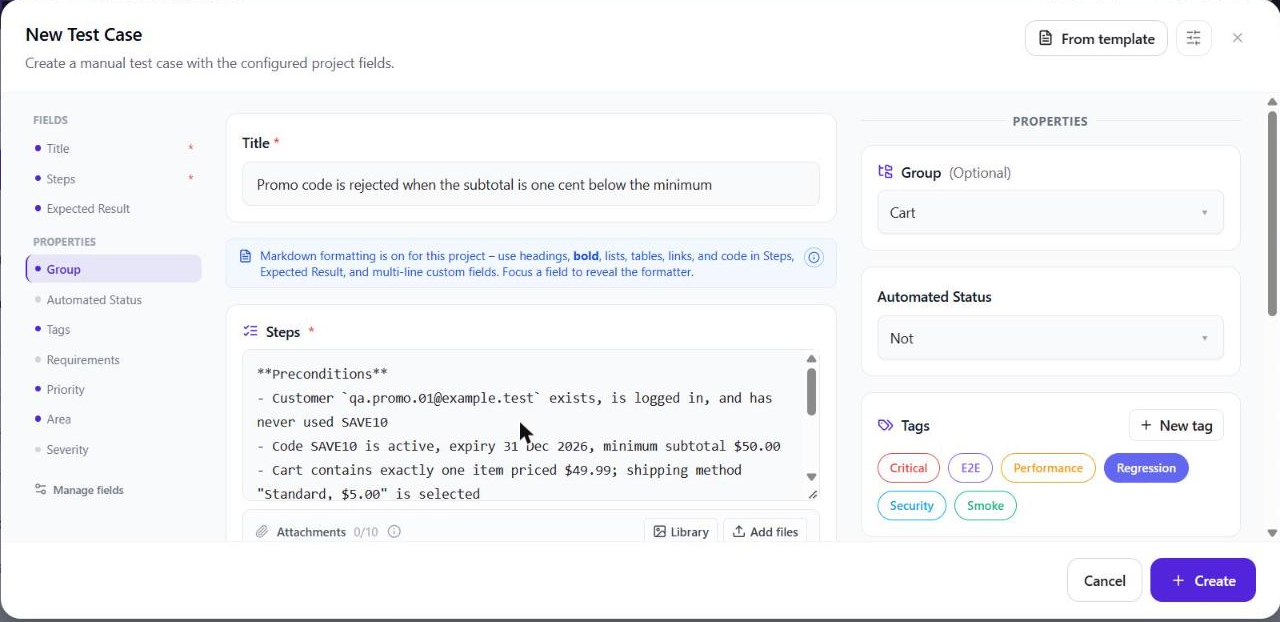
Write preconditions as a state, not as a route. "Customer has one item in the cart with subtotal $49.99" is a state, and the tester can reach it any way they like, including with a fixture or an API call. "Go to Products, click the first item, click Add to cart" is a route, it is three steps hiding in the wrong field, and it stops working when the first product changes price. If the route is complicated, make it a shared case and reference it: "Precondition: run TC-005 (Create test customer with empty cart)."
Dates are the most common rot. A code "expiring 31 Dec 2026" makes TC-54 unrunnable on 1 Jan 2027. Write relative dates where the system allows it ("expiry: today + 30 days"), or make the expiry part of the test data that a setup step creates, so the case carries its own clock.
Accounts are the second. A case that depends on qa.promo.01 never having used SAVE10 is fine until another case uses that account and that code. Either give each consuming case its own account (and say so in the postcondition), or reset state in a setup step. Shared mutable fixtures are how one failed case in a run cascades into eleven.
Never put real customer data into a test case. Beyond the compliance problem, real data changes without telling you. Synthetic data with stable, obviously fake values (@example.test domains, card numbers from the payment provider's test set) is both safer and more repeatable.
Titles and IDs
The title is the only part of the case most people ever read: in the suite tree, in the run, in the failure report, in the traceability matrix. A pattern that works is condition → expected outcome, written so the title alone tells you what a failure means. "Promo code below minimum subtotal is rejected" says what broke. "Test promo code" does not. "TC-54" alone, which is how many failure reports arrive, says nothing at all.
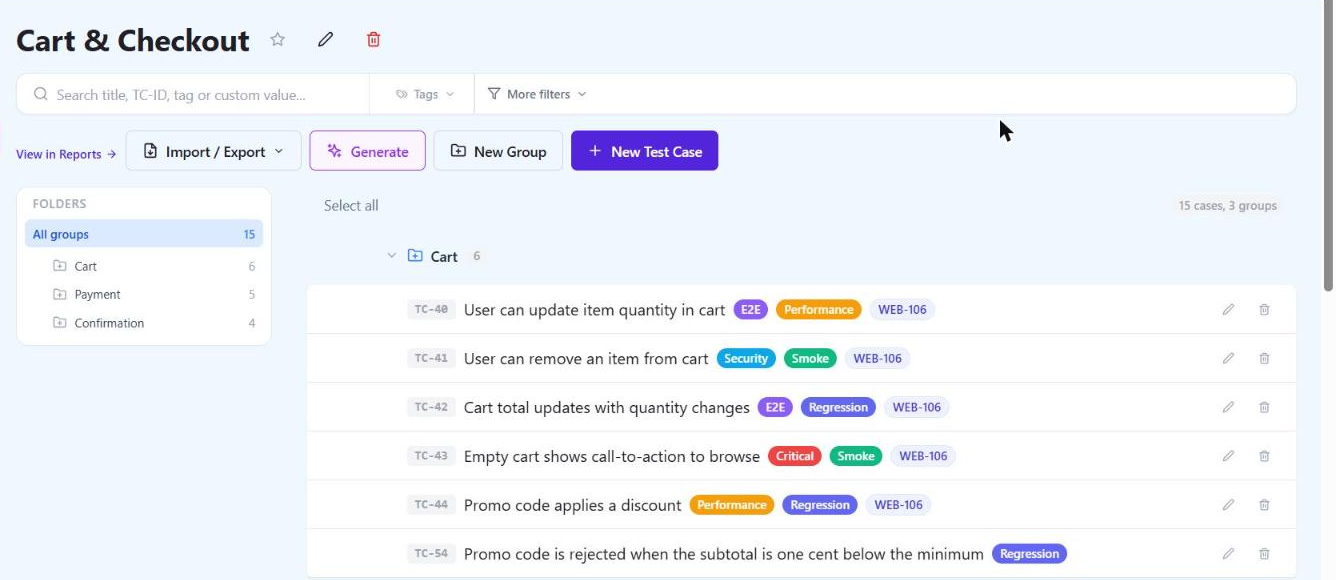
The ID is for machines and for cross-referencing, and it has one rule: it never changes and is never reused. Renumbering a suite destroys every link from requirements, bug reports and automated tests. When automated tests carry the case ID in their title, the test management system can attach each automated result to its manual case. QAM Hub, for instance, reads TC-54 in a Playwright or Cypress test title and links the result to case 214, and one test can carry several IDs. The mapping article covers how that link breaks when teams rename tests or renumber cases.
// The manual case, translated. Same data, same assertions, same ID.
test('TC-54 promo code is rejected one cent below the minimum', async ({ page }) => {
  await seedCart(page, { items: [{ price: 49.99 }], shipping: 'standard' });
  await page.goto('/checkout');
  await page.getByLabel('Promo code').fill('SAVE10');
  await page.getByRole('button', { name: 'Apply' }).click();

  await expect(page.getByText('SAVE10 requires a subtotal of $50.00 or more')).toBeVisible();
  await expect(page.getByTestId('summary-discount')).toHaveCount(0);
  await expect(page.getByTestId('summary-total')).toHaveText('$54.99');
});
If the manual case had said "apply an invalid code, expect an error", none of those three assertions could have been written without going back to the requirement. That is the practical test of whether a manual case is precise enough: could an automation engineer implement it without asking you anything?
The same anatomy for an API test case
Nothing about the format is specific to a UI. The same promo rule behind an endpoint produces the same case with different inputs and a different kind of observable result.
| TC-231 · POST /cart/promo rejects a code below the minimum subtotal | |
|---|---|
| Preconditions | Cart crt_7f3a exists for customer cus_019 with subtotal 4999 (cents). SAVE10 active, minimum 5000, unused by cus_019. |
| Request | POST /v1/carts/crt_7f3a/promo with body {"code":"SAVE10"}, bearer token for cus_019 |
| Expected | HTTP 422. Body: {"error":"PROMO_MIN_SUBTOTAL","minimum":5000,"subtotal":4999}. GET /v1/carts/crt_7f3a afterwards shows discount: 0, total: 5499. No promo_redemptions row created for cus_019 / SAVE10. |
Two things are different and worth noticing. The expected result includes a check that nothing was persisted, which UI cases usually cannot make and API cases should. And the amounts are in cents, because that is what the API speaks. A case that mixes "$49.99" in preconditions with 4999 in assertions is where unit-mismatch bugs hide in the test itself.
Review before the case enters the suite
A test case costs more to maintain than to write, so the cheapest moment to reject a weak one is before it is saved. A second person and seven questions are enough, no meeting required. Ask them in this order, because the early ones are cheap and a failure on them makes the later ones irrelevant.
- Does the expected result trace to a stated requirement or acceptance criterion? If the case asserts something nobody specified, either the requirement is missing (raise it) or the case is inventing behaviour (delete it).
- Could the case fail? A case whose expected result is "the page is displayed" after a step that displays the page cannot fail and is not a test.
- Does it check one behaviour? If the title contains "and", it probably checks two.
- Could a tester who has never seen the feature run it from the text alone, with the data given, in the environment named?
- Is there already a case for this? Search by the rule, not by the title; duplicates rarely share wording.
- Does it survive the next UI change? Any step that names a colour, a position or a pixel fails this one.
- Does it carry its metadata: suite, priority, requirement link, tags?
Writing in pairs for the first few cases of a new feature is faster than reviewing afterwards, because the second person asks "what do you mean by valid?" before it is written down fifteen times. Where that is not possible, a reviewer who was not involved in the feature catches the gaps a teammate who sat in the refinement meeting cannot see.
Duplicates are the review failure that compounds. Two cases that check the same rule with different wording double the execution cost, and when the rule changes one of them is updated and the other quietly tests the old behaviour. In a suite past a few hundred cases, title search stops finding them, which is why finding duplicate and low-quality test cases is a job in itself. QAM Hub's Quality Analyzer, on the Advanced plan, flags likely duplicates and unclear steps with the evidence for each finding, but the deciding is still a reviewer's job.
Keeping cases alive
A suite nobody prunes reaches the state where half the cases are untrustworthy and nobody knows which half. Four practices prevent it, and none of them are complicated.
When a requirement changes, follow the requirement link to every case that traces to it before the story is marked done, and update or retire them in the same sprint. Doing it later means doing it after the first false failure.
Retire deliberately. A case that has not been executed in a year, has no requirement link and whose author has left is a candidate. Archive it instead of deleting it, so a surprise in production can still be checked against what used to be tested. Version history on cases (QAM Hub keeps it from the Standard plan, with rollback) means an edit that broke a case can be undone instead of reconstructed from memory.
Templates and custom fields keep structure consistent across authors. A template that pre-fills Preconditions, Steps and Expected result with the house format saves the review comment "please split this step" from being written forty times. Custom fields (component, test level, automation status) are what make the suite filterable later. Standardise them early, because retrofitting a field onto 1,500 cases is a week nobody has.
Watch two numbers. Cases never executed since creation, which tells you what is being written for show. And cases that have failed on three consecutive runs without a linked defect, which tells you which cases are testing the old behaviour.
AI-generated drafts
Generating test cases from a specification with an AI assistant is now ordinary, and it changes the job from writing to reviewing. Everything above still applies, with one shift in emphasis: a generated case is fluent, and fluency is what reviewers wave through. A draft that invents a "within 3 seconds" criterion the requirement never stated reads exactly like one that did not. The seven review questions become mandatory instead of advisable, and the first three (traces to a requirement, could fail, checks one thing) do most of the filtering. Generate from the written rules, never from screenshots of the finished feature, or the expected results will describe the current bugs as correct behaviour. The practices for AI-generated test cases cover input, batch size and what to measure. QAM Hub's generation from a description, available on every plan, puts every draft in front of a reviewer before anything is saved, which is the right default for any tool.
A template you can paste
The fields below are the ones that survived the discussion above: five that make the case runnable, five that make it findable, none that belong to a run. The example column is filled so you can see the expected level of concreteness. Replace it, do not loosen it.
| Field | Rule | Example |
|---|---|---|
| ID | Assigned once, never reused | TC-54 |
| Title | Condition → expected outcome; a failure should be readable from the title alone | Promo code is rejected when the subtotal is one cent below the minimum |
| Suite / feature | Where it lives in the tree | Checkout → Promo codes |
| Priority | Driven by risk and usage, not by how easy it was to write | High |
| Traces to | Requirement, user story or acceptance criterion | US-482, AC 2 |
| Tags | What a run is assembled from | regression, checkout, promo |
| Preconditions | State, not route; reference shared setup cases | Logged-in customer who has never used SAVE10; cart subtotal $49.99 |
| Test data | Concrete values; parameterise when the same case runs with several | Code SAVE10; subtotal $49.99; shipping $5.00 |
| Steps | One action each, imperative | 1. Open checkout. 2. Enter SAVE10, click Apply. 3. Read the summary. |
| Expected result | Observable, exact, per step where state changes | Step 2: message "SAVE10 requires a subtotal of $50.00 or more". Step 3: total $54.99, no discount line |
| Postconditions | Only when shared state changed | SAVE10 still unused by this customer |
Left out on purpose: Actual result, Status, Executed by, Date, Defects. They belong to each run of the case, not to the case. If your tool is a spreadsheet, add them as columns per run tab and expect the pain described earlier. If it is a test management system, it already stores them per execution.
What to do first
If your suite already exists and is in the usual state, do not rewrite it. Start with the next feature: list its test conditions before writing a case, run boundary analysis on every numeric and date rule in the requirement, and write the cases at the level the people who will run them need. Take the questions that fall out of the decision table to the product owner before the sprint starts. That is where test case writing pays for itself. Then go back to the existing suite one failing case at a time, fixing each vague expected result when it produces a result nobody can interpret. Suites get better at the rate people have to read them, and that is enough.
What not to over-engineer: postconditions on every case, a twelve-field template, click-level steps for a team that knows the product, and a numbering scheme that encodes the suite structure in the ID (it will be wrong after the first reorganisation). Spend the effort on expected results instead. A suite with vague steps and exact expected results still finds bugs; a suite with exact steps and vague expected results finds far less.
Frequently asked questions
How many steps should a test case have?
As few as the check needs, and rarely more than ten. A case that runs past ten steps is usually two cases with a shared setup, or a scenario that should be a checklist. Ten is roughly where a failure stops telling you where the problem is, and that is the only reason to care about the count.
Does every step need an expected result?
No. Put one on each step that changes state or whose outcome the next step depends on. Navigation steps need a result only when navigation is the thing under test. A case where every step says "page is displayed" is padding, and reviewers learn to skip the column, which is how the one result that matters gets missed.
Who should write test cases?
Whoever understands the requirement and has not written the code. On most product teams that is the QA engineer embedded with the squad. On small teams it is often the developer who did not implement the feature, reviewed by the one who did. The person who wrote the code tends to test the behaviour they built rather than the behaviour that was specified, which is also the reason to generate AI drafts from the specification and not from the implementation.
How do you write test cases when the requirements are a two-line user story?
Write the test conditions first and treat the gaps as questions, exactly as in the promo-code example: the two-line story said nothing about rounding, time zones or rule precedence, and listing conditions surfaced all three. Take the questions to refinement, write the cases against the answers, and link each case to the story so the next change finds them. The cases you write this way often become the acceptance criteria the story never had.
Should test cases be written before or after development?
Before, when the requirement exists, because that is when the questions they raise are cheapest to answer. Write the conditions and the high-level cases during refinement, then add concrete data and exact messages once the build exists and the messages are known. Writing everything after development produces cases that describe what was built, which is the one thing a test should not assume.